Table of Contents >> Show >> Hide
- Quick take: what you’re actually buying (late 2025 edition)
- Latest news: the M4 generation made the 15-inch Air easier to recommend
- Price: MSRP, real-world configs, and what you should actually pay
- Specs: the numbers (with context, so they’re not just numbers)
- Performance in real life: what the 15-inch Air is great at
- 15-inch Air vs the alternatives
- What’s next: should you wait?
- FAQ
- Everyday experiences with the 15-inch MacBook Air (about )
- Conclusion
The 15-inch MacBook Air is Apple’s “big screen, small drama” laptop: roomy enough to feel like a real workstation,
light enough to forget you’re carrying it, and quiet enough to make you suspicious it’s even on. In late 2025, the
current 15-inch MacBook Air is the M4 generationmeaning the headline isn’t a radical redesign. It’s smarter
basics: better default memory, improved video calling, stronger performance, and a price that’s (finally) not
allergic to the word “value.”
If you’re shopping for a 15-inch MacBook Air today, you’ll run into three categories: the current M4 model, last-gen
M3 deals still floating around at retailers, and older M2 models (often refurbished). This guide breaks down the
latest news, real-world pricing expectations, and the specs that actually matterwithout making you read a spec sheet
that looks like it was generated by a sentient spreadsheet.
Quick take: what you’re actually buying (late 2025 edition)
- Current model: 15-inch MacBook Air with M4 chip (15.3-inch Liquid Retina display).
- Best for: students, home offices, writers, analysts, and creators who want screen space without “Pro” weight or cost.
- Big headline upgrades: stronger M4 performance, 16GB base unified memory, 12MP Center Stage camera, and improved multi-display support.
- Reality check: it’s still fanless (silent), still has just two Thunderbolt/USB-C ports, and upgrades still cost real money.
Latest news: the M4 generation made the 15-inch Air easier to recommend
1) The price story got better (and that matters more than it sounds)
Apple’s M4 refresh didn’t reinvent the MacBook Air. Instead, it fixed the annoying parts of the buying decision.
The biggest “news” is that the 15-inch Air’s starting price is positioned more competitively than earlier generations,
especially once you factor in the new baseline memory and how often retailers discount MacBooks.
2) 16GB unified memory is now the floor, not the “nice-to-have”
For years, laptop shoppers did the same tired math: “I’ll buy the base model… unless 8GB feels like living in 2015.”
With the current generation, Apple’s baseline unified memory is higher, which helps with the stuff people actually do:
lots of browser tabs, Slack/Teams calls, photo libraries, spreadsheets, school research, and light creative work.
Translation: you’ll spend less time negotiating with your own laptop like it’s a toddler refusing vegetables.
3) A more modern webcam (because it’s 2025 and your face deserves better)
The 15-inch Air now includes a 12MP Center Stage camera with features aimed at callslike keeping you in frame as you
move and improving clarity in typical laptop lighting. If your laptop is your classroom, meeting room, or podcast
guest seat, this is a bigger upgrade than it looks on paper.
4) The desk setup upgrade: external display support is finally “normal person” friendly
A laptop with a 15-inch display already feels expansive, but many buyers still want a second (or third) screen at a desk.
The current Air supports two external displays in addition to the built-in display, which is a big deal for
spreadsheet people, researchers, developers, and anyone who thinks “alt-tab” is cardio.
Price: MSRP, real-world configs, and what you should actually pay
Apple’s U.S. starting price (15-inch M4)
The 15-inch MacBook Air (M4 generation) starts at $1,199 in the U.S. That base price typically includes
the M4 chip with a 10-core CPU and 10-core GPU, 16GB unified memory, and 256GB of SSD storage.
Apple also sells “step-up” configurations that bump storage (and sometimes memory) without requiring a custom order.
Common 15-inch configurations you’ll see most often
- Base (best for most people): 16GB / 256GB great for school, office work, and everyday creative tasks.
- Sweet spot for longevity: 16GB / 512GB more breathing room for apps, photos, and “I swear I’ll organize my files later.”
- Power multitasker: 24GB / 512GB for heavier creative work, larger datasets, or long-term “keep this laptop forever” plans.
Deal reality: yes, you can often pay less than MSRP
If you’re buying in the U.S., MacBook Air pricing often softens during big retail cycles (back-to-school, Prime Day-ish
moments, Black Friday/Cyber Monday, and holiday promos). It’s common to see meaningful discounts on the base 15-inch
configuration, and occasionally on upgraded storage tiers too.
Buying strategy that doesn’t require a finance degree:
start with your storage needs. If 256GB already feels cramped in your current life, don’t repeat the mistake
with a fancier laptop. Storage upgrades cost more upfront, but running out of space costs you later in time, external drives,
and existential sighing.
New vs. refurbished vs. last-gen: what’s smartest?
New (current M4): best overall experience, best support window, and the best “I don’t want to think about this again” choice.
Refurbished: can be a strong value if you find the right memory/storage combo (especially 512GB+).
Last-gen deals (M3 or M2): can be great if the price is aggressively lower and you’re confident the specs fit your workflow.
The danger is getting tempted by a low sticker price and ending up with the wrong storage or memory.
Specs: the numbers (with context, so they’re not just numbers)
Display
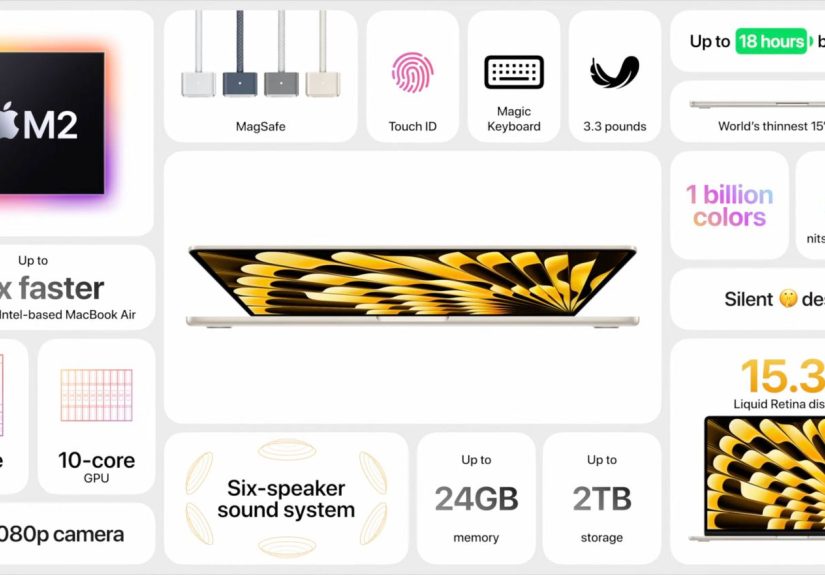
- Size: 15.3-inch Liquid Retina display
- Resolution: 2880 × 1864 at 224 pixels per inch
- Brightness: 500 nits
- Color: wide color (P3), True Tone, 1 billion colors support
In practical terms: the 15-inch Air is ideal for split-screen workDocs + research, Excel + email, timeline + preview,
or “my professor posted 19 PDFs” + sanity. It’s not the Pro’s mini-LED XDR panel, but it’s crisp, bright, and reliable
for everyday work and media.
Chip and performance
- Chip: Apple M4
- CPU: 10-core (4 performance cores + 6 efficiency cores)
- GPU: 10-core GPU
- Neural Engine: 16-core
- Memory bandwidth: 120GB/s
- Graphics features: hardware-accelerated ray tracing
- Media engine: hardware-accelerated H.264, HEVC, ProRes/ProRes RAW, plus AV1 decode
Translation: the Air is fast at everyday tasks and surprisingly capable at creative workespecially short-to-medium bursts
like photo editing, coding, and light-to-moderate video work. Because it’s fanless, it stays silent, but sustained heavy
loads (long video exports, huge 3D renders) are still where a MacBook Pro earns its name.
Memory and storage
- Unified memory: 16GB standard; configurable to 24GB or 32GB
- SSD storage: 256GB standard on base; configurable to 512GB, 1TB, or 2TB
Practical advice: if you keep laptops for 4–6 years, memory is about “how many things can stay open comfortably,” while
storage is about “how many years until you start living off external drives.” If you do creative work, keep large photo/video libraries,
or run multiple heavier apps at once, consider 24GB memory. If you live inside Google Drive and stream everything, 16GB can still be perfect.
Ports and connectivity
- Charging: MagSafe 3
- Ports: two Thunderbolt 4 (USB-C) ports
- Headphone jack: 3.5mm (with advanced support for high-impedance headphones)
- Wireless: Wi-Fi 6E and Bluetooth 5.3
The port story is the same as before: minimal, modern, and occasionally annoying. If your life involves SD cards, HDMI,
USB-A accessories, or wired Ethernet, budget for a good hub or dock. The good news is MagSafe keeps charging separate, so the
two Thunderbolt ports aren’t instantly reduced to “one usable port and one emotional support port.”
External display support
- Supports the built-in display (1 billion colors) plus up to two external displays with up to 6K resolution at 60Hz.
- Thunderbolt 4 digital video output with native DisplayPort 1.4 over USB-C.
Camera and audio
- Camera: 12MP Center Stage camera with Desk View support; 1080p HD video recording
- Mics: three-mic array with directional beamforming; Voice Isolation and Wide Spectrum modes
- Speakers: six-speaker sound system with force-cancelling woofers; Spatial Audio support
If you take calls daily, the improved webcam and microphone modes are worth caring about. And the six-speaker setup
makes the 15-inch Air feel premium in a way you notice every time you play music, watch a movie, or edit audio.
Battery and charging
Apple rates the Air for long battery life, and real-world reviews generally back that up for everyday productivity.
Your mileage depends on brightness, apps, and whether your browser has turned into a chaotic art installation of 47 tabs.
Size and weight
- Thickness: 0.45 inch (1.15 cm)
- Dimensions: 13.40 × 9.35 inches
- Weight: 3.3 pounds (1.51 kg)
The whole point of the 15-inch Air is that it gives you “big laptop energy” without the usual big-laptop consequences.
It’s easy to carry, easy to use on a couch, and it doesn’t sound like a tiny hair dryer under load.
Performance in real life: what the 15-inch Air is great at
The 15-inch MacBook Air is at its best when your day is varied: writing, research, video calls, light creative work,
and some entertainment. The M4 chip helps it feel snappy across mixed taskslike switching between a spreadsheet,
a browser full of sources, a notes app, and a meeting, without the system feeling “sticky.”
Concrete examples where the 15-inch Air shines:
- Students: split-screen reading + note-taking, long battery days, reliable video calls, and a big display without Pro pricing.
- Office and business: heavy browser workflows, Microsoft 365/Google Workspace, CRM tabs, and multi-monitor desks.
- Creators (light to moderate): photo editing, short-form video, podcast editing, and social content creation with quiet operation.
- Coders and analysts: comfortable text size, more visible lines of code, and better multitasking with external displays.
Where you should consider a MacBook Pro instead: sustained heavy exports, long 3D renders, more ports without dongles,
or if you need a high-refresh mini-LED display. If you regularly push your machine until it gets warm enough to toast a bagel,
the Pro will toast the bagel faster and with fewer feelings.
15-inch Air vs the alternatives
15-inch Air vs 13-inch Air
This is mostly a lifestyle decision. The 15-inch gives you more space for everything: side-by-side windows, timelines,
and “I’m just going to make the text bigger” comfort. The 13-inch is easier to travel with and fits smaller bags.
If you do desk work more than travel work, the 15-inch is the one that feels like an upgrade every single day.
15-inch Air vs 14-inch MacBook Pro
The Pro usually brings a more advanced display, more ports, and better sustained performance thanks to active cooling.
The 15-inch Air fights back with a bigger screen, lower weight, and a price that doesn’t make your wallet file a complaint.
If you’re mostly doing productivity and moderate creative work, the 15-inch Air is often the smarter buy.
Upgrading from M1, M2, or M3
Coming from M1: the jump is noticeableespecially in multi-tasking, media handling, and overall snappiness.
Coming from M2: the question is less “can you feel it?” and more “do you want better baseline memory, better camera,
and improved external display flexibility?” Coming from M3: upgrade only if pricing is compelling or you specifically want
the M4 generation improvements; otherwise, it’s not a mandatory leap.
What’s next: should you wait?
If you like buying at the absolute latest moment, there’s always something “next.” As of late 2025, reporting and rumor coverage suggests
Apple is working on future MacBook Air models (often discussed as an “M5” generation) for 2026. That doesn’t make the current 15-inch Air a bad buy
it just means the tech calendar continues doing what it always does: moving.
A simple rule: if you need a laptop now, buy based on today’s prices and today’s work. If you can comfortably wait and love chasing the newest refresh,
keep an eye on early-2026 timing windows. Just don’t “wait” so long that you end up doing finals week on a laptop that sounds like it’s auditioning for a leaf blower role.
FAQ
Is the 15-inch MacBook Air too big to travel with?
Not really. At about 3.3 pounds, it stays in the “portable” category. The main consideration is bag size and whether you prefer a smaller footprint on airplane trays.
Is 256GB storage enough?
It can beif you stream media, store documents in the cloud, and don’t keep huge local photo/video libraries. If you create content or keep lots of local files,
512GB is the stress-reduction upgrade most people don’t regret.
Do I need 24GB or 32GB unified memory?
Most everyday users are fine with 16GB. Consider 24GB or 32GB if you do heavier creative work, run VMs/containers, keep many pro apps open, or want extra future-proofing.
Everyday experiences with the 15-inch MacBook Air (about )
The best way to understand the 15-inch MacBook Air is to picture a normal daynot a benchmark chart, not a cinematic montage of someone color grading a film in a mountain cabin.
A normal day starts with the lid opening and the screen immediately feeling “big enough.” Email on the left, a doc on the right, and you’re not constantly resizing windows like you’re playing laptop Tetris.
That extra space is the quiet superpower: it makes everything feel calmer, from school research to budgeting to planning a presentation.
In meetings and classes, the improved camera experience matters because it’s one of the few moments your laptop is literally showing you.
Centering features help keep your face framed when you lean back, turn to grab a notebook, or gesture while explaining something. Add solid microphones and voice modes,
and calls feel less like “Can you hear me?” and more like “Yes, this is a conversation between humans.”
For productivity, the Air’s real-world speed shows up in the little things: waking quickly, switching apps without hesitation, handling dozens of browser tabs without turning into a stuttering mess,
and keeping everything responsive while you’re also streaming music and syncing files. The fanless design adds a surprising emotional benefitsilence.
When a laptop stays quiet under typical workloads, it disappears into the background. And when a tool disappears, you focus on the work instead of the tool.
On a desk, external display support turns the 15-inch Air into a legit workstation. With one or two monitors attached, you can spread out: calendar and email on one screen,
spreadsheet or research on another, and your main app on the laptop. This is where the Air stops feeling like “a portable computer” and starts feeling like “your main computer.”
The limitation you’ll notice isn’t performanceit’s ports. With only two Thunderbolt/USB-C ports, you quickly learn the value of a good dock or hub,
especially if you use SD cards, HDMI, or older USB accessories. The good news is MagSafe keeps charging from stealing a USB-C port, which makes the two ports feel less stingy.
Creative work is where expectations need to be honest. For photos, design work, and short-to-medium video projects, the Air feels powerful and smooth.
But if you routinely export long videos or push sustained loads for extended periods, you may notice performance leveling off compared to a Pro model with active cooling.
Still, for most creators doing social content, school projects, and everyday editing, the Air is more than enoughand its battery and portability encourage you to work anywhere.
After a few days, the 15-inch Air tends to earn the same compliment: it feels “easy.” Easy to carry. Easy to look at for hours. Easy to live with.
That’s not a flashy feature, but it’s the reason so many people buy a MacBook Air and keep it for years. It’s the laptop you stop thinking aboutbecause it keeps doing its job.
Conclusion
The 15-inch MacBook Air is the rare laptop that makes a big-screen upgrade feel practical instead of indulgent. In the current M4 generation, the combination of stronger performance,
better baseline memory, improved webcam features, and desk-friendly display support makes it a top pick for students, professionals, and everyday creators who want a larger canvas
without stepping into MacBook Pro prices and weight. If you choose storage wisely and plan for a simple hub, it’s a “buy it once, enjoy it daily” machine.