Table of Contents >> Show >> Hide
- What Does Strikethrough Mean on Discord?
- Method 1: Use Markdown to Strikethrough Text on Discord
- Method 2: Use Discord’s Formatting Menu on Desktop or Web
- Desktop vs. Mobile: What Changes?
- How to Combine Strikethrough with Other Discord Formatting
- Common Reasons Strikethrough Is Not Working on Discord
- Best Ways to Use Strikethrough on Discord
- Is There a Keyboard Shortcut for Discord Strikethrough?
- Quick Recap: The 2 Easy Ways
- Real-World Experiences Using Strikethrough on Discord
- Conclusion
- SEO Tags
Discord is great at many things: chatting with friends, organizing communities, debating whether pineapple belongs on pizza, and letting you dramatically cross out your own words for comedic effect. If you have ever wanted to type something like I totally meant to say ~~Monday~~ Tuesday, you are in the right place.
The good news is that learning how to cross out text on Discord is wonderfully easy. You do not need a plugin, a bot, or a secret hacker cape. In most cases, you only need a couple of symbols or a quick formatting shortcut. Once you know how Discord strikethrough works, you can edit the tone of your messages, add sarcasm, show corrections, and make your chat look a little more polished.
In this guide, you will learn the two easiest ways to strikethrough text on Discord, how to use the feature on desktop and mobile, common mistakes that stop it from working, and a few clever ways to combine strikethrough with other Discord text formatting options.
What Does Strikethrough Mean on Discord?
Strikethrough is a text format that places a horizontal line through words. On Discord, people use it for all kinds of reasons. Sometimes it signals a correction. Sometimes it adds a joke. Sometimes it softens a statement, as in, “I am definitely not ~~avoiding work~~ being productive in a creative way.”
In plain English, strikethrough helps your message say two things at once: what you typed and what you really meant. That is why it is so popular in casual chats, gaming servers, school groups, fandom communities, and workplace Discords where people like their messages with a side of personality.
Better yet, Discord strikethrough is part of the platform’s built-in text formatting system. That means you do not need to install anything. You just use the correct formatting method, and Discord handles the rest.
Method 1: Use Markdown to Strikethrough Text on Discord
The Basic Formula
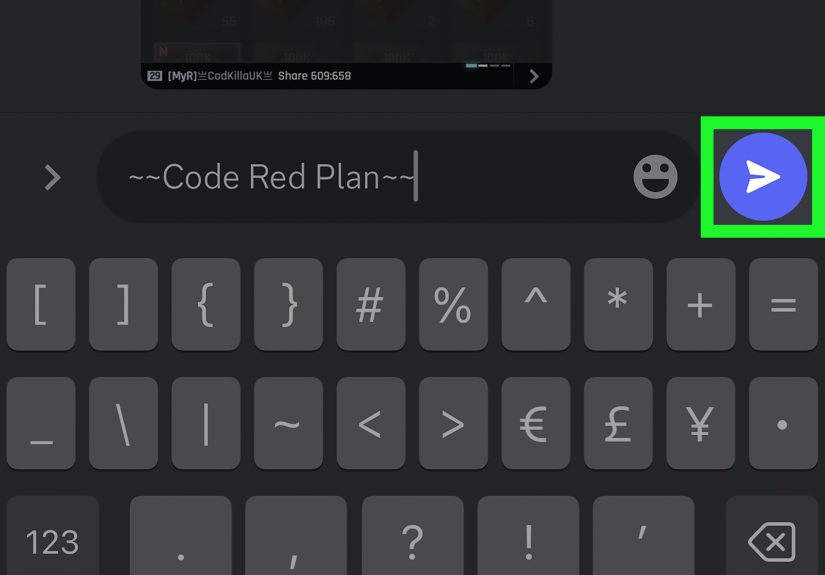
The fastest and most universal method is using Markdown. To cross out text on Discord, place two tildes before and after the words you want crossed out.
For example:
When you send the message, Discord will display the text with a line through it.
How to Type the Tilde Symbol
If the tilde key feels like it is hiding from you, you are not alone. On many keyboards, the tilde is near the top-left area, often sharing a key with the backtick. On mobile, you usually need to switch to the symbols or punctuation keyboard to find it. It is a tiny character with a very big personality.
Step-by-Step Instructions
- Open Discord and go to the chat, direct message, or channel where you want to post.
- Type two tildes:
~~ - Type the word or sentence you want crossed out.
- Type two more tildes at the end.
- Send the message.
That is it. No treasure map required.
Examples You Can Copy
This method works especially well when you want to cross out just one part of a longer sentence. For example:
That kind of message is classic Discord: useful, honest, and just self-aware enough to be funny.
Why Markdown Is the Best All-Around Option
If you want the most reliable way to strikethrough text on Discord, Markdown wins. It is quick, works naturally once you memorize the pattern, and is especially handy on mobile where formatting menus may be limited or missing. It also gives you precise control over exactly which words get the line-through effect.
Method 2: Use Discord’s Formatting Menu on Desktop or Web
If you are on Discord desktop or the web app, there is another easy way to cross out text: use the built-in formatting menu. This is the friendlier option for people who do not want to memorize Markdown symbols or who would rather click than type extra punctuation.
How It Works
Type your message normally first. Then highlight the word or sentence you want to format. On supported desktop and web versions, Discord can show a small formatting toolbar near the selected text. From there, you can choose formatting options such as bold, italics, or strikethrough.
Step-by-Step Instructions
- Open Discord on desktop or in your browser.
- Type your message in the message box.
- Highlight the text you want to cross out.
- Click the strikethrough option in the formatting pop-up.
- Send your message.
Discord will automatically add the correct Markdown symbols for you behind the scenes. In other words, the app does the typing so your fingers can take a short coffee break.
When This Method Is Better Than Markdown
This method is great if you:
- do not want to remember special characters,
- are formatting only once in a while,
- want to combine styles visually, or
- prefer seeing your formatting choices before sending the message.
That said, the formatting menu is more of a desktop convenience feature. If you also use Discord on your phone or tablet, it is still worth learning the Markdown version because that skill travels with you.
Desktop vs. Mobile: What Changes?
On Desktop
You usually have both options: Markdown and the formatting menu. That makes desktop the easiest place to learn and test Discord text formatting.
On Mobile
On the Discord mobile app, Markdown is usually the practical choice. So if you are wondering how to strikethrough text on Discord mobile, the answer is simple: use the double-tilde method.
This is one reason experienced Discord users tend to memorize the syntax. It works whether you are sitting at your desk, half-awake on your couch, or trying to send a “professional” message while waiting in line for coffee.
How to Combine Strikethrough with Other Discord Formatting
Once you learn strikethrough, it is tempting to stop there. Resist that temptation. Discord formatting gets more fun when you combine styles.
Bold + Strikethrough
Italic + Strikethrough
Underline + Strikethrough
Bold + Italic + Strikethrough
The trick is to keep the formatting symbols balanced. Think of them like parentheses. If you open a style, close it properly. Discord likes symmetry. Your middle-school math teacher would be proud.
Combined formatting is useful when you want to emphasize corrections, exaggerate a joke, or create a more expressive message. Just do not overdo it. A message with five styles at once can start to look like your keyboard slipped on a banana peel.
Common Reasons Strikethrough Is Not Working on Discord
1. You Used One Tilde Instead of Two
This is the most common mistake. One tilde will not do the job. You need two on each side of the text:
2. The Symbols Are in the Wrong Place
The tildes must wrap the exact text you want crossed out. If the symbols are misplaced, Discord may show plain punctuation instead of formatting.
3. You Forgot the Ending Tildes
If you only type the opening pair, Discord has nothing to complete the formatting. It is like putting on one shoe and declaring the outfit finished.
4. You Are Expecting the Desktop Toolbar on Mobile
Many users get confused because guides often show desktop screenshots. On mobile, typing the Markdown manually is usually the easier method.
5. You Are Formatting Too Much at Once
If you stack multiple styles and something breaks, simplify the message and rebuild it one layer at a time. Start with strikethrough alone, confirm it works, then add bold or italics if needed.
Best Ways to Use Strikethrough on Discord
Correcting Yourself Without Deleting Context
Sometimes you want people to see the original wording, especially in fast-moving chats. Strikethrough keeps the joke, the correction, and the context all in one neat package.
Adding Humor
Discord culture thrives on tone. Strikethrough is perfect for playful contradictions, fake backtracking, and sarcastic punchlines.
Softening a Strong Opinion
Instead of sounding blunt, strikethrough can make your message feel lighter and more conversational.
Highlighting Revisions in Community Chats
If you are helping run a server, posting event times, or updating game plans, strikethrough can show what changed without creating confusion.
Is There a Keyboard Shortcut for Discord Strikethrough?
There is no universally memorized “magic key” for strikethrough in Discord like there is in some word processors. On Discord, the most dependable shortcut is really a habit: typing the Markdown yourself. Once your fingers remember ~~text~~, it becomes faster than digging through menus.
On desktop, selecting text and using the formatting pop-up can feel shortcut-like, but Markdown remains the more portable skill because it works across devices and does not depend on the interface showing a toolbar at the right moment.
Quick Recap: The 2 Easy Ways
- Way 1: Markdown Type
~~text~~to cross out words on Discord. - Way 2: Formatting menu On desktop or web, highlight text and choose strikethrough from the formatting options.
If you want one method that works almost everywhere, learn Markdown first. If you want the easiest point-and-click option on a computer, use the formatting menu. Together, these two methods cover nearly every normal Discord situation.
Real-World Experiences Using Strikethrough on Discord
In actual Discord conversations, strikethrough ends up being one of those tiny features people underestimate until they start using it. Then suddenly it is everywhere. In gaming servers, it is often used to show failed predictions in a funny way. Someone says, “We are definitely winning this round,” then a few minutes later types, “We are ~~definitely winning~~ learning valuable lessons.” It softens the sting of losing and turns frustration into a shared joke.
In study groups, strikethrough feels surprisingly useful for edits and corrections. A student may post, “The quiz is on ~~Thursday~~ Friday,” which instantly shows the update without forcing everyone to compare old and new messages. That makes the information easier to follow, especially in busy channels where messages stack up quickly. It is not flashy, but it is efficient, and Discord users tend to appreciate anything that reduces confusion.
Work-related Discord spaces use strikethrough a little differently. There, it often acts like a lighter version of a revision note. People may write, “The draft goes live on ~~Monday~~ Wednesday,” or “We need ~~three~~ four screenshots for the post.” It communicates change without sounding overly formal. That matters because many teams use Discord for fast, human conversations rather than polished corporate announcements.
Then there is the comedy side, which might be where strikethrough really shines. A lot of users enjoy typing messages that reveal what they “almost” said. For example: “I am ~~complaining~~ offering thoughtful feedback.” That format works because readers can instantly understand the joke. The crossed-out text becomes the punchline, while the uncrossed text becomes the pretend correction. It is basically digital side-eye in formatting form.
Mobile users often have a slightly different experience. At first, typing tildes on a phone keyboard can feel annoyingly fiddly. But after a few tries, many people get used to it. In fact, once you learn the pattern, it becomes muscle memory. You stop thinking, “How do I do this?” and start thinking, “How many jokes can I make with this before my friends mute me?”
Another interesting thing is how strikethrough changes tone. The exact same sentence can feel sharper without it and more playful with it. “You are late” sounds direct. “You are ~~late~~ fashionably delayed” sounds teasing. That difference matters in text-based communication where tone can easily get lost. A simple line through a few words can make a message feel more casual, more self-aware, and a lot less likely to start accidental drama.
So while strikethrough may look like a small formatting trick, user experience says otherwise. It helps people revise, joke, clarify, and express tone more naturally. In a platform built around fast conversation, that little crossed-out line does a lot of heavy lifting.
Conclusion
If you were wondering how to cross out text on Discord, now you have two easy answers. The first is the classic Markdown method: wrap your text in double tildes. The second is the desktop and web formatting menu, which lets you highlight text and click strikethrough instead. Both methods are simple, useful, and surprisingly powerful once you start using them in real conversations.
Whether you want to correct yourself, add humor, highlight a change, or just make your messages look sharper, Discord strikethrough is one of the easiest formatting tools to learn. It takes seconds to use, works naturally with other text styles, and instantly makes your messages feel more expressive. Not bad for two little squiggles.