Table of Contents >> Show >> Hide
- Before you follow: what “following” actually does
- Way 1: Follow someone using Pinterest Search (the fastest “I know their name” method)
- Way 2: Follow someone from a Pin you like (the “who made this?” method)
- Way 3: Follow from their profileand choose “all” or “just the good parts” (boards)
- Way 4: Follow through “Find Friends,” contact suggestions, or an invite link (the “I can’t find them” rescue plan)
- Quick troubleshooting: when the Follow button is missing (or nothing changes)
- How to confirm you’re following someone (and unfollow if needed)
- Bonus: of experience-based tips (what people actually run into)
- Conclusion
Pinterest is basically a giant visual search engine where your next “I’m just browsing” moment turns into a new hobby, a new paint color, and somehow a new air fryer. Following people on Pinterest helps you steer that inspiration firehose toward creators you actually care aboutfriends, brands, bloggers, recipe wizards, interior design geniuses, and that one person who pins 47 variations of “tiny laundry room, big dreams.”
The best part: you don’t need to be besties, mutuals, or even remotely coordinated. If their Pins or boards make you think “Yes, that’s my vibe,” you can follow them in a few taps. Below are four practical ways to follow someone on Pintereston the app or on desktopplus troubleshooting tips and real-world “why didn’t anyone tell me this?” experiences.
Before you follow: what “following” actually does
When you follow someone, you’re subscribing to their public Pinterest activitylike new Pins they save and public boards they curate. You may still see recommended content mixed in your Home feed (Pinterest is big on discovery), but following gives Pinterest a clearer signal about what you want more of.
- Follow a person to see more of what they save and create publicly.
- Follow a board when you only want one slice of their brain (example: recipes), not everything (example: wedding seating charts from 2016).
- Secret/private content stays privatefollowing won’t magically reveal hidden boards.
Way 1: Follow someone using Pinterest Search (the fastest “I know their name” method)
If you know the person’s name, brand name, or Pinterest username, search is usually the cleanest path. This works on both mobile and desktop, and it’s perfect when someone says, “I’m on Pinterest, follow me,” and then gives you a username that looks like a Wi-Fi password.
On the Pinterest app (iPhone/Android)
- Tap the Search icon.
- Type the person’s name or username.
- Use the filter option and choose Profiles to narrow results (so you don’t get 900 “pumpkin bread” Pins first).
- Tap Follow right from results, or tap their profile to confirm it’s the right account, then hit Follow.
On desktop (web browser)
- Use the search bar at the top to enter their name or username.
- Filter results to Profiles.
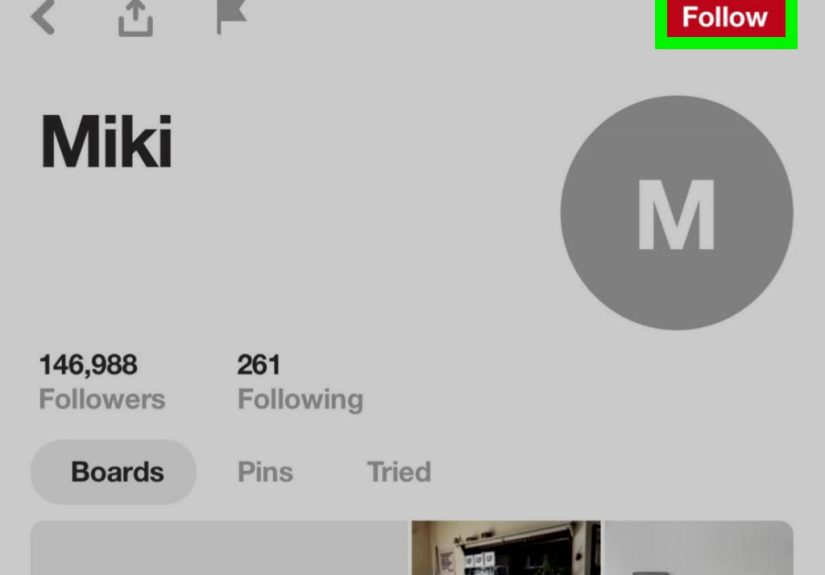
- Open the profile and click Follow.
Pro tip: If you’re searching a common name, add a clue word they’d likely pin about (for example: “Sarah + sourdough” or “Alex + mid-century”). Pinterest search is keyword-driven, and that extra context helps you find the right person faster.
Important note: Some accounts may be private, and private profiles may not show up in search the way public profiles do. In those cases, you’ll need a different method (keep reading).
Way 2: Follow someone from a Pin you like (the “who made this?” method)
This is the most natural way to follow people on Pinterest because it starts with the only thing that truly matters: a Pin that made you stop scrolling. Maybe it’s a five-ingredient dinner, a small bathroom makeover, or a spreadsheet template that makes your brain feel hugged. If you like one Pin, odds are you’ll like the rest of their saving style.
How it works (app or desktop)
- Open the Pin.
- Look for the profile name and/or profile icon on the Pin.
- Tap/click the profile to open it.
- Hit Follow.
Example: You discover a Pin for “tiny balcony herb garden.” You open the creator’s profile, and suddenly there are boards for “Apartment-friendly veggies,” “Plant styling,” and “Budget planters.” Following from a Pin is basically saying, “I trust your tasteplease keep enabling me.”
Bonus move: If the person’s profile is a mix of content you love and content you absolutely do not need (hello, 300 wedding invitation fonts), use Way 3 to follow only the boards you care about.
Way 3: Follow from their profileand choose “all” or “just the good parts” (boards)
Going directly to someone’s profile is the best option when you want control. On many profiles, you can follow the person broadly, and you can also follow specific boards instead of everything. This is ideal when you want their “Weeknight dinners” board but not their “DIY pallet bed frame” era.
Option A: Follow the person (full follow)
- Open the person’s profile (from search, a Pin, a shared link, or suggestions).
- Tap/click Follow.
Option B: Follow only specific boards (targeted follow)
Following boards is a little like ordering off the menu: you can skip the mystery casserole and go straight to dessert. The steps can vary slightly by device, but the idea is the same: open the board, then follow it.
- On the person’s profile, scroll through their boards.
- Open the board you want (example: “Budget Meal Prep” or “Modern Farmhouse Entryway”).
- Use the board’s menu (often a three-dot icon) and select Follow for that board, if you see it.
- Repeat for any other boards you want to follow.
Why this matters: Board-following helps you keep your feed relevant without unfollowing the person entirely. It’s also great for brands and creators who organize by category (recipes, seasonal decor, travel itineraries, style boards).
Example: You follow a creator’s “Air Fryer Dinner” board and “One-Pan Meals” board, but skip “Holiday Elf-on-the-Shelf Ideas,” because you are protecting your peace.
Way 4: Follow through “Find Friends,” contact suggestions, or an invite link (the “I can’t find them” rescue plan)
Sometimes search doesn’t helpmaybe you don’t know their username, they have a private profile, or Pinterest is showing you 400 accounts with the same display name. That’s when friend-finding tools and profile invite links come in clutch.
Option A: Use “Find Friends” / contact-based suggestions (mobile-friendly)
Pinterest can suggest people you might know if you choose to connect contacts (this is optionalonly do it if you’re comfortable with the privacy tradeoff). Once it surfaces accounts from your contacts, you can follow them with a tap.
- In the app, go to your profile and open settings (location varies by device).
- Look for something like Find friends or Contacts.
- If you choose to allow contact access, review the list Pinterest provides.
- Tap Follow next to the person you want.
Tip: If you’d rather not sync contacts, you can still use other options belowno pressure, no guilt, no “but what if it recommends my dentist?”
Option B: Follow someone via a shared profile link (great for private profiles)
If someone shares their Pinterest profile link directly, open it while logged in and hit Follow. Pinterest also supports unique invite links that can expire after a short window, so if a link doesn’t work, ask for a fresh one.
Option C: Follow through mutual connections (the “friend-of-a-friend” method)
If you already follow someone in the same niche, open that person’s Following list and browse for accounts you recognize. It’s a surprisingly effective way to find creators in a specific style community (like budget home decor, sourdough baking, capsule wardrobes, or travel planning).
Quick troubleshooting: when the Follow button is missing (or nothing changes)
- You’re not logged in: Pinterest hides some actions until you’re signed in.
- Private profiles: You may not be able to find them via search; use a shared link or invite.
- Board-follow controls vary: On some devices, following a board can be tucked under a menu (like a three-dot icon).
- App weirdness: If a button disappears, try updating the app, restarting it, or using desktop temporarily.
- You followed, but your Home feed looks the same: Pinterest still mixes in recommendations. Check your Following view or keep interacting with the person’s Pins to “train” your feed.
How to confirm you’re following someone (and unfollow if needed)
If you want to double-check, go to your profile and tap/click Following. You can usually filter between People and Boards to see what you’re subscribed to, and you can unfollow from there if your interests change.
Bonus: of experience-based tips (what people actually run into)
If you’ve ever followed someone on Pinterest and thought, “Why am I still seeing random stuff?” you’re not imagining it. A common first-time experience is expecting Pinterest to behave like a classic social feedfollow a person, see only their posts. In reality, Pinterest’s Home feed is designed for discovery, so it blends ideas from people you follow with recommendations based on what you search, save, and click. The practical takeaway: following is powerful, but your behavior is the steering wheel.
Another very relatable moment: you follow an account for one specific thing (say, simple weeknight dinners), and then your feed starts serving you 12 variations of “cloud bread” because you saved one experimental recipe at midnight. This is where targeted board-following becomes your best friend. Following a creator’s “Dinner” board instead of their whole profile can keep your inspiration stream focused. People often say this feels like cleaning out a closet: you’re not rejecting the entire wardrobeyou’re just choosing what fits your life right now.
Search can also be an adventure. Lots of users share display names (think “Emily” or “Home Ideas”), and Pinterest usernames aren’t always obvious. One helpful real-world tactic is to use “context breadcrumbs.” If someone is a teacher who pins classroom decor, search their name plus “classroom” or “bulletin board.” If they run a bakery, add “cake,” “cookies,” or their city. These extra keywords narrow results, and once you find the right profile, it’s worth saving a board of theirs so you can get back to it quickly later.
Private profiles are another common speed bump. People often assume a private account is “gone” when it doesn’t appear in search. In practice, following a private profile usually works best when the person sends a direct link or an invite link. The experience here is similar to joining a members-only club: you need the door code, not a better flashlight. If a shared link is expired, don’t overthink itask for a new one and try again while logged in.
Finally, a surprisingly positive experience: following can help you build your own Pinterest “neighborhood.” When you follow a few creators in the same styleminimalist home, budget-friendly recipes, thrift flips, travel itinerariesPinterest gets the hint faster. Users often notice that their suggested accounts start matching their tastes more closely, and their feed feels less chaotic. If you want a quick improvement, spend five minutes doing three things: follow one or two creators you genuinely like, follow one highly relevant board, and save a handful of Pins that match your current goal (like “small kitchen organization” or “beginner strength training”). It’s the Pinterest equivalent of telling a barista your order instead of letting them freestyle your latte.
Conclusion
Following someone on Pinterest doesn’t have to be complicated: search for their profile, follow from a great Pin, follow directly from their profile (and optionally just their boards), or use friend-finding tools and shared links when search isn’t cooperating. Once you start following intentionallyand saving what you truly want more ofPinterest becomes less “random internet soup” and more “my personalized inspiration shelf.”