Table of Contents >> Show >> Hide
- First, What Exactly Are You Checking?
- NYC: How to Check Your MetroCard Balance (Plus What’s Changing in 2026)
- NYC Bonus: Checking OMNY (Because MetroCard Is Retiring)
- Tokyo: How to Check Suica & PASMO Balance (Plus Mobile Wallet Shortcuts)
- “Metrocard” in Other Cities: A Quick Balance-Check Playbook
- Troubleshooting: When the Balance Won’t Show (Or Looks Wrong)
- Smart Habits So You Don’t Get Stuck at the Gate
- Conclusion: Balance Checks Should Be Boring (That’s a Compliment)
- Extra: Real Rider Experiences (and What They Teach You)
There are two kinds of public-transit panic: (1) realizing you’re on the wrong platform and (2) realizing your card is empty
while you’re already doing the “confident commuter stride” toward the gate. The good news? Checking your Metrocard
(or “metro card”) balance is usually fastif you know where to look, and if you don’t accidentally stand in the middle of a moving crowd like a decorative traffic cone.
This guide walks you through the most reliable ways to check balances in New York City (MetroCard and OMNY), Tokyo (Suica/PASMO/ICOCA),
and several other major systems. You’ll also get troubleshooting tips for “Why does my balance not update?” and “Why is this gate judging me?” moments.
First, What Exactly Are You Checking?
Most transit cards fall into two buckets:
- Stored value (a dollar/yen amount that goes down each ride or purchase).
- Time-based passes (like 7-day or 30-day unlimited rides, where you care about the expiration date, not the remaining dollars).
The “balance” you see might be money left, a pass expiration date, or bothdepending on your city and card type. In NYC, for example,
Pay-Per-Ride MetroCards show remaining value, while Unlimited cards are all about time and expiration.
NYC: How to Check Your MetroCard Balance (Plus What’s Changing in 2026)
If you’re visiting NYC in 2026, here’s the headline: the MTA has ended MetroCard sales after December 31, 2025.
MetroCards will still be accepted into 2026, but you won’t be able to buy or refill them anymoreso checking your remaining value matters more than ever.
Method 1: Swipe at a Subway Turnstile (Quickest in the Moment)
For a Pay-Per-Ride MetroCard, the turnstile display typically shows your remaining value after you swipe. If you’re using an Unlimited card,
you’re more likely to see an expiration date or time-related info. This is the “I need to know right now” optionperfect when you’re deciding
whether to reload or sprint to the next station’s machine.
Pro tip: Do your glance-and-go. The display is helpful, but it’s not a bedtime story. Step through, then move aside if you need a longer look.
Method 2: Use a Station MetroCard Reader or Booth Reader (If Available)
Some stations have MetroCard readers that can display balance and/or expiration details without requiring you to sacrifice a swipe at the turnstile.
If you see a dedicated reader or can ask at a station booth, this can be a calmer way to check.
Method 3: Check at a MetroCard Vending Machine (Best When You Might Refill)
A MetroCard vending machine is the most practical place to confirm your balance when you’re thinking about adding money or converting to a pass.
Even though MetroCard sales ended after December 31, 2025, machines may still exist in some locations as the system transitions. If you’re
still using a valid MetroCard in early 2026, your best bet is to check at a station where machines are still installed.
If a vending machine hiccups during a transaction, it can automatically dispense a receipt with machine number and datekeep it if something looks off.
Why MetroCard Balance Checks Can Be Weird Outside the System
MetroCard is a magnetic-stripe system, and the “truth” about your remaining value is often written back onto the card when you swipe.
That’s one reason remote, real-time balance checks aren’t always straightforward compared with modern account-based tap systems.
NYC Bonus: Checking OMNY (Because MetroCard Is Retiring)
OMNY is the MTA’s contactless “tap and ride” system. Instead of swiping, you tap a card/device. For many riders, the biggest “where’s my balance?” surprise
is that turnstiles often show “GO” rather than a remaining stored value the way MetroCard didso you’ll use different tools to check.
Method 1: Tap at an OMNY Vending Machine
You can check an OMNY Card balance by tapping it at an OMNY vending machine (and reload there, too). This is the closest OMNY equivalent to the classic “turnstile balance peek.”
Method 2: Use an OMNY Account (Best for Balance + Tracking)
A free OMNY account lets you check card balance, manage refills, and see trip/charge history. It also helps with features like balance protection (freezing a card) if supported for your card type.
Method 3: Use OMNY’s Trip History Tool (Quick Check Without Full Setup)
If you don’t want to set up an account yet, OMNY offers a trip history lookup for recent activity (commonly the past 7 days), which can help you confirm recent taps and charges.
MetroCard-to-OMNY: What About Leftover Value?
The MTA has stated that remaining MetroCard balances can be eligible for transfer or reimbursement for up to two years after the expiration date,
and that customers can transfer value to an OMNY Card at select Customer Service Centers. (Translation: don’t toss that card in a junk drawer “for later” and forget it exists.)
Tokyo: How to Check Suica & PASMO Balance (Plus Mobile Wallet Shortcuts)
Tokyo’s IC cards (like Suica and PASMO) are famously commuter-friendly. The balance-checking experience is usually smoother than NYC’s swipe era:
tap in, tap out, and a little display quietly tells you what happenedlike a polite accountant with excellent timing.
Method 1: Look at the Ticket Gate Display After You Tap
When you pass through ticket gates, the remaining balance is typically displayed near the reader as the fare is deducted.
Welcome Suica materials also note that your balance is displayed when you pass through the ticket gate.
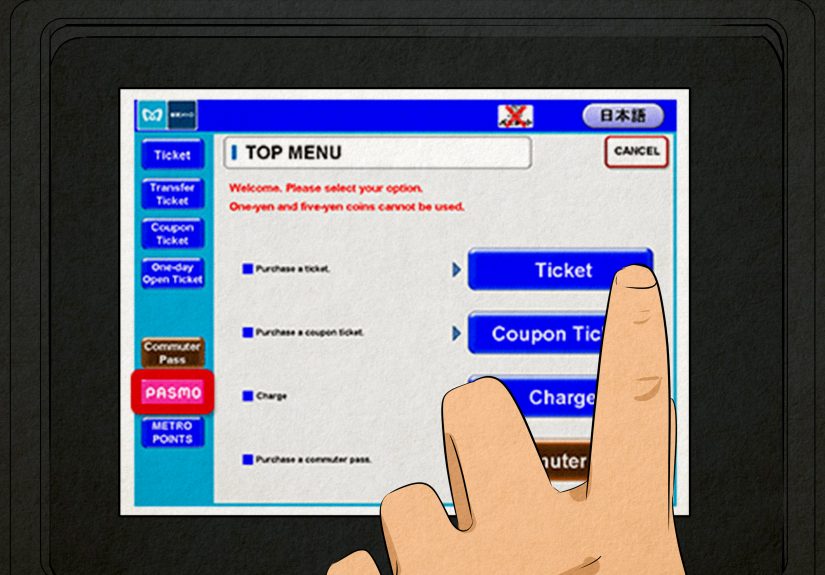
Method 2: Use a Ticket Vending/Charging Machine
You can check your balance at ticket vending machines and charging machines. This is especially handy if you want a slower, clearer view (or if you’re topping up anyway).
Method 3: Check in Apple Wallet (Digital Suica/PASMO/ICOCA)
If your Suica, PASMO, or ICOCA is in Apple Wallet, balance checking is refreshingly simple:
- iPhone: Open Wallet → tap your transit card → your current balance appears.
- Apple Watch: Open Wallet → tap the card → scroll to see the balance.
If the balance doesn’t update, Apple provides steps (including “Service Mode”) to help refresh the displayed value.
PASMO-Specific Note: Balance Displays After Taps and Purchases
PASMO guidance notes that after paying (for example, at participating shops), the balance will be displayedso you can confirm right away without hunting for a machine.
“Metrocard” in Other Cities: A Quick Balance-Check Playbook
Plenty of places use the phrase “metro card” casually, even when the official product has a different name. The methods are usually the same three:
(1) gate/reader display, (2) station machine or service point, (3) app/online account.
Here are a few popular systems and the fastest ways to check.
Chicago: Ventra
- Ventra app/website: Manage your account and see balances/passes through Ventra’s tools.
- On the go: The app is designed specifically for checking balance and loading fare without needing a station machine.
London: Oyster
- Online account: Create a Contactless & Oyster account to access journey/payment history and manage your card online.
- App support: TfL has also highlighted ways to access Oyster/contactless account info through its app ecosystem.
Hong Kong: Octopus
- Readers show remaining value: Each use typically shows remaining value on a reader or receipt.
- Enquiry machines/service points: Check remaining value and recent transactions at enquiry machines in MTR stations or service points.
- Octopus App: Official app support includes checking transaction records and related services.
Singapore: EZ-Link (SimplyGo)
- SimplyGo app: Add compatible cards to check balances and view transactions (and often top up).
Troubleshooting: When the Balance Won’t Show (Or Looks Wrong)
1) Your “balance” is actually a pass expiration
If you’re used to stored value and you switch to an unlimited pass, your brain will keep asking “How much money is left?” when the system is really saying,
“Money isn’t the point right nowtime is.” In NYC, MetroCard details and expiration timing matter, especially as cards approach their printed expiration date.
2) Your digital wallet balance doesn’t update instantly
For Wallet-based transit cards, occasionally the displayed balance lags behind reality. Apple provides specific steps to refresh transit card balances (including checking card details and using Service Mode where applicable).
3) You’re using OMNY and expecting a MetroCard-style readout
OMNY turnstiles typically confirm entry (like “GO”), but your stored value balance is best checked through an OMNY vending machine tap or your OMNY account dashboard.
4) Your card is worn, bent, or just having a day
Magnetic-stripe cards (like MetroCard) can be sensitive to damage, and that can cause inconsistent reads. If you suspect a MetroCard issue, the MTA provides official channels for claims and support.
Smart Habits So You Don’t Get Stuck at the Gate
- Check before rush hour. The best time to learn your balance is not when 40 people are speed-walking behind you.
- Use accounts when available. Systems like OMNY and Oyster are designed to show balances and history once you register.
- Know your “reload plan.” If you rely on cash, confirm where vending machines or reload retailers are located for your city’s system.
- Budget with fare caps in mind (where offered). In NYC, OMNY can cap weekly spending when you tap the same device/card, which can change how you think about “balance” in the first place.
Conclusion: Balance Checks Should Be Boring (That’s a Compliment)
The perfect transit day is delightfully unremarkable: your card works, the gate opens, and your balance is exactly what you expected.
Whether you’re swiping the last months of a MetroCard in NYC, tapping OMNY like it’s second nature, or watching the Suica/PASMO gate display flash your remaining yen,
the trick is knowing which screen, machine, or app is telling the truth for that system.
Do one quick balance check before you head out, and you’ll save yourself the classic “awkward shuffle away from the turnstile” move.
Your future selfand the people behind youwill be deeply, spiritually grateful.
Extra: Real Rider Experiences (and What They Teach You)
One of the funniest things about transit cards is how they turn otherwise confident adults into comedians the second a gate beeps at them.
Someone can negotiate a salary, parallel park on a hill, and assemble IKEA furniture with only minor emotional damagebut the moment a turnstile says “Insufficient fare,”
they suddenly forget how numbers work. That’s why a simple balance-check habit pays off.
In New York, the classic MetroCard experience is the “one-swipe truth test.” You think you have plenty of value left, you swipe, and the display reveals you have just enough for
exactly one rideplus a mysterious extra few cents that will never again be useful. You make a mental note to refill later, then proceed to forget for the next three days, until the card
fails at the least convenient time (usually when you’re late and holding an iced coffee you refuse to spill). The real lesson: check balance when you enter the station, not when you’re
already committed to the gate.
OMNY brings a different flavor of confusion. People who loved MetroCard’s “remaining balance” readout sometimes tap and stare at the “GO” like it’s being vague on purpose.
(“Go… where? With what money?”) The first time you switch systems, it helps to do a quick tap at an OMNY vending machine or set up the account dashboard on your phone.
Once you see your balance and trip history laid out clearly, the anxiety drops fast. The second lesson: the system changed, so your balance-checking muscle memory has to change, too.
Tokyo is where many travelers have their “why can’t everything be this smooth?” moment. You tap a Suica or PASMO, the gate display flashes your remaining balance, and you keep walking
no drama, no debate, no frantic wallet excavation. But even there, travelers learn a very specific etiquette: don’t stop in the gate lane to read the tiny screen like it’s a museum exhibit.
If you want to confirm the number, step aside after you pass through. The third lesson: balance visibility is great, but gate lanes are for movement, not meditation.
Then there’s the universal “I topped up… I think?” story. Someone adds money at a machine, gets distracted (a text, a toddler, an announcement, a sudden craving for a convenience-store snack),
and walks away unsure if the transaction worked. In modern systems, the receipt, the app transaction history, or the wallet balance screen becomes your calm proof.
The fourth lesson: whenever possible, keep a digital recordbecause memory is not a payment method.
Finally, seasoned riders develop a small, almost silly ritual: they check their balance the night before a big day. Airport trip? Job interview? Concert across town?
Quick balance check. It’s not because they love numbersit’s because they love removing friction from tomorrow. The fifth lesson: a 10-second balance check today can save
a 10-minute problem tomorrow (and preserve your reputation as someone who “totally has their life together,” even if your kitchen says otherwise).