Table of Contents >> Show >> Hide
- First, a Quick Reality Check: Python Comments Are Line-Based
- Method 1: Use # on Each Line (The Real Comment Method)
- Method 2: Use Triple Quotes to “Disable” a Block (Works, But It’s Not a True Comment)
- Which Method Should You Use?
- FAQ: Quick Answers to Common “Wait, What?” Moments
- Conclusion
- Real-World Experiences: What People Actually Run Into (500-ish Words of “Yep, Been There” Scenarios)
You’ve got a chunk of Python code you want to “turn off” for a minutemaybe you’re debugging,
maybe you’re testing an idea, maybe you’re just trying to stop that one function from yelling at you
like it pays rent. Either way, you need a quick, clean way to comment out multiple lines.
Here’s the twist: Python doesn’t have a true “block comment” operator like /* ... */.
Instead, it has one official comment styleand one popular workaround that looks like a comment but
technically isn’t. Let’s do both (and keep your future self from filing a complaint).
First, a Quick Reality Check: Python Comments Are Line-Based
In Python, an actual comment starts with # (as long as that # isn’t inside a string)
and runs to the end of the physical line. That’s it. That’s the whole comment buffet.
So when people say “multi-line comment,” they usually mean “a bunch of single-line comments.”
The good news: it’s simple, readable, and every tool understands it. The better news:
your editor can do most of the work so you don’t have to type # 47 times like it’s 1998.
Method 1: Use # on Each Line (The Real Comment Method)
If you want to comment out multiple lines in Python in a way that’s always correct, always expected,
and always friendly to linters, formatters, and teammatesthis is the method.
1) Manual (works everywhere)
Add a # at the start of each line you want to disable:
When you run the file, Python ignores those lines. Your code stays intact. Your indentation stays honest.
And your coworkers don’t have to decode your “creative” commenting strategy.
2) The fast way: toggle comments in your editor
Most code editors let you highlight multiple lines and toggle line comments in one shortcut.
This still produces # comments (which is exactly what we want), just without the finger workout.
- VS Code (Windows):
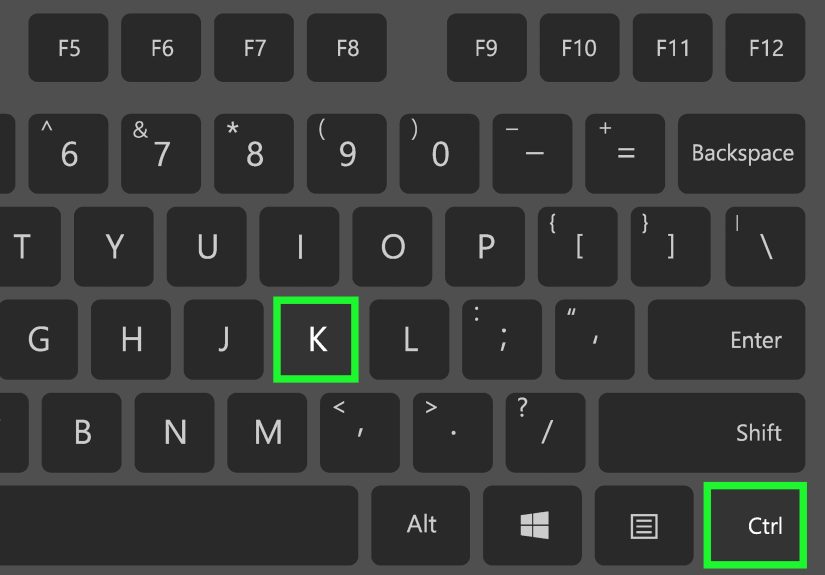
Ctrl + /toggles line comments for selected lines. - VS Code (Windows):
Ctrl + KthenCtrl + Cadds line comments;Ctrl + KthenCtrl + Uremoves them. - IDLE (Windows): common shortcuts include commenting/uncommenting from the Format menu (shortcuts vary by setup).
Pro tip: If you’ve ever tried to “comment out” code by deleting it, pause. Put the scissors down.
Use toggle comments. You get a reversible change, clean diffs, and fewer “wait… what did I remove?” moments.
How to make block-style comments look professional (without writing a novel)
When your goal is documenting a section (not just disabling it), treat the block like a real “unit.”
A clean block comment is easy to scan and doesn’t fight your indentation.
- Indent the comment to the same level as the code it describes.
- Use a single space after
#(readability matters). - Keep comments meaningfuldescribe “why,” not “what Python is obviously doing.”
- Separate paragraphs in a block comment with a line that contains only
#.
Example of a tidy block comment:
Common gotchas (so you don’t accidentally comment the wrong thing)
-
A
#inside quotes is not a comment: - Inline comments are fine, but don’t overdo them:
-
If you comment out part of a multi-line statement, you can break the syntax. When in doubt,
comment out the entire statement, not just one line in the middle.
Method 2: Use Triple Quotes to “Disable” a Block (Works, But It’s Not a True Comment)
You’ve probably seen this:
And yesoften it “works” to prevent code from running. But here’s what’s actually happening:
triple quotes create a multi-line string literal. That string may be treated as documentation (a docstring)
or as a standalone expression that gets ignored by your program’s logic.
In other words, it can behave like a comment, but it isn’t one. That difference matters in a few places.
How triple-quote “commenting” behaves (and why it sometimes surprises people)
-
If the triple-quoted string is the first statement inside a module, class, or function,
Python treats it as a docstring. That means it can show up in generated documentation
and is accessible via.__doc__. -
If it’s not the first statement, it becomes an expression statement that creates a string value
and then goes unused. Most tools treat this as suspicious because it looks like “dead” code or a mistake. -
The code inside the triple quotes isn’t executed, but the string still has to be valid syntax as a string.
If you accidentally include the same triple-quote sequence inside it, you’ll break the file.
When this method is reasonable
Triple quotes can be okay for short-term, local debuggingespecially when you’re experimenting and you
know you’ll remove the block quickly. They can also be useful when you’re sketching out notes in a throwaway script.
But for production code, team code, or anything that will live longer than a weekend? Prefer #.
Triple-quoted “comments” can confuse linters, accidentally create docstrings, and make code reviews harder.
You want your intent to be obvious: “this is commented out,” not “this is a mysterious unused string that may or may not be documentation.”
A safer pattern (without adding a third “official method”)
If you’re using triple quotes to temporarily disable code, consider whether you actually want to keep that code at all.
If it’s needed later, stash it in version control (Git) and delete it from the file. Commented-out code ages like milk.
Which Method Should You Use?
| Situation | Best Choice | Why |
|---|---|---|
| Disabling a block while debugging | Method 1 (# via editor toggle) |
True comments, clean diffs, zero surprises |
| Writing documentation for a section of code | Method 1 (# block comments) |
Matches Python style guidance and tool expectations |
| Quick scratch notes in a personal script | Method 2 (triple quotes, short-term) | Convenient, but treat it as temporary |
FAQ: Quick Answers to Common “Wait, What?” Moments
Does Python support /* ... */ block comments?
No. Python’s official comment syntax is # to end-of-line. “Multi-line comments” are typically
multiple # lines.
Why do people say triple quotes are “multi-line comments”?
Because they can function like one in practice: the code inside won’t execute. But triple quotes create a string literal,
and that can become a docstring or an unused expressionso it’s not the same as a comment.
Can triple-quoted strings affect documentation?
Yesif placed as the first statement in a module/class/function, it becomes a docstring and may show up in docs or tooling.
That’s great for documentation, not great when you were just trying to silence a block of code.
What’s the most “professional” way to comment out multiple lines?
Use your editor’s toggle line comment feature so it inserts # on each line.
It’s readable, reversible, and plays nicely with style tools and code reviews.
Conclusion
If you remember only one thing, make it this: Python’s real multi-line commenting is just many single-line comments.
Method 1 (adding # to each line) is the clear, correct, tool-friendly approach.
Method 2 (triple quotes) can “work” for temporarily disabling code, but it’s a string literalnot a true comment
and it comes with quirks that can confuse documentation, linters, and humans.
So go ahead: highlight the block, smash that toggle comment shortcut, and enjoy the rare thrill of solving a problem
without creating three new ones.
Real-World Experiences: What People Actually Run Into (500-ish Words of “Yep, Been There” Scenarios)
In real projects, “comment out multiple lines” is rarely the final goal. The final goal is usually “figure out why this
broke without turning my entire codebase into a haunted house.” And that’s where the details matter.
One common scenario: you’re debugging a flaky bug and you start commenting out chunks like you’re defusing a bomb in a movie.
If you do it manually, you’ll eventually miss a line, especially inside a long block with nested indentation.
That’s why editor toggles are such a lifesaver: they apply the comment marker consistently to every selected line.
Even better, they undo cleanly. When you’re testing possibilities fast, reversibility is everything.
Another classic: someone uses triple quotes to “comment out” a block inside a function… and accidentally puts it as the first
statement. Now that string becomes the function’s docstring. Suddenly, help() output (or your documentation generator)
shows a giant chunk of “disabled code” as if it’s the official description of the function. It’s not just awkwardit can confuse
anyone trying to use the function later. The fix is simple (don’t do that), but it’s an easy mistake when you’re moving quickly.
Code reviews reveal a different kind of pain: commented-out code tends to hang around. A developer disables something “temporarily,”
merges the change, and six weeks later nobody remembers why those lines are still there. The commented block becomes a fossil.
It might reference an old API, use outdated assumptions, or even contain sensitive logic that shouldn’t be sitting in plain sight.
Many teams prefer deleting unused code and relying on Git history to retrieve it if needed. Version control is basically a time machine
use it.
In notebooks and quick scripts, people often comment out multi-line data prep steps while experimenting. That’s totally normal, but it
creates another gotcha: commenting out only part of a multi-line statement can cause confusing syntax issues. For example, if you comment
out the first line of a chained call but leave the continuation lines, Python can’t interpret the leftover indentation and punctuation.
When disabling code, comment out the whole statement block so you don’t end up debugging a problem you invented.
Finally, modern tooling adds its own pressure. Formatters and linters (think “keep code consistent automatically”) generally expect
true comments to use #. A mysterious unused triple-quoted string can trigger warnings or make the file look messy.
If your team uses automated checks, the “cute shortcut” can become the reason your build fails. That’s why Method 1 is the boring hero:
it’s boring, and boring is dependable.