Table of Contents >> Show >> Hide
- What Does It Mean to Unlock a Verizon Phone?
- Is It Legal to Unlock a Verizon Phone?
- Verizon Unlock Policy: What You Need to Know
- How to Check If Your Verizon Phone Is Already Unlocked
- How to Unlock a Verizon Phone for Free
- Unlocking a Verizon iPhone
- Unlocking a Verizon Android Phone
- What If Verizon Says Your Phone Is Not Eligible?
- Can You Unlock a Used Verizon Phone?
- Will an Unlocked Verizon Phone Work on AT&T, T-Mobile, or an MVNO?
- Common Verizon Unlocking Problems and Fixes
- How to Avoid Verizon Unlocking Scams
- Real-World Experience: What Unlocking a Verizon Phone Usually Feels Like
- Conclusion
Unlocking a Verizon phone sounds like something that should require a secret code, a trench coat, and a dramatic keyboard scene. Thankfully, the legal version is much less cinematic. In most cases, unlocking a Verizon phone simply means removing the carrier restriction that keeps the device tied to Verizon’s network. Once unlocked, the phone may work with another compatible carrier, whether you are switching to save money, using an international SIM while traveling, or passing your old phone to someone who is not on Verizon.
The important words here are legally and for free. You do not need a shady “instant unlock” site, a mystery app, or a guy on a forum who types in all caps. Verizon has official unlocking rules, and when your phone qualifies, unlocking is handled by Verizon at no extra unlock fee. The catch is that eligibility depends on how the phone was purchased, whether it is postpaid or prepaid, whether it is paid off, whether the account is in good standing, and whether the device has been reported lost, stolen, or connected to fraud.
This guide explains how to unlock a Verizon phone the right way, how to check whether it is already unlocked, what to do if the unlock does not happen, and how to avoid common mistakes that can turn a simple carrier switch into a customer-service marathon.
What Does It Mean to Unlock a Verizon Phone?
A locked phone contains software restrictions that prevent it from being activated on another carrier’s compatible network. Unlocking removes that carrier restriction. It does not erase your data, remove your screen passcode, bypass iCloud Activation Lock, clear a blacklist, or magically make an old phone support every wireless band on Earth.
Think of unlocking like taking off a “Verizon only” name tag. The phone may then be allowed to use another carrier’s SIM or eSIM, but it still needs compatible hardware and software. A Verizon phone that is unlocked may work beautifully on another U.S. carrier, or it may have limited features if the new carrier uses network bands the phone does not support. That is why unlocking and compatibility are two different checks.
Carrier Unlock vs. Screen Unlock
Do not confuse a carrier unlock with unlocking your screen. If you forgot your iPhone passcode or Android PIN, carrier unlocking will not help. A Verizon carrier unlock only affects which mobile networks the device can use. Your photos, apps, passwords, and lock screen remain separate issues.
Is It Legal to Unlock a Verizon Phone?
Yes, unlocking a phone for legitimate use on another authorized network is legal in the United States when done under applicable law and carrier policy. The safe path is simple: use Verizon’s official process, meet the eligibility rules, and avoid services that promise to bypass lost, stolen, financed, or fraud-blocked status. Those shortcuts are not “hacks”; they are usually expensive headaches wearing sunglasses.
For normal customers, the practical rule is this: if the phone is yours, it is eligible under Verizon’s policy, and the new network authorizes the device, you can request or receive a carrier unlock legally. Verizon does not charge a separate unlock fee for eligible devices.
Verizon Unlock Policy: What You Need to Know
Verizon’s unlocking rules changed in 2026, so old advice online can be misleading. Many older guides still say every Verizon phone unlocks automatically after 60 days. That used to be a common answer, but it is no longer the complete picture. The current rules depend heavily on whether the device is postpaid, prepaid, business, or tied to special circumstances.
Postpaid Verizon Phones
For phones purchased directly from Verizon on a postpaid account, Verizon’s current policy says devices are locked to Verizon’s network. A device can be unlocked when it is bought at full retail price or when the device financing agreement balance is paid in full. If the phone was previously reported lost or stolen, Verizon will not unlock it unless that status is cleared first.
One small but important detail: if a Verizon Gift Card is used to buy a smartphone or pay off a remaining balance, unlocking may be delayed while Verizon verifies the funds. This is not the phone being dramatic; it is Verizon trying to reduce fraud.
Prepaid Verizon Phones
Prepaid rules are stricter. For Verizon prepaid phones activated on or before January 26, 2026, the older 60-day rule may apply if the phone had paid activation and 60 days of paid active service. For phones activated on or after January 27, 2026, Verizon’s prepaid unlock guidance says the device can be unlocked upon request after 365 days of paid and active service.
That means a prepaid Verizon phone bought today is not usually an instant unlock candidate. It must be active, paid, working, turned on, not reported lost or stolen, and free of fraud indicators. In plain English: Verizon wants the phone to behave like a real customer’s phone, not a device that sprinted out of a retail box and into a resale scheme.
Business Verizon Phones
Business devices follow rules similar to postpaid phones, with extra attention to the terms of the business agreement. A Verizon Business device may unlock after it is purchased at full retail price, after financing is paid in full, when the line term ends, or when any applicable termination fee is paid. The exact answer may depend on the business contract.
Military Deployment Unlocks
Verizon provides an unlocking option for qualifying military customers with relocation orders outside the Verizon coverage area. The account must be verified and in good standing, and Verizon may require the line to have been active for a certain period before unlocking. Military customers should contact Verizon directly and be ready to provide deployment documentation.
How to Check If Your Verizon Phone Is Already Unlocked
Before you request anything, check whether your Verizon phone is already unlocked. Many people discover that the “locked phone problem” is actually a “wrong SIM,” “inactive eSIM,” or “carrier compatibility” problem. Checking first can save you a call, a chat session, and a small emotional support snack.
How to Check an iPhone
On an iPhone, open Settings, tap General, then tap About. Look for Carrier Lock. If it says No SIM restrictions, your iPhone is unlocked. If it shows a carrier restriction or displays an unsupported SIM message after you insert another carrier’s SIM, the device may still be locked or not properly activated.
How to Check an Android Phone
Android menus vary by brand, but the quick test is usually simple. Insert a SIM card from another carrier, restart the phone, and watch what happens. If the phone connects to the new carrier after activation, it is likely unlocked. If it asks for a network unlock code, says the SIM is not supported, or refuses to register on the network, the phone may still be carrier locked.
You can also check your IMEI. Dial *#06# to display your IMEI, or find it in your phone settings. Then use the new carrier’s compatibility checker before switching. A phone can be unlocked and still not be ideal for a particular network.
How to Unlock a Verizon Phone for Free
The best way to unlock a Verizon phone for free is to follow Verizon’s official eligibility path. Here is the clean, legal process.
Step 1: Identify the Type of Verizon Phone
First, figure out whether your phone is postpaid, prepaid, business, or connected to a military deployment request. This matters because the unlock timeline is different. A paid-off postpaid phone may qualify sooner than a prepaid phone that must complete 365 days of paid active service.
Step 2: Confirm the Phone Is Paid Off
If the phone was financed, check your Verizon account to confirm the device payment agreement is paid in full. If you still owe money, the unlock may be denied or delayed. Paying your monthly bill is not always the same as paying off the phone. Your service bill and your device balance are cousins, not twins.
Step 3: Make Sure the Account Is in Good Standing
Verizon can deny or delay unlocking if the account has unpaid balances, suspicious activity, or unresolved fraud indicators. Before contacting support, clear overdue amounts and make sure the account owner or authorized manager is the one making the request.
Step 4: Check Lost, Stolen, or Fraud Status
A phone reported lost or stolen will not be unlocked until that report is cleared. This is especially important when buying used Verizon phones. If a seller says, “It only needs a quick unlock,” but refuses to provide proof that the phone is paid off and clean, treat that as a red flag wearing tap shoes.
Step 5: Request the Unlock Through Verizon
For eligible phones that do not unlock automatically, contact Verizon support through the My Verizon app, Verizon chat, phone support, or a Verizon store. Provide the phone number, account details, IMEI, and device model. Ask specifically for a carrier unlock or network unlock, not a screen unlock.
Step 6: Restart and Test the Phone
After Verizon confirms the unlock, restart the phone. For iPhone, connect to Wi-Fi and allow the carrier settings to update if prompted. For Android, insert the new SIM or activate the new eSIM, then restart. If the device still refuses the new carrier, wait a few hours and try again. Some systems need time to update across carrier databases.
Unlocking a Verizon iPhone
Verizon iPhones typically unlock remotely once eligible. You usually do not receive a special code. After Verizon processes the unlock, the iPhone checks Apple’s activation system and updates its carrier lock status. If the phone still says locked, connect it to Wi-Fi, update iOS, restart the device, and check Settings > General > About again.
If you see “No SIM restrictions,” you are ready to test a different carrier’s SIM or eSIM. If you see an error saying the SIM is not supported, contact Verizon first. Apple cannot unlock your iPhone for you; the carrier controls the carrier lock.
Unlocking a Verizon Android Phone
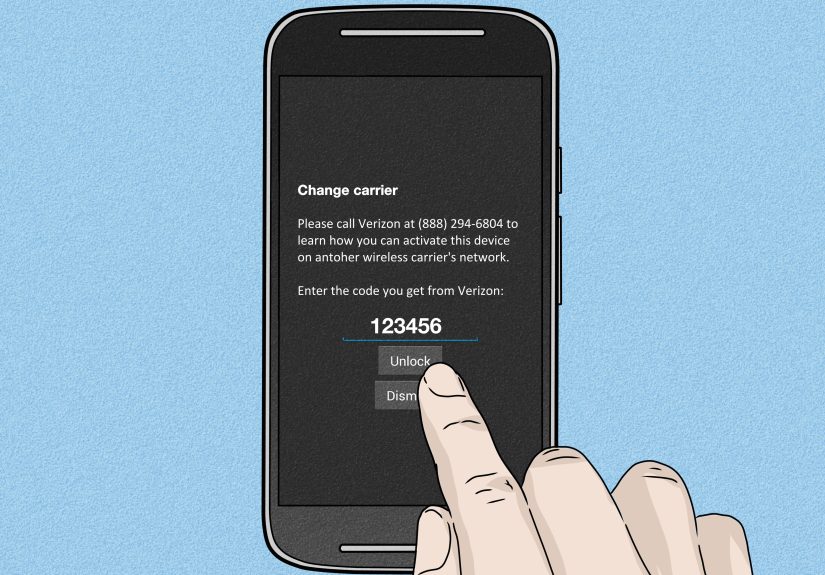
Many Verizon Android phones unlock remotely, but some may ask for a network unlock code depending on the model. If your Android device prompts for a code after inserting another carrier’s SIM, contact Verizon and provide the IMEI. Do not buy random unlock codes from websites unless you enjoy donating money to the internet goblin economy.
After unlocking, update the phone software, reset network settings if necessary, and test calls, texts, mobile data, hotspot, and voicemail on the new carrier. Android phones may need the correct APN settings for data and picture messaging.
What If Verizon Says Your Phone Is Not Eligible?
If Verizon denies the unlock, ask for the exact reason. The most common causes are an unpaid device balance, prepaid service time not completed, a lost or stolen report, fraud indicators, a non-Verizon purchase source, or a business contract restriction. Once you know the reason, you can fix what is fixable.
For example, if the phone is prepaid and has only 180 days of paid active service, the solution is not a magic code. The solution is time. If the phone is financed, pay off the device. If the phone was bought used and is blacklisted, contact the seller immediately and request a refund.
Can You Unlock a Used Verizon Phone?
Yes, but only if the used phone is eligible. Before buying, ask for the IMEI and check it with the carrier you plan to use. Confirm that the phone is paid off, not reported lost or stolen, and not tied to an unpaid account. If the seller refuses to provide the IMEI before purchase, walk away. There are plenty of phones in the sea, and some of them are not carrying a financial anchor.
When buying used, meet in a safe place, test the SIM or eSIM if possible, and check the iPhone Carrier Lock field or Android SIM behavior before handing over payment. A clean used phone should not require a complicated story.
Will an Unlocked Verizon Phone Work on AT&T, T-Mobile, or an MVNO?
Maybe. Unlocking only removes the carrier restriction. The phone still needs to support the new carrier’s network bands, VoLTE requirements, 5G support, and eSIM or physical SIM setup. Before switching, use the new carrier’s IMEI checker. This is especially important for older Android phones, imported models, and devices bought through special prepaid programs.
Most recent iPhones and many newer Samsung, Google Pixel, and Motorola phones have broad U.S. carrier support. Still, “unlocked” does not always mean “perfect everywhere.” Check first, switch second, celebrate third.
Common Verizon Unlocking Problems and Fixes
The Phone Says “SIM Not Supported”
This usually means the phone is still locked, the unlock has not fully processed, or the SIM is not compatible. Restart the phone, update the operating system, and contact Verizon if the message remains.
The Phone Is Unlocked but Mobile Data Does Not Work
Check APN settings, install carrier settings, restart the phone, and confirm the new carrier has activated your line correctly. Calls may work before data is fully configured.
The New Carrier Says the IMEI Is Not Compatible
This is not always a Verizon lock issue. The device may lack required network support, be blocked by the new carrier’s compatibility rules, or need software updates.
The Phone Was Paid Off but Still Locked
Contact Verizon with proof of payoff and the IMEI. If a gift card or unusual payment method was used, ask whether a verification delay applies.
How to Avoid Verizon Unlocking Scams
Avoid any service that promises to unlock a blacklisted, stolen, financed, or fraud-flagged phone. Also avoid “guaranteed instant unlock” pages that ask for payment before explaining eligibility. Real carrier unlocking depends on carrier databases, not motivational sales copy.
The safest free method is always Verizon’s official route. If a third-party service claims it can override Verizon policy, ask yourself why Verizon, Apple, Google, and the entire wireless industry somehow forgot to mention this miracle.
Real-World Experience: What Unlocking a Verizon Phone Usually Feels Like
In real life, unlocking a Verizon phone is rarely dramatic. The smoothest cases usually involve a paid-off postpaid phone, an account in good standing, and a customer who checks the IMEI before switching. The owner contacts Verizon, confirms eligibility, restarts the phone, inserts a new SIM, and everything works. Birds sing. Data flows. Nobody has to yell at a robot menu.
The bumpy cases tend to start with assumptions. Someone buys a used Verizon phone because the price is “too good to ignore,” then discovers the device is still financed. Another person switches carriers before confirming compatibility and learns that the phone is unlocked but missing features on the new network. A prepaid customer expects the old 60-day rule to apply to a newly activated phone and is surprised by the 365-day requirement. None of these situations are fun, but most are avoidable with five minutes of checking.
One practical lesson is to gather information before contacting support. Have the IMEI, phone model, purchase date, account phone number, and payoff status ready. Support conversations are much easier when you can say, “This is the IMEI, the device is paid off, the account is current, and I am requesting a carrier unlock.” That sentence is the customer-service equivalent of showing up to airport security with your ID already in hand.
Another useful habit is testing the unlock before you actually need it. If you are traveling internationally next month, do not wait until you are standing in an airport at 5:47 a.m. with one shoe untied and an eSIM QR code refusing to cooperate. Check your carrier lock status now. If you plan to sell the phone, unlock it and verify the status before listing it. Buyers love the phrase “unlocked and verified,” and they love screenshots almost as much as they love not inheriting your carrier problems.
For families, unlocking can also extend the life of a phone. A parent may upgrade and pass an older Verizon iPhone to a teenager on a cheaper MVNO plan. A small business owner may move paid-off phones to a lower-cost carrier. A traveler may keep Verizon service at home but use local data abroad. In all of these cases, the unlock adds flexibility without requiring a new device.
The biggest takeaway from experience is simple: unlocking is easy when the paperwork is clean and frustrating when the history is messy. Keep receipts, pay off the device, avoid suspicious used-phone deals, and use official carrier channels. Your future self will thank you, probably while enjoying cheaper service or a working travel SIM.
Conclusion
Learning how to unlock a Verizon phone legally and for free is mostly about understanding eligibility. Postpaid phones generally need to be paid off or purchased at full retail price. Prepaid phones activated under newer rules may require 365 days of paid active service before Verizon will unlock them upon request. Phones reported lost, stolen, or connected to fraud will not qualify until those issues are cleared.
Once your phone is eligible, use Verizon’s official support channels, check your carrier lock status, restart the device, and test it with the new carrier. Skip paid “instant unlock” shortcuts, check compatibility before switching, and never buy a used phone without verifying the IMEI. Do that, and unlocking a Verizon phone becomes less of a mystery and more of a checklist.