Table of Contents >> Show >> Hide
- What Infinite Axis Printing Actually Means
- Why the Ender 3 Is Such a Popular Belt Printer Candidate
- How Belt Printing Changes the Rules of Design
- What You Actually Modify on an Ender 3
- Slicing and Software for Infinite Axis Printing
- The Best Applications for an Infinite-Axis Ender 3
- The Biggest Challenges You Should Expect
- Materials, Nozzles, and Real-World Tuning
- Should You Convert an Ender 3 or Buy a Dedicated Belt Printer?
- A Practical Path to Your First Successful Infinite-Axis Prints
- Real-World Experiences: What Building and Using an Infinite-Axis Ender 3 Actually Feels Like
- Conclusion
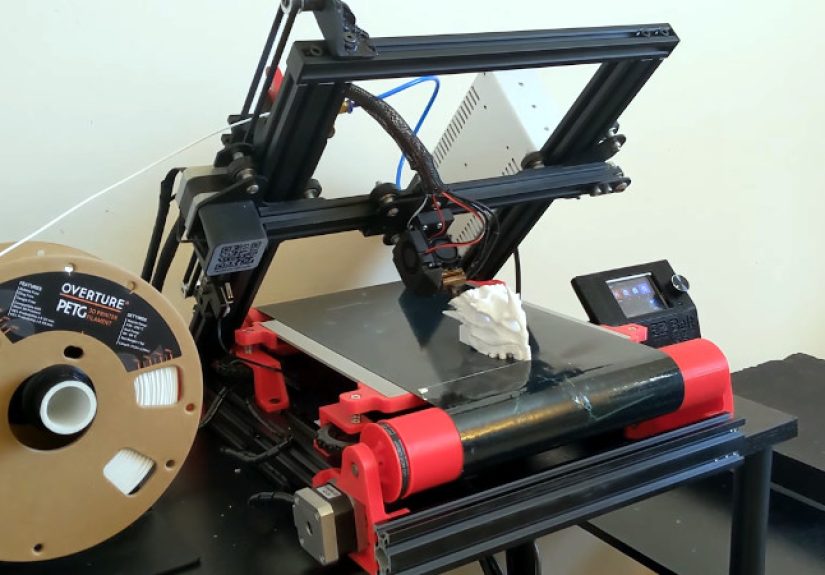
If standard 3D printing feels like trying to build a canoe inside a shoebox, infinite axis printing is the rebellious cousin that says, “What if the shoebox had a treadmill?” That, in plain English, is the magic behind converting an Ender 3 into a belt printer. Instead of printing on a fixed bed with a hard stop at the front edge, the machine prints on a moving conveyor-style surface. The result is a theoretically unlimited axis for long parts, automatic part ejection, and batch production that feels suspiciously close to turning your desk into a tiny plastic factory.
For Ender 3 owners, that idea is especially tempting. The printer is affordable, moddable, and supported by a community that has never met a stock machine it didn’t immediately want to “improve.” Infinite axis printing on the Ender 3 is not a beginner’s weekend project unless your weekends include firmware edits, tension tuning, and dramatic speeches at misaligned rollers. But for makers who want long functional parts, repeat production, or a deeper understanding of belt printing, it is one of the most fascinating upgrades in the hobby.
What Infinite Axis Printing Actually Means
Infinite axis printing is usually tied to conveyor belt 3D printing. On a conventional Cartesian printer, the nozzle deposits material perpendicular to a flat bed, and your build volume is limited by fixed X, Y, and Z dimensions. On a belt printer, the geometry changes. The nozzle is typically oriented around 45 degrees to the moving belt, which means the printer is no longer building layers straight upward in the familiar way. Instead, each new layer is added on a slant, while the belt itself advances the part forward.
That one change rewrites the playbook. The “infinite” axis is not magic, and it is not actually limitless in practical terms. You still need room for the part to exit the printer, support for extremely long finished sections, stable belt tracking, and enough filament to finish the job. But compared with a stock Ender 3 bed, the new workflow opens the door to printing parts far longer than the original machine could ever handle.
This is why belt printers are loved for long rails, trim pieces, cable channels, signage components, cosplay strips, jigs, guards, and repeatable production runs of small parts. If a normal Ender 3 is a workshop tool, an infinite-axis Ender 3 starts acting a bit like a miniature assembly line.
Why the Ender 3 Is Such a Popular Belt Printer Candidate
It is affordable and everywhere
The Ender 3 became popular because it delivered a lot of printing capability at a low price. That matters in the belt-printing world because dedicated infinite-axis machines tend to cost much more than a basic Ender. Converting a machine you already own feels financially smarter, especially if your idea of “saving money” includes buying new motors, custom belts, fasteners, extra printed parts, and then insisting you still came out ahead.
Its hardware is easy to repurpose
Many Ender 3 belt conversion projects reuse a surprising amount of the original printer. Depending on the design, builders often keep major frame components, the heated bed system, electronics, wheels, and hotend arrangements while replacing the Y-axis bed motion with rollers and a conveyor belt. Some kits even advertise that they preserve most stock components, which makes the mod feel less like scrapping a printer and more like giving it an exotic second career.
The community has already done the hard part
Open-source and commercial projects have already mapped out several approaches. Some tilt the gantry into a 45-degree belt-printer layout. Others use more modular add-on kits. A few designs keep a 90-degree setup for different conveyor behavior. In other words, you are not inventing the concept from scratch. You are joining a long line of makers who looked at an Ender 3 and thought, “This should be weirder.”
How Belt Printing Changes the Rules of Design
The biggest mental shift is that model orientation matters even more than on a regular printer. On a standard machine, the usual questions are support, strength, surface finish, and print time. On a belt printer, you add directional overhang behavior, belt contact area, part stability over time, and whether the finished section will peel cleanly off the belt.
Overhangs become directional
One of the quirks of conveyor-belt printing is that overhangs can be more forgiving in the belt direction than they are on ordinary flat-bed machines. That sounds wonderful until you realize the opposite is also true: poor orientation can ruin an otherwise printable model. Long unsupported bridges, tall features placed too early, or tiny contact patches at the belt can create a print that technically slices but behaves like a stubborn noodle.
The best orientation is often not the obvious one
When preparing a model for an infinite-axis Ender 3, the longest feature usually works best when aligned with the belt axis. The shortest, most stable section should leave the printer first, while larger or taller geometry is often safer later in the print. That reduces wobble and helps the part stay anchored while the belt keeps moving. In belt printing, “just rotate it until it looks right” is a bold strategy and usually a bad one.
Adhesion has to do two opposite jobs
A normal printer wants strong bed adhesion until the print is done. A belt printer wants strong adhesion at first and graceful release later. Too little grip and the part shifts early. Too much grip and the part may refuse to peel off cleanly. This balancing act is one of the reasons belt printing still feels like a craft, not just a checkbox in a slicer.
What You Actually Modify on an Ender 3
Turning an Ender 3 into a machine capable of infinite axis printing usually involves mechanical, electrical, and software changes at the same time.
1. The bed becomes a moving belt
The fixed or reciprocating bed is replaced with a roller-and-belt system. The printer now needs stable belt tracking, consistent tension, and a belt surface that can both grip and release prints at the right moments. Some builders use purpose-made conveyor belts designed for 3D printing, while others experiment with DIY belt assemblies. Dedicated belts generally reduce drama, which is valuable because this project already comes with enough drama.
2. The gantry geometry changes
Many popular Ender 3 belt conversions tilt the gantry to create the familiar 45-degree printing angle associated with infinite-Z machines. That geometric change is what allows the nozzle to print onto the moving belt while the part gradually exits the machine. Some kits instead pursue different conveyor layouts, but the core idea is the same: the motion system must be reinterpreted to support printing on a continuous surface.
3. Motion parts may need upgrades
Builders often add stronger motors, different belt paths, extra supports, or roller changes because the stock arrangement is not always enough for reliable conveyor motion. Some projects specifically note that the original Ender 3 Y motor lacks the torque to drive the conveyor belt effectively, which is why upgraded NEMA 17 motors are common. More rigid hardware also helps because belt printing punishes flex in ways ordinary bed-slingers sometimes forgive.
4. Firmware and machine definitions must be adjusted
Once the mechanics change, the firmware and slicer settings have to follow. A belt printer needs motion assumptions, dimensions, offsets, and sometimes custom G-code behavior that do not match a stock Ender 3 profile. This is not the place for guessing. It is the place for backups, labels, and the occasional deep breath.
Slicing and Software for Infinite Axis Printing
Software is where many first-time belt printer conversions either become successful or become modern art. Ordinary slicer profiles are not enough. The machine can still use familiar concepts like walls, infill, flow, speed, and retraction, but belt printing adds a different geometry and different priorities.
Specialized belt modes matter
Some slicers and slicer branches support belt printing directly. Features like belt raft, belt wall, seam placement on the belt edge, offset from the belt, and repeated production jobs are not gimmicks. They solve real printing problems unique to conveyor machines. A belt raft can improve early adhesion. Belt wall settings can reinforce the section touching the conveyor. Seam control can make the first contact areas cleaner and more predictable. Repetition tools make batch printing more practical.
Profiles need testing, not blind faith
Even if a conversion kit includes a tested slicer profile, it should be treated as a starting point, not a sacred text handed down from the nozzle gods. Belt material, roller alignment, nozzle shape, cooling, and hotend choice all influence results. A profile that works beautifully on one converted Ender 3 can be merely “character building” on another.
Start small before going full infinity
The smartest first prints are not giant sword blades or six-foot ducts. Start with short calibration strips, simple wedges, or repeatable small parts that let you verify adhesion, tracking, belt release, dimensional accuracy, and layer behavior. Infinite-axis printing becomes a lot more fun once you stop using very long failures as your test pieces.
The Best Applications for an Infinite-Axis Ender 3
Long functional parts
This is the headline use case. Need a cable raceway longer than your stock bed? A trim strip, drawer divider, rail cover, or custom guide? This is where a conveyor conversion earns its keep. Instead of splitting a long part into multiple segments and gluing them together later, you can often print it as one continuous piece.
Small-batch production
Belt printers shine when identical parts can print one after another and eject themselves. Brackets, clips, tags, organizers, and simple fixtures are good candidates. This is not injection molding speed, but it is a meaningful improvement over babysitting a standard printer and manually removing every completed part.
Weird geometries that benefit from angled printing
Some parts slice more elegantly when printed at belt-friendly angles. The 45-degree workflow can reduce support in cases where a conventional print would need a forest of scaffolding. This is not universal, but for the right geometry it feels like a clever shortcut.
The Biggest Challenges You Should Expect
Belt leveling and tracking
Ask enough builders about belt printers and they eventually say the same thing with the haunted expression of people who have already lived it: leveling matters. A lot. Belt leveling is not exactly the same as leveling a normal flat bed, and errors can show up as poor adhesion, angled prints, nozzle collisions, or strange first-layer behavior. Add belt tracking into the mix and suddenly a tiny mechanical misalignment can start a whole chain reaction.
Adhesion is trickier than on glass or PEI
Belt surfaces behave differently from standard spring steel sheets or textured beds. Surface prep, belt condition, heat distribution, and part footprint all affect success. Some builders lightly scuff belt surfaces to improve grip. Others rely on slicer tricks like belt rafts or wall adjustments. The key is consistency, because belt printing punishes “close enough” faster than many stock printers do.
Print speed may not impress you
Infinite-axis printing sounds futuristic, but a converted Ender 3 is not always faster than a stock machine in real-world motion. Some open-source builders note that their setups print more slowly because of the mechanics used to drive the conveyor system. You are trading simplicity for capability. That can be a great trade, but it is still a trade.
Long parts need physical support after leaving the printer
The printer may be able to produce a very long object, but gravity still exists and remains deeply committed to the bit. If the finished section droops, twists, or catches on something as it leaves the machine, your “infinite” part becomes a very expensive spaghetti experiment. Output rollers or a cleared runout area are not luxuries for longer prints. They are part of the setup.
Materials, Nozzles, and Real-World Tuning
PLA is usually the easiest entry point for a converted Ender 3 belt printer because it is predictable, forgiving, and easier to cool. PETG and TPU can also work, but they raise the stakes for adhesion and cleanup. Belt vendors commonly recommend PLA bed temperatures in the mid-60s to mid-70s Celsius range and somewhat higher ranges for PETG or TPU, though exact values depend on the specific belt surface and how much grip you need.
Some companies sell nozzles designed specifically for belt printers, often with sharper geometry intended to produce cleaner results while printing at an angle. That does not mean you must buy specialized nozzles on day one, but it does tell you something important: belt printing changes the way plastic meets the world. Even the nozzle can benefit from being optimized for the task.
In practical terms, tuning should focus on first-layer contact, flow consistency, cooling, belt release, and part orientation before chasing cosmetic perfection. A flawless Benchy on a stock printer is cute. A perfectly released 700 mm functional part on a belt printer is a lifestyle choice.
Should You Convert an Ender 3 or Buy a Dedicated Belt Printer?
If your goal is plug-and-play production with the least amount of troubleshooting, a dedicated belt printer is usually the better choice. Commercial machines were designed around conveyor geometry from the beginning, and even those can still require calibration and patience. A converted Ender 3 is for people who enjoy the process almost as much as the result.
If your goal is to learn, experiment, customize, and stretch a familiar platform into something genuinely unusual, the conversion route makes a lot of sense. It can also be cheaper than buying a purpose-built machine, especially if you already own the printer and do not mind sourcing parts, printing brackets, and spending quality time with fasteners that are somehow always one drawer farther away than you thought.
A Practical Path to Your First Successful Infinite-Axis Prints
Start with a proven conversion design or kit instead of inventing every part yourself. Build carefully and square everything. Verify belt tracking before running hot. Use a belt-capable slicer profile. Print short, low-risk test pieces first. Tune adhesion and release before attempting long parts. Add output support for anything substantial. Keep notes. Change one variable at a time. And above all, resist the urge to declare victory after one successful print and immediately launch a 14-hour job shaped like a kayak paddle.
Real-World Experiences: What Building and Using an Infinite-Axis Ender 3 Actually Feels Like
The experience of converting an Ender 3 for infinite axis printing is usually equal parts engineering project, software puzzle, and confidence test. At first, the machine no longer behaves like the friendly little bed-slinger you know. A simple first layer suddenly becomes a referendum on gantry angle, belt tension, roller alignment, slicer assumptions, nozzle offset, heat distribution, and your emotional resilience. Many builders report that the hardest part is not printing long models. It is getting the machine into a state where ordinary short prints become boringly reliable again.
Once the conversion is assembled, the first few jobs often feel strange because your instincts from regular FDM printing are only partly useful. On a standard Ender 3, you look at a model and think in terms of flat-bed orientation. On a belt printer, you start thinking about what leaves the machine first, which side needs to stay stable longer, and how a part will peel from the belt. That mental shift is one of the most interesting parts of the whole experience. It changes how you design. It changes how you slice. It even changes what kinds of parts seem worth printing.
There is also a very specific kind of satisfaction that comes from watching a part exit the machine under its own power. On a normal printer, the finished object just sits there waiting for you like a dog that will not get out of the car. On an infinite-axis Ender 3, the part keeps moving, cools as it travels, and eventually leaves the belt. That moment feels less like hobby printing and more like process automation. For makers who love workflow improvement, it is addictive.
At the same time, real experience teaches humility fast. Long parts reveal tiny errors. If the belt tracks slightly off-center, a two-inch test piece may not complain, but a thirty-inch component absolutely will. If adhesion is inconsistent, short jobs may survive while repeat production starts failing on the third or fourth cycle. If your output path is cramped, the machine may successfully create a long print only to bend it into sadness as it falls off the end. Infinite-axis printing rewards patience because it multiplies small mistakes into visible, often theatrical failures.
Most people who stick with the mod eventually develop a new routine. They stop treating the printer like a generic Ender 3 and start treating it like a dedicated production tool. They keep proven profiles for specific materials. They learn which part shapes are ideal and which are secretly terrible. They check belt condition more often than they ever checked a stock bed. They become suspicious of anything “almost level.” And once the machine is dialed in, they usually stop printing random novelty trinkets and start printing parts that actually justify the conveyor workflow.
That is probably the clearest sign of the experience: an infinite-axis Ender 3 changes not only how the machine works, but how you think about printing itself. It pushes you away from the mindset of “Can I fit this on the bed?” and toward “Can I design this for continuous manufacturing?” For a humble Ender 3, that is a pretty wild glow-up.
Conclusion
Infinite axis printing on the Ender 3 is one of the most ambitious and rewarding mods in consumer 3D printing. It can transform a budget printer into a specialized machine capable of long parts, hands-off batch production, and genuinely different design possibilities. But it is not a magic trick, and it is definitely not a no-effort upgrade. Success depends on good mechanics, correct slicing, careful tuning, and a willingness to learn a workflow that behaves very differently from standard flat-bed FDM printing.
If you want effortless printing, keep your Ender 3 stock or buy a purpose-built belt machine. If you want a project that teaches you more about motion systems, print geometry, production thinking, and the glorious fragility of seemingly simple settings, this conversion is hard to beat. Infinite-axis printing on the Ender 3 is not for everyone. For the right maker, though, it is exactly the kind of ridiculous idea that turns into a very useful machine.