Table of Contents >> Show >> Hide
Once upon a time, “going to spin class” meant packing a gym bag and praying your favorite bike wasn’t already taken. Then Peloton rolled in with a glossy bike, a giant touchscreen, and instructors who somehow remember your name and your birthdayand suddenly, your living room became a boutique studio.
But at roughly $1,695 for the standard Peloton Bike and $2,695 for the Bike+, plus about $49.99 per month for the All-Access Membership in the U.S., that convenience comes with a serious price tag. It’s no surprise that “DIY Peloton” setups and lower-cost competitors like Echelon, NordicTrack, and Schwinn are having a moment.
So which route is actually better: the iconic Peloton Bike, a budget-friendly DIY alternative built around the Peloton app, or a full-on competitor bike with its own ecosystem? Let’s break down the hardware, content, costs, and real-world experience so you can decide what deserves a spot in your home.
What You Really Get with a Peloton Bike in 2025
Hardware: Smooth, Solid, and Built for the Long Haul
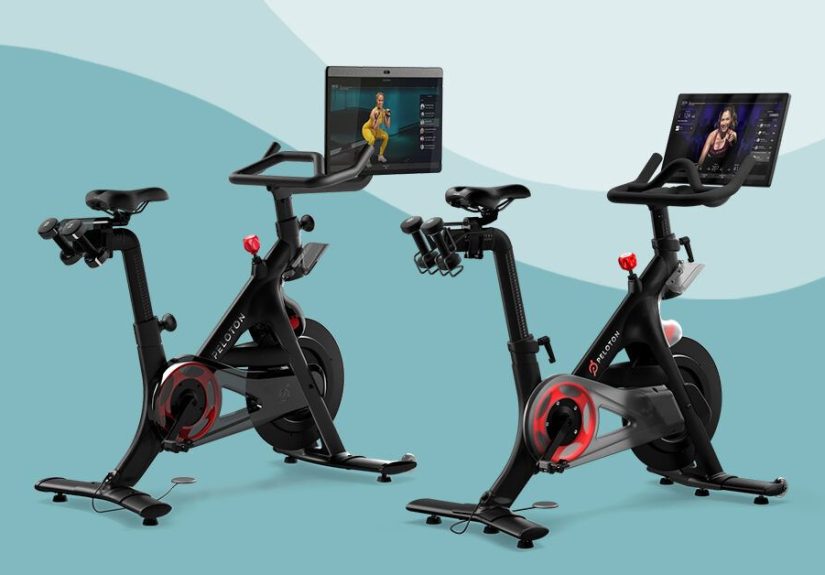
Peloton’s bikes are designed to feel like the high-end spin studio bikes you’d find at a boutique gym. The original Peloton Bike uses a belt-driven system and magnetic resistance with 100 micro-adjustable levelssmooth, quiet, and low-maintenance compared with old-school friction systems. Riders consistently describe the frame as sturdy, with a 30-ish pound flywheel that feels stable even during out-of-the-saddle sprints.
You also get a big, integrated touchscreen that shows:
- Cadence (RPM), resistance level, and estimated output in watts
- Heart rate (if you pair a monitor), distance, and calorie burn
- Leaderboard ranking and milestones to keep you competitive and mildly obsessed
The Bike+ ups the ante with a larger rotating screen, better speakers, and more advanced integration with Peloton’s expanding cross-training and strength content.
Content & Community: The Real Secret Sauce
Ask long-time riders why they stick with Peloton and they almost never say “for the frame geometry.” It’s the content. With an All-Access Membership, you can choose from tens of thousands of live and on-demand cycling classes, scenic rides, power zone programs, and off-bike workouts like strength, yoga, and bootcamps.
Key features include:
- Leaderboard with real-time rankings, high-fives, and shout-outs
- Badges, streaks, and milestones for extra motivation
- New AI-powered “Peloton IQ” style coaching on newer equipment, offering real-time feedback and personalized training plans
- Profiles for multiple household members on one membership
For many users, this blend of high-energy instructors, curated playlists, and social accountability is what keeps the bike from becoming an expensive laundry rack.
Costs, Recalls, and Downsides
In late 2025, Peloton’s U.S. pricing generally looks like this: around $1,695 for the standard Bike and $2,695 for the Bike+, plus about $49.99 per month for the All-Access Membership. That means roughly $3,500 over three years for the Bike plus membership (not counting shoes, weights, and accessories).
There are also some caveats:
- Recent recalls: Peloton has issued major recalls on hundreds of thousands of bikes due to seat-post issues, including a 2025 recall affecting nearly 878,000 “Original Bike+” units in the U.S. and Canada.
- Locked ecosystem: You’re meant to live inside the Peloton appusing other platforms is possible but clunky.
- Price creep: Hardware and membership prices have risen as Peloton leans into premium positioning and AI features.
In short: Peloton gives you polished hardware and best-in-class content, but you’ll pay for itand you’re betting on the brand to keep things stable after a few bumpy years.
The DIY “Peloton-Style” Setup
What a DIY Setup Actually Looks Like
A DIY Peloton alternative doesn’t mean pedaling a rusty bike while watching random YouTube videos (unless that’s your thing). Most DIYers follow a consistent recipe:
- An indoor cycling bike, often a budget-friendly model from Sunny Health & Fitness or another brand in the $250–$500 range
- A cadence sensor (e.g., Wahoo or Magene) strapped to the crank or pedal to measure RPM
- A tablet or iPad mounted on the handlebars
- The Peloton App or other fitness apps (Zwift, Apple Fitness+, iFit, etc.)
Multiple bloggers have documented builds under about $400–$700, combining a Sunny spin bike, a cadence sensor, a tablet holder, and sometimes a gel seat and clip-in pedals.
Pros of Going DIY
The big advantages of a DIY Peloton-style setup:
- Lower upfront cost: You can often get a solid bike and basic accessories for less than half the price of a Peloton.
- Cheaper subscription: Peloton’s app-only membership has historically been priced below the full All-Access membership, and you can also rotate between cheaper or free apps depending on your mood and budget.
- Flexibility: You’re not tied to one brandtry Peloton one month, Zwift the next, Apple Fitness+ after that.
- Easier upgrades: Don’t like the bike? Swap it out. Want a bigger screen? Upgrade the tablet, not the whole machine.
DIY Trade-Offs and Limitations
Of course, there’s a reason the Peloton Bike exists. With DIY setups:
- You won’t see official Peloton resistance numbers or power output; you’re mostly riding by feel and cadence.
- No native leaderboard integrationyour DIY ride isn’t ranked alongside Peloton Bike users.
- Fit and finish vary widely; a cheaper bike may not feel as smooth or stable for heavy riders or all-out sprints.
- Setup can be slightly techy: pairing sensors, mounting a tablet, figuring out how to gauge “Peloton resistance” on a generic knob.
If you like fiddling with gear and saving money, DIY can feel empowering. If you’d rather just clip in and go, the Peloton one-box solution may be more appealing.
Competitor Smart Bikes: Echelon, NordicTrack, and Friends
Between Peloton and full DIY sits the competitor crowd: bikes from Echelon, NordicTrack, Schwinn, Bowflex, ProForm, and others that pair a connected bike with their own subscription content.
How Competitors Stack Up
- Echelon Smart Connect (EX-5, EX-5s, etc.): Similar concept to Peloton with live and on-demand classes, leaderboard, and magnetic resistance. Membership prices for full access are generally in the same ballpark as Peloton, often around $39.99 per month in the U.S.
- NordicTrack S22i and Studio Cycles: Use iFit, with a heavy emphasis on scenic outdoor rides and automatic incline/decline and resistance adjustments.
- Schwinn IC4 / Bowflex C6: Often marketed as “open” bikes that pair via Bluetooth with multiple apps (Peloton, Zwift, etc.), giving you more flexibility than a fully locked ecosystem.
Many of these bikes undercut Peloton on price or offer features like leaning frames, adjustable screens, or deeper integration with specific platforms. But the app experience, instructor style, and interface polish vary a lot, and reviews can be mixedsome riders love the alternatives, others feel Peloton’s content and community still lead.
3-Year Cost Comparison: Peloton vs DIY vs Competitors
Let’s do some back-of-the-envelope math for a three-year period (very roughly, assuming U.S. pricing and not including tax or financing costs):
Peloton Bike
- Bike cost: about $1,695 for the standard Bike
- All-Access Membership: about $49.99/month = ~$1,799.64 over 3 years
- Approximate 3-year total: around $3,500 (before accessories)
DIY Peloton-Style Setup
- Bike + accessories: about $400–$700, depending on bike quality and add-ons
- Peloton App or similar: if we assume something around the ~$28.99/month range for an app membership, that’s about $1,043.64 over 3 years.
- Approximate 3-year total: roughly $1,400–$1,800
Competitor Smart Bike (e.g., Echelon)
- Bike cost: often $900–$1,500 depending on model and whether a screen is included.
- Membership: around $39.99/month for full Echelon Premier-style access = ~$1,440 over 3 years.
- Approximate 3-year total: roughly $2,300–$2,900
Broadly speaking:
- DIY is cheapest, but requires more effort and sacrifices some polish.
- Competitors sit in the middle, with varying levels of content quality and hardware refinement.
- Peloton is typically the most expensive, but offers the most cohesive and polished experience, especially if you care about metrics, community, and now AI coaching.
Which Option Is Better for You?
Choose Peloton If…
- You’re deeply motivated by polished classes, charismatic instructors, and a global community.
- You care about structured programs, precise metrics, and a tightly integrated ecosystem.
- You prefer “set it and forget it” over tinkering with tech or swapping apps.
Choose a DIY Setup If…
- You’re budget-conscious but still want access to Peloton-style or similar classes.
- You’re comfortable with a little DIYmounting a tablet, pairing sensors, and approximating resistance.
- You like flexibility and don’t care about official leaderboards or perfectly matched metrics.
Choose a Competitor Bike If…
- You want something more plug-and-play than DIY but at a lower cost or with features Peloton doesn’t offer (e.g., incline, leaning frame).
- You’re curious about alternative content ecosystems like iFit or Echelon.
- You find a great sale or bundle that dramatically undercuts Peloton’s pricing.
The “best” choice isn’t universal; it’s about the mix of budget, content, and convenience that keeps you riding. A $400 DIY spin bike that you use five days a week will always beat a $3,000 setup that gathers dust.
Real-World Experiences: Life on Peloton, DIY, and Competitor Bikes
To really feel the differences, it helps to imagine how each option fits into daily lifebecause what looks great in a spec sheet can feel very different at 6 a.m. when your alarm goes off.
Living with a Peloton Bike
Picture this: your alarm buzzes, you stumble to the bike, tap into a 20-minute low-impact ride, and your favorite instructor greets you like an old friend. You see your PR bar, your cadence targets, and a leaderboard full of fellow sleep-deprived humans chasing the same badge.
For many riders, that routine becomes a cornerstone of their week. The structure is baked in: programs tell you which rides to take, instructors cue when to push and when to back off, and milestones nudge you from “just trying it” to “I’m on a 60-day streak and nobody can stop me.”
On the flip side, you might occasionally feel locked in. If you ever want to pause your membership, the expensive hardware becomes a very fancy coat rack. And when news of recalls or price hikes drops, some members question the long-term stability of the platform.
The DIY Peloton Experience
With a DIY setup, the vibe is different. You assemble your bike, strap on a budget-friendly cadence sensor, and angle your tablet just right. The first time you fire up a Peloton app ride, you get the same instructors, playlists, and energybut your metrics are simpler. No official Peloton resistance; you’re translating cues like “30 to 40” into “turn the knob about a quarter-turn and see how it feels.”
Riders who love this approach often describe a sense of pride: “I built this. I hacked the system and kept hundreds or thousands of dollars in my pocket.” They’re usually okay with a few compromisesmaybe the bike isn’t quite as whisper-quiet, or the fit takes more tweaking. The payoff is the freedom to switch apps and keep costs lower over time.
The challenge? Motivation can dip if the friction goes up. If your sensor doesn’t connect one day, or the tablet battery dies, it’s easier to say “eh, I’ll ride tomorrow.” DIY works best for people who enjoy a little tech tinkering and aren’t thrown off by small hiccups.
Riding with a Competitor Bike
Competitor bikes offer a “Goldilocks” experience for some riders. You get a dedicated bike with integrated electronics, but maybe at a lower hardware price or with particular strengths, like NordicTrack’s auto incline/decline on outdoor-style rides or Echelon’s broad class library.
Experiences here are more varied. Some users rave about iFit’s immersive outdoor routes and trainer-led workouts that automatically adjust your resistance and inclinea huge win if you like to “zone out and follow the trail.” Others appreciate that Echelon or Schwinn bikes can pair with multiple apps, letting them test-drive Peloton, Zwift, or other platforms without buying a Peloton-branded bike.
But reviews also mention frustrations: slightly clunkier interfaces, occasional app bugs, or content that feels less polished than Peloton’s flagship classes. You might save on hardware or unlock specific features, but you may also spend more time figuring out the best combination of bike, app, and device for your preferences.
So, What’s Better in Real Life?
In practice, the “best” option is the one that you’re excited to use often. If the idea of live shout-outs, perfectly synced metrics, and a seamless app fires you up, Peloton will probably feel worth it, even at a premium. If you get more satisfaction from knowing you paid half the price for a DIY setup and still get great workouts, that joy might keep you more consistent. And if you’re a tech-curious rider who loves testing platforms, a flexible competitor bike could be your sweet spot.
The most important thing isn’t the badge on the frame or the logo on the screenit’s whether the bike in your home becomes part of your routine, your stress relief, and your long-term health. Choose the path that makes you want to clip in again tomorrow.