Table of Contents >> Show >> Hide
- What Is the Philips Lifeline Medical Alert System?
- Why Medical Alert Systems Matter
- Philips Lifeline System Options
- Key Features of Philips Lifeline
- Pricing and Fees: What to Expect
- Pros and Cons of Philips Lifeline
- Who Is Philips Lifeline Best For?
- How Philips Lifeline Compares With Competitors
- Buying Tips Before You Sign Up
- Real-Life Experience Notes: What Using Lifeline Can Feel Like
- Final Verdict: Is Philips Lifeline Worth It?
Note: Philips Lifeline is now commonly presented as Lifeline, formerly Philips Lifeline. Because pricing, fees, discounts, and device availability can change, readers should confirm final costs directly with Lifeline before ordering.
Choosing a medical alert system is a little like choosing a smoke detector, a seat belt, and a very calm friend who answers the phone at 2 a.m. You hope you never need it, but if the day comes, you want it to work without drama. That is why the Philips Lifeline medical alert system, now branded mainly as Lifeline, remains one of the most recognized names in senior safety.
Lifeline has been around for decades, and the brand has served millions of users in the United States. Its appeal is simple: press a button, connect to help, and give older adults and caregivers a little more breathing room. The company offers in-home systems, mobile GPS devices, optional fall detection, caregiver tools, and smartwatch-style options. In a market packed with new medical alert companies promising superhero-level safety from a tiny pendant, Lifeline stands out because of its long track record and straightforward emergency response model.
Still, name recognition does not automatically mean best value. Lifeline is reliable and easy to understand, but it can cost more than some competitors once monthly monitoring, fall detection, setup fees, and add-ons enter the chat. This review breaks down how the system works, who it is best for, what it costs, where it shines, and where shoppers should slow down before handing over a credit card.
What Is the Philips Lifeline Medical Alert System?
The Philips Lifeline medical alert system is a personal emergency response system designed to connect users with a trained response center when they need help. A user wears a button as a pendant, wristband, mobile device, or smartwatch. When they press the button, the system connects them to a monitoring specialist who can contact emergency services, family members, neighbors, or caregivers depending on the situation.
The basic promise is not complicated, and that is a good thing. In an emergency, nobody wants a device that requires a software update, a six-digit login code, and a motivational speech. Lifeline focuses on fast access to help through monitored devices built for older adults, people living alone, and caregivers who want extra peace of mind.
One important detail: Lifeline is no longer owned by Philips in the same way many longtime shoppers remember. Connect America acquired Philips’ Aging and Caregiving business in 2021, while Philips maintained an equity stake. That means consumers may still search for “Philips Lifeline,” but the official brand experience today is largely under the Lifeline name.
Why Medical Alert Systems Matter
Medical alert systems are not just gadgets for “someone else’s parents.” Falls are a major concern for adults age 65 and older. The CDC reports that more than one out of four older adults falls each year, and falling once doubles the chance of falling again. That statistic is sobering enough to make anyone look suspiciously at a loose bath mat.
A medical alert device cannot prevent every fall, illness, or emergency, but it can reduce the time between “something happened” and “someone knows.” That time matters. For seniors who live alone, have mobility challenges, manage chronic conditions, or feel nervous after a previous fall, a monitored button can support independence without turning the home into a full-time surveillance zone.
Philips Lifeline System Options
Lifeline offers several device categories, and the best choice depends on where the user spends most of their time. A mostly homebound user does not need the same setup as someone who walks the dog, visits friends, shops independently, or considers gardening a competitive sport.
HomeSafe In-Home System
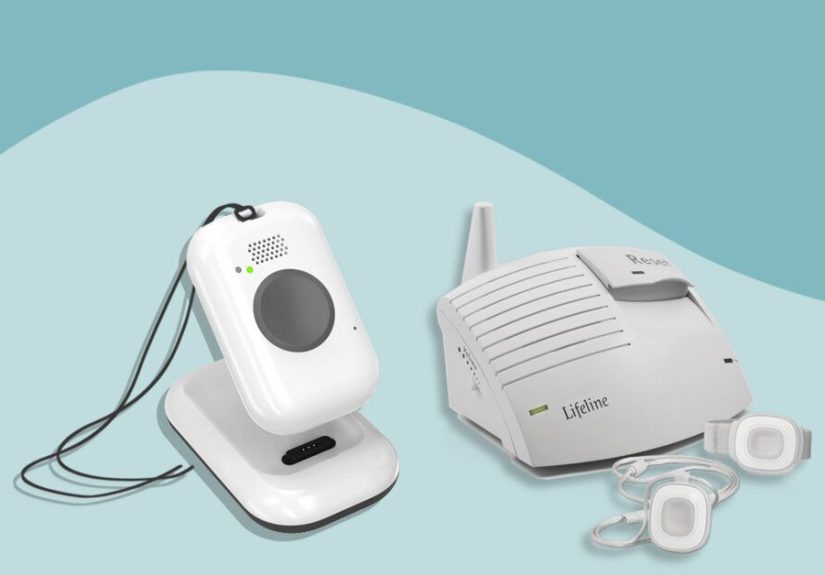
The HomeSafe system is designed for protection inside the home. It typically includes a base station and a wearable help button. Depending on the plan and availability, users may choose landline or cellular service. The cellular version is useful for households that no longer have a traditional landline, which is many households because landlines have quietly gone the way of DVD binders and answering machines.
HomeSafe is best for seniors who spend most of their time at home and want a simple, dependable emergency button. The wearable button is waterproof, which is important because bathrooms are one of the most common places for slips and falls. Users should still avoid treating the pendant like a snorkeling accessory, but wearing it in the shower is a practical safety advantage.
On the Go Mobile System
The Lifeline On the Go system is built for people who leave the house regularly. It includes mobile connectivity and location technology so help can be sent to the user’s location, not just their home address. This is a major difference from basic in-home medical alert systems.
For active seniors, the mobile medical alert system may be the better choice. It can be worn as a pendant or clipped to clothing, depending on the model. Lifeline also offers an On the Go Mini, a smaller version for users who want something lighter and less noticeable. The Mini is appealing for people who do not want their safety device to announce itself like a name tag at a conference.
Smartwatch Option
Lifeline’s smartwatch-style device is designed for users who prefer a more modern look. A medical alert smartwatch can feel less clinical than a pendant, which may increase the odds that the user actually wears it. And let’s be honest: the best medical alert system is not the one with the fanciest brochure. It is the one that is on the person when they need help.
The smartwatch option may include features such as step tracking or heart-rate-style wellness tools, depending on the model and plan. However, it should not be confused with a full Apple Watch replacement. The main purpose is emergency help, not checking text messages, controlling smart lights, or winning a fitness badge before breakfast.
Key Features of Philips Lifeline
24/7 Monitoring
The biggest feature is round-the-clock monitoring. When the user presses the button, they connect to a response center. A trained specialist can speak with the user, assess the situation, and contact the right help. That may mean emergency medical services, a caregiver, a family member, or a neighbor.
This monitored model is different from unmonitored systems that simply dial 911 or call a preset contact. For many families, professional monitoring is worth the monthly fee because the response center can stay calm, follow a protocol, and coordinate help even if family members are unavailable.
Optional Fall Detection
Fall detection is one of Lifeline’s most promoted features. The technology uses sensors and algorithms to identify movements that may indicate a fall. If a fall is detected, the system can connect to the response center even if the user cannot press the button.
This sounds almost magical, but it is important to keep expectations realistic. No fall detection technology catches 100% of falls. Lifeline itself notes that users should press the help button if they are able. Fall detection is a safety net, not a superhero cape. It may add monthly cost, but for users with a history of falls, fainting, balance problems, or mobility limitations, it can be one of the most valuable upgrades.
GPS and Location Support
Mobile Lifeline devices include GPS and location technology to help responders identify where the user is. This matters for people who walk outdoors, run errands, drive, or travel locally. If someone presses the button at a grocery store parking lot, the response center needs more than the user’s home address.
As with all cellular-based medical alert devices, coverage depends on network availability and environmental conditions. Before buying a mobile system, shoppers should confirm that the service works well in the user’s area, especially in rural communities or homes with weak cellular reception.
Waterproof Help Buttons
Lifeline help buttons are designed to handle water exposure, which is essential for daily use. Many falls happen in bathrooms, where tile, water, soap, and gravity team up like villains in a slapstick movie. A waterproof help button encourages users to keep the device on while showering instead of leaving it on the sink “just for a minute.”
Caregiver App and Support Tools
Lifeline offers caregiver-friendly tools that may help family members manage account details, emergency contacts, device status, and care-related information. These tools are especially useful for adult children who support a parent from another city. The app is not the flashiest in the industry, but it adds convenience for families who want visibility without hovering.
Pricing and Fees: What to Expect
Lifeline’s pricing varies by device, billing term, connection type, and add-ons. Current online information commonly places entry-level plans in the range of about $30 to $40 per month, with mobile systems and fall detection costing more. On the Go plans may start around $39.95 per month with annual billing, while some in-home options may be listed lower depending on landline or cellular service.
The bigger issue is total cost. Shoppers should look beyond the monthly price and ask about activation fees, programming fees, shipping, equipment charges, professional installation, fall detection, lockboxes, protection plans, and cancellation rules. A system that starts at a reasonable monthly rate can become less budget-friendly once extras are added.
AARP members may qualify for a Lifeline discount, including a percentage off medical alert service and possible shipping or activation benefits. This can make Lifeline more competitive, especially for households already paying for AARP membership. Still, discounts may have terms and limitations, so verify the final quote before signing up.
Pros and Cons of Philips Lifeline
Pros
- Strong brand recognition: Lifeline is one of the most established names in medical alert systems.
- Multiple device choices: Users can choose in-home, mobile, mini mobile, or smartwatch-style options.
- Optional fall detection: Helpful for people with higher fall risk or limited mobility.
- Waterproof help buttons: Useful for bathroom safety and everyday wear.
- Professional monitoring: Users can reach trained response specialists 24/7.
- Caregiver support: App-based tools can help families manage safety details.
Cons
- Higher total cost: Monthly fees, add-ons, and setup charges can make Lifeline pricier than some competitors.
- Pricing can feel less transparent: Shoppers may need to compare billing terms carefully.
- Fall detection costs extra: The feature is valuable but not always included by default.
- Cellular coverage matters: Mobile and cellular systems depend on network strength.
- Mixed customer feedback: Some complaints focus on billing, cancellation, or service issues, so documentation is important.
Who Is Philips Lifeline Best For?
The Philips Lifeline medical alert system is best for seniors and caregivers who value a familiar brand, professional monitoring, and a simple user experience. It is a good match for older adults who want help at home, active seniors who need mobile GPS protection, and families who prefer a company with a long history in personal emergency response systems.
It is also a strong choice for users who may benefit from optional professional installation. Not every older adult wants to unpack a device, read a setup guide, and troubleshoot blinking lights. For some households, paying for guided setup is worth it because it reduces confusion and increases confidence.
Lifeline may not be the best fit for extremely budget-conscious shoppers. Competitors such as Bay Alarm Medical, MobileHelp, Medical Guardian, and Medical Alert often compete aggressively on monthly pricing, equipment fees, response time claims, or feature bundles. If price is the top priority, compare at least three providers before deciding.
How Philips Lifeline Compares With Competitors
Compared with many medical alert systems, Lifeline’s biggest advantage is trust. Families recognize the name, and that matters when buying a service tied to health and safety. Lifeline also offers a broad product lineup, including in-home systems, mobile pendants, and smartwatch-style devices.
Where competitors may pull ahead is value. Some brands offer lower monthly rates, free equipment, cheaper fall detection, longer in-home ranges, or more modern caregiver apps. Lifeline is rarely the cheapest option, and shoppers who enjoy bargain hunting may find better deals elsewhere.
The best way to compare is to calculate the real first-year cost. Include monthly service, fall detection, activation, shipping, equipment, lockbox, warranty protection, and installation. Then compare features that matter to the user’s lifestyle. A homebody with a small apartment may not need the same plan as a senior who drives, gardens, volunteers, and refuses to miss Wednesday bingo under any circumstances.
Buying Tips Before You Sign Up
Before buying Lifeline, ask whether the system requires a landline, cellular signal, or both. Confirm fall detection pricing and whether it works with the exact device you want. Ask about cancellation terms, return windows, equipment ownership, and what happens if the user moves. If professional installation is offered, confirm whether it is available in the user’s ZIP code and whether it costs extra.
Caregivers should also test the device after setup. Place a test call, check speaker volume, confirm emergency contacts, and make sure the user can comfortably wear the button. A medical alert pendant left in a drawer is not safety equipment; it is expensive drawer decor.
Real-Life Experience Notes: What Using Lifeline Can Feel Like
For many families, the first week with a medical alert system is less about technology and more about emotion. An older adult may feel relieved, annoyed, embarrassed, protected, or all four before lunch. A daughter may feel better knowing Mom has a button, while Mom may insist she is “not old enough for that thing” despite having three throw rugs, two cats, and a heroic commitment to climbing step stools.
One of the most common experiences with Lifeline-style systems is the adjustment period. The device has to become part of the routine. Users may need reminders to wear the pendant in the shower, keep the mobile device charged, or place the base station where the speaker can be heard clearly. At first, wearing a medical alert button can feel awkward. Over time, many users treat it like glasses, keys, or a watch: not exciting, but useful enough to keep close.
Caregivers often report that the biggest benefit is peace of mind. It does not eliminate worry, but it changes the flavor of worry. Instead of wondering, “What if Dad falls and nobody knows?” the thought becomes, “Dad has a way to call for help.” That is still concern, but it is concern with a plan. And families love plans almost as much as they love group texts with too many emojis.
Testing the system is also part of the experience. A good setup process should include a practice button press so the user understands what happens. This can reduce fear of “bothering someone.” Many seniors hesitate to press emergency buttons because they do not want to make a fuss. A practice call helps show that the response center is there for exactly that reason. It is not being dramatic to ask for help after a fall, chest pain, dizziness, confusion, or a frightening moment.
For mobile users, charging habits matter. A GPS medical alert pendant is only useful if it has battery power. Families can build charging into a routine, such as placing the device on the charger during breakfast or bedtime. Caregivers may also want to check whether app tools show battery status or device location. Small habits make the system more dependable.
Another real-world issue is false alarms. They happen. A pendant may get bumped, fall detection may misread a movement, or the user may press the button accidentally while wrestling with a sweater. This is not ideal, but it is usually better than the opposite problem: needing help and not getting it. Users should be reassured that accidental calls are part of the system’s world. The response specialist can confirm everything is fine and close the call.
Finally, Lifeline can support independence when introduced the right way. The conversation should not sound like, “You are fragile, so wear this.” A better message is, “This helps you keep doing what you like while making sure help is available.” That framing matters. The goal is not to wrap older adults in bubble wrap. The goal is to help them live safely, confidently, and with fewer emergency guessing games.
Final Verdict: Is Philips Lifeline Worth It?
The Philips Lifeline medical alert system is worth considering for seniors who want a recognizable brand, reliable monitored help, and a choice of in-home or mobile devices. Its optional fall detection, waterproof buttons, GPS support, and caregiver tools make it a practical safety solution for many households.
The main drawback is cost. Lifeline may be more expensive than some competitors, especially once fall detection and setup-related fees are included. Pricing can also require careful reading, which is not ideal for shoppers trying to make a quick, confident decision. Still, for families who prioritize reputation, simplicity, and professional monitoring, Lifeline remains a strong contender.
The smartest move is to compare Lifeline with two or three other medical alert providers, calculate the full first-year price, and choose the device that the user will actually wear every day. Because in the end, the best medical alert system is not the cheapest, smallest, or most advertised. It is the one that is charged, worn, tested, and ready when life decides to be rude.