Table of Contents >> Show >> Hide
- What Is FaceApp?
- So, Is FaceApp Safe to Use?
- What Data Does FaceApp Collect?
- Does FaceApp Upload Your Photos?
- Does FaceApp Keep Your Photos Forever?
- What About FaceApp’s Terms of Use?
- The Real Privacy Risk: Your Face Is Biometric Data
- Is FaceApp Safer Than It Used to Be?
- Is FaceApp Safe for Kids?
- How to Use FaceApp More Safely
- Who Should Avoid FaceApp?
- FaceApp vs. Other Photo Editing Apps
- Final Verdict: Is FaceApp Safe?
- Experience Notes: What Using FaceApp Safely Feels Like in Real Life
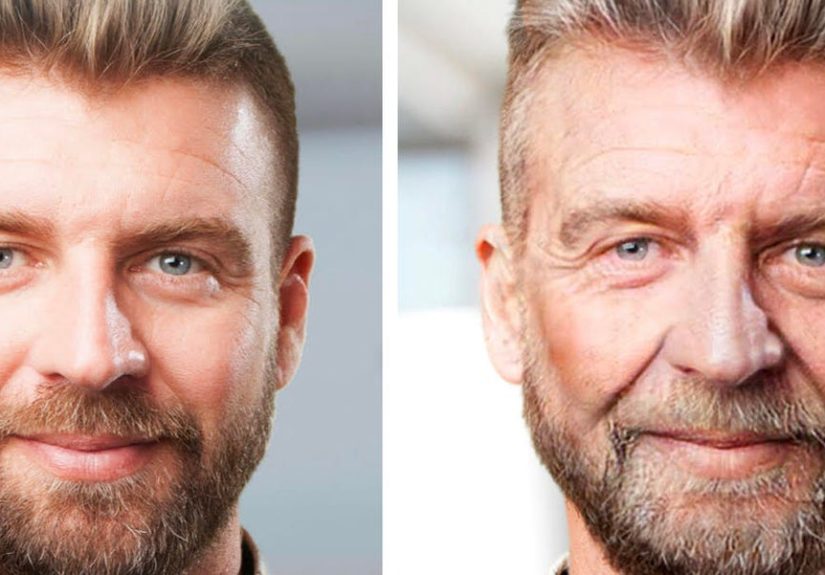
FaceApp has a rare talent: it can make you look 30 years older, 10 years younger, suspiciously glamorous, or like someone who has never once eaten gas-station nachos at midnight. But behind the fun filters sits a serious question many users ask before uploading a selfie: Is FaceApp safe?
The honest answer is: FaceApp is not automatically “dangerous,” but it is not risk-free either. It is a real photo-editing app with published privacy policies, app-store listings, and millions of users. At the same time, it handles something more personal than a username or shopping preference: your face. A face is not just a cute profile picture. It can be biometric information, an identity clue, and a piece of data you cannot exactly reset like a password. Unless you are planning to grow a replacement face in the garage, caution is smart.
This guide breaks down what FaceApp collects, how it says it processes photos, what changed from earlier privacy concerns, and how to use the app more safely if you still want to test the “old age” filter without feeling like you just handed your digital soul to a mysterious cloud.
What Is FaceApp?
FaceApp is an AI-powered photo and video editing app best known for realistic facial transformations. Users can apply filters that adjust age, hairstyle, facial expression, makeup, background, and other appearance details. Unlike simple sticker apps, FaceApp relies on advanced image processing to create edits that look surprisingly natural. That realism is the reason people love itand the reason privacy experts keep raising an eyebrow.
The app became especially famous for its age filter, which showed users what they might look like decades later. It also became famous for the privacy debate that followed. When a face-editing app goes viral, millions of people upload highly personal images in a short period of time. That creates a perfect storm of curiosity, memes, panic, and people suddenly reading privacy policies as if they are detective novels.
So, Is FaceApp Safe to Use?
For most casual users, FaceApp is probably not a malware-style threat when downloaded from official app stores. The bigger issue is privacy risk, not whether the app is secretly exploding your phone. FaceApp’s current policy says it processes only the photos or videos you choose for editing, not your entire photo library. It also says edited photos and videos are temporarily cached on cloud servers, encrypted, and automatically deleted within 24 to 48 hours after your last edit.
That is more reassuring than the wildest rumors that once spread online. However, “more reassuring” is not the same as “zero concern.” FaceApp may collect other information such as app usage data, device data, IP address, purchase confirmation, referral sources, and information gathered through software tools or service providers. Its Google Play data-safety listing also indicates that the app may collect and share several categories of data, depending on how it is used and where the user is located.
In plain English: FaceApp can be safe enough for light, careful use, but it should not be treated like a private vault for sensitive images.
What Data Does FaceApp Collect?
FaceApp’s privacy policy separates photo and video content from other types of user data. That distinction matters. The app says photos and videos selected for editing are used only to provide editing features. It also says it does not collect your full photo album even if you grant photo-library access. That means selecting one photo should not automatically upload every embarrassing screenshot, dinner picture, and accidental pocket photo on your phone.
Still, the app may collect non-photo information, including:
- App usage information, such as features used and launch times
- Device details, including operating system, model, browser type, and screen resolution
- IP address and approximate city or country associated with it
- Push notification tokens
- Subscription confirmation from app stores if you purchase premium features
- Contact details if you email support or make a privacy request
- Analytics and marketing-related information through third-party tools, where allowed
None of this is unusual for a modern mobile app, which is both comforting and depressing. Many apps collect device and usage data. The difference is that FaceApp’s central feature involves portraits, and portraits feel more personal than, say, tracking how many times you opened a weather app to confirm it is still raining.
Does FaceApp Upload Your Photos?
Yes, but with an important limitation. FaceApp says only photos or videos you specifically select for editing are uploaded for processing. The app’s current FAQ states that edited photos are temporarily cached on secure cloud servers using Google Cloud Platform and Amazon Web Services. It also says unedited photos that you do not use with FaceApp filters are not uploaded to its servers.
This cloud processing is one of the core reasons FaceApp has attracted privacy questions. Some users assume photo editing happens entirely on their device. In reality, many advanced AI tools rely on cloud processing because it can be faster, more powerful, and easier for the company to manage. The trade-off is that your selected image leaves your device, at least temporarily.
Why Cloud Processing Matters
When a photo stays on your phone, the privacy risk is mostly limited to your device security and local app permissions. When a photo is uploaded to a server, even temporarily, new questions appear: How long is it stored? Who can access it? Is it encrypted? Can it be used for training? Can it be disclosed? Can it be deleted? These are not paranoid questions. They are normal questions in a world where data leaks are about as common as people saying “just one more episode” at midnight.
FaceApp’s current policy gives more specific answers than it did during earlier controversies. It says selected photos and videos are encrypted during temporary cloud caching, and the encryption key is stored locally on the user’s device. It also says cached photos and videos are configured for deletion within 24 to 48 hours after the last edit. That is a positive sign, but users still have to trust that the company’s systems work as described.
Does FaceApp Keep Your Photos Forever?
According to FaceApp’s current public statements, edited photos and videos are not kept forever. The company says they are temporarily cached for 24 to 48 hours after your last edit so you can make additional changes without repeatedly uploading the same file. Users can also request deletion of the cloud photo cache from within the app’s privacy or support settings.
That said, there is an important distinction between photos and other data. FaceApp’s policy says non-photo and non-video information may be retained as long as necessary for the purposes described in its policy, unless a different period is required or allowed by law. In other words, the edited selfie may be short-lived in cloud cache, but device identifiers, app usage information, support emails, and subscription-related information may follow a different retention schedule.
What About FaceApp’s Terms of Use?
FaceApp’s older terms drew heavy criticism because the language appeared broad and alarming. The current terms are narrower than the versions that fueled much of the early panic. FaceApp now says users retain rights to their user content and grant the company a license to use, temporarily cache, modify, adapt, and display content during the term of the agreement solely for the purpose of providing the services.
That matters because many articles and social media posts still quote old terms as if nothing changed. If you are evaluating FaceApp today, use current documents, not a screenshot from 2019 wearing digital cobwebs.
Still, you should read the terms before uploading anything sensitive. Legal language can change, and continued app use can mean accepting updated policies. The boring document you skip may be the document that decides what happens to your data. Privacy policies are not beach reads, but sometimes adulthood means reading the beige parts of the internet.
The Real Privacy Risk: Your Face Is Biometric Data
The biggest concern is not simply that FaceApp edits photos. The bigger concern is that face-related data can be connected to biometric privacy. Biometric information can be used to recognize or identify people. It can also be difficult or impossible to replace. If your email leaks, you can create a new email. If your password leaks, you can change it. If your face leaks, the recommended solution is not “try having a different skull.”
Regulators such as the Federal Trade Commission have warned that biometric technologies can create risks involving privacy, surveillance, discrimination, accuracy, and misuse. Large databases of biometric information may become attractive targets for malicious actors. Facial analysis systems can also raise fairness concerns if they work less accurately across certain populations.
This does not mean every selfie app is evil. It means users should treat face-editing apps with the same seriousness they give banking apps, health apps, and identity documents. A silly filter can still involve serious data.
Is FaceApp Safer Than It Used to Be?
FaceApp appears to provide more detailed privacy explanations today than it did during the first major viral controversy. Its current policy describes temporary cloud caching, encryption, deletion timing, selected-photo processing, service providers, user choices, and data-rights requests. The current terms also use narrower language around user content than the broad license that caused alarm in earlier years.
That is progress. However, safer does not mean perfectly private. A safer app can still collect data. A clearer policy can still be complicated. A deletion option can still require the user to know where it is. And an app that behaves properly today may update its terms tomorrow. App privacy is not a tattoo; it is more like a weather forecast with lawyers.
Is FaceApp Safe for Kids?
Parents should be especially careful. FaceApp states that its apps and site are not directed at children under 13 or users below the applicable age limit in their jurisdiction. It also advises parents and guardians not to allow children below that age limit to use the services and not to upload photos or videos of children unless they are the parent or guardian.
Even when a parent is allowed to upload a child’s photo, the better question is whether they should. Children cannot meaningfully understand long-term digital privacy. A funny age filter on a toddler might get laughs today, but parents should consider whether that image needs to leave the device at all. When in doubt, use offline editing tools or avoid uploading children’s faces to AI apps.
How to Use FaceApp More Safely
If you decide to use FaceApp, you can reduce risk with a few practical habits. You do not need to move to a cabin, throw your phone into a lake, and communicate only by carrier pigeon. Just use the app with intention.
1. Download Only From Official App Stores
Use the Apple App Store or Google Play Store. Avoid modified APK files, “pro unlocked” versions, and random download sites promising free premium features. Free premium apps from unknown websites often cost more than money; they may cost your data, your account security, and possibly your patience when your phone starts acting like it joined a secret club.
2. Limit Photo Permissions
On iPhone and Android, you can often give an app access only to selected photos instead of your entire library. Use that option when available. The safest permission is the narrowest permission that still lets you do what you came to do.
3. Avoid Sensitive Images
Do not upload photos that include children, government IDs, workplace badges, medical settings, private locations, other people without consent, or anything you would not want processed on a server. A selfie at a picnic is one thing. A photo showing your passport, home address, and office security badge is not a selfie; it is a privacy buffet.
4. Delete the Cloud Photo Cache
FaceApp says users can request deletion of recently edited photos from the cloud cache through app settings. After editing, use the available deletion option if privacy matters to you. Also delete exported images from your phone if you no longer need them.
5. Review App Tracking and Advertising Settings
Check your phone’s privacy settings for app tracking, analytics, location, camera, microphone, and photo access. Disable anything that is not necessary. Most apps do not need a backstage pass to your entire digital life.
6. Read Updates Before Tapping “Agree”
Privacy policies and terms can change. If an app updates its data practices, your risk calculation may change too. A quick review of major policy updates is better than blindly accepting every pop-up like it is a cookie notice blocking a recipe.
Who Should Avoid FaceApp?
Some people should be more cautious than others. Consider skipping FaceApp or using it only with non-sensitive images if you are:
- A public figure, journalist, activist, politician, lawyer, or security-sensitive professional
- Handling confidential work, client, patient, or student information
- Concerned about biometric privacy or face-recognition misuse
- Uploading photos of children or other people who did not consent
- Uncomfortable with cloud processing of personal images
For these users, the safest choice may be to avoid uploading real portraits to any cloud-based AI face editor. The fun of seeing yourself with movie-star cheekbones may not outweigh the privacy risk.
FaceApp vs. Other Photo Editing Apps
FaceApp is not alone. Many photo editing, social media, beauty filter, and AI image apps collect data, use cloud processing, rely on third-party service providers, or include broad legal permissions. Singling out FaceApp while ignoring every other app on your phone is like locking the front door while leaving the garage open with a neon sign that says “Passwords This Way.”
The smarter approach is to compare all apps using the same questions:
- Does the app process images on-device or in the cloud?
- Does it upload only selected images?
- How long does it retain uploaded content?
- Can users request deletion?
- Does the app use data for advertising, analytics, or AI training?
- Does it share information with service providers or third parties?
- Are the terms clear, current, and reasonable?
FaceApp’s current answers are more detailed than they once were, but users should apply this checklist to every AI selfie editor, not just the famous one.
Final Verdict: Is FaceApp Safe?
FaceApp can be reasonably safe for casual use if you download it from official stores, upload only low-risk images, limit permissions, and delete cached photos when finished. It is not a perfect privacy tool, and it should not be treated as one. The app’s current policy is more transparent than older controversy suggested, but the basic trade-off remains: you are giving an AI photo editor access to selected face images so it can process them, often in the cloud.
If your goal is a funny selfie transformation, the risk may be acceptable. If your goal is strict privacy, professional confidentiality, child safety, or biometric caution, skip it or use alternatives that work fully on-device. The safest FaceApp strategy is simple: treat every uploaded image as something that temporarily leaves your control. If that makes you uncomfortable, listen to that feeling. Your future 80-year-old FaceApp self would probably nod wisely.
Experience Notes: What Using FaceApp Safely Feels Like in Real Life
Using FaceApp safely is less about fear and more about developing a practical privacy routine. Think of it like sunscreen. You do not wear sunscreen because the sun is evil. You wear it because the sun is powerful, and your skin has plans. In the same way, you do not need to assume every AI photo app is plotting against you. You simply need to remember that face images are personal data, and personal data deserves boundaries.
A careful user experience might look like this: you download FaceApp from the official app store, open it, and immediately check permissions before editing. Instead of granting full access to your entire photo library, you choose limited photo access. You select one casual selfie that does not include your home address in the background, your child’s face, your office badge, or your car license plate. You apply the filter, laugh for 12 seconds because apparently your older self owns a vineyard and judges people’s shoe choices, then save the result only if you truly want it.
After that, you go into the app settings and use the available cloud-cache deletion option. You also remove any exported image you do not plan to keep. Then you check your phone settings and confirm that FaceApp does not have unnecessary access to location, microphone, or more photos than it needs. This entire routine takes less time than arguing with a printer, and it gives you much better control.
The experience also teaches a useful lesson: privacy is not a one-time decision. It is a habit. People often ask, “Is this app safe?” as if the answer is a permanent sticker. In reality, app safety depends on how you use it, what you upload, which permissions you grant, whether the policy changes, and how comfortable you are with the trade-off. The same app can be low-risk for one person and inappropriate for another. A college student testing a silly beard filter on a public Instagram photo faces a different risk than a lawyer uploading a client image or a parent uploading photos of a child.
The most comfortable way to use FaceApp is to assume that anything selected for editing may be processed outside your device, even if only temporarily. That mindset removes the surprise factor. You are no longer shocked that the app uses cloud processing; you planned for it. You choose images accordingly. You avoid sensitive content. You delete what you can. You keep permissions tight. Congratulations: you have become the calm, responsible adult of the selfie-filter universe. Please collect your digital cardigan.
For many users, this balanced approach is enough. You can enjoy the creative features without pretending privacy does not matter. You can make a funny image without uploading your entire life story. You can try the old-age filter without giving every app unlimited access forever. That is the sweet spot: not panic, not carelessness, just smart use.
Note: This article is for general privacy education and should not be treated as legal advice. App policies, permissions, data practices, and store listings can change, so users should review the latest FaceApp privacy policy, terms, and device permission settings before installing or uploading personal images.