Table of Contents >> Show >> Hide
- What Is TeensyROM, Exactly?
- How NFC Game Loading Works on a Commodore 64
- Why This Feels Better Than Traditional C64 Loading
- Setting Up TeensyROM NFC Loading Without Losing Your Mind
- Practical Use Cases That Make This More Than a Gimmick
- Limitations and Things to Keep in Mind
- Why Retro Enthusiasts Love the Idea
- Examples of How a Smart C64 NFC Collection Could Be Organized
- Experience: What It Actually Feels Like to Use TeensyROM NFC Game Loading on a C64
- Conclusion
There are retro projects, and then there are retro projects that make you grin like you just found a mint-condition floppy in your attic. TeensyROM NFC game loading on the Commodore 64 lands squarely in the second category. It takes one of the most beloved home computers ever made and gives it a strangely modern trick: tap a physical NFC card, and your game launches on real C64 hardware. No endless file browsing. No typing commands like you are filing taxes in 1984. Just tap and play.
That is the charm of the idea. TeensyROM already had a strong reputation in the Commodore scene as a multi-purpose cartridge for the C64 and C128, but the NFC loading feature adds a whole new layer of fun. Suddenly, a digital game collection starts to feel physical again. It is part cartridge nostalgia, part clever engineering, and part “why didn’t someone do this sooner?”
For retro fans, collectors, homebrew tinkerers, and anyone who likes their old computers with a side of wizardry, this setup is one of the smartest ways to modernize the C64 without turning it into something it never was.
What Is TeensyROM, Exactly?
At its core, TeensyROM is an open-source cartridge built around the Teensy 4.1 development board. It plugs into the Commodore 64 or Commodore 128 expansion port and gives the machine a surprising amount of new muscle. It can emulate ROM cartridges, instantly load PRG files, pull content from built-in storage, microSD cards, and USB drives, and even add extra features like MIDI and internet connectivity.
That alone would make it interesting. The Commodore 64 expansion port was designed for devices that needed direct access to the system’s address and data buses, so it has always been fertile ground for clever cartridges and hardware add-ons. TeensyROM takes that classic idea and drags it into the present with a microcontroller that is far more powerful than anything 1980s Commodore users could have reasonably expected unless they were very optimistic and had recently been struck by lightning.
Why the Teensy 4.1 Matters
The choice of the Teensy 4.1 is not random. It offers a fast 600 MHz Cortex-M7 processor, native microSD support through SDIO, and a USB host port that can handle external devices independently from the main USB connection. That matters because TeensyROM is not just pretending to be a cartridge. It is juggling storage, interfacing with the C64, handling menus, and in NFC mode, talking to an external reader as well.
In plain English, the Teensy 4.1 gives the cartridge enough speed and I/O flexibility to act like a very polite hacker hiding inside a purple shell. It can do the work quickly enough that the C64 still feels like the star of the show rather than a confused prop in a microcontroller demo.
How NFC Game Loading Works on a Commodore 64
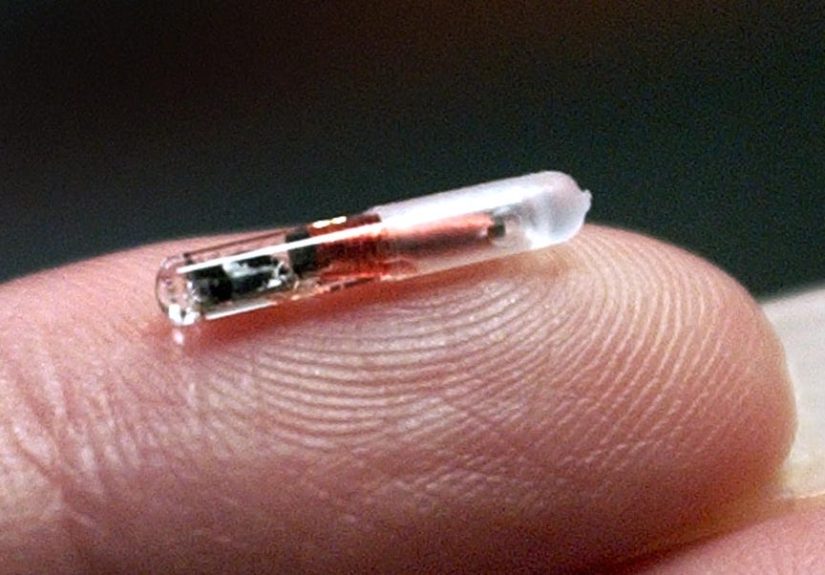
The magic trick is surprisingly practical. An NFC tag does not hold the game itself. Instead, the tag stores a text path that points to a file the TeensyROM can access. That file might live on an SD card, a USB drive, or built-in TeensyROM storage. When you tap the card against the NFC reader, the reader sends the tag data to TeensyROM, which then loads the matching game or program on the C64.
So the card is basically a shortcut with swagger. It says, “Hey, go load this exact thing,” and TeensyROM does the rest.
The Hardware Stack
A working NFC setup usually relies on a PN532 NFC reader plus a CH340 USB-to-serial interface. TeensyROM documentation describes those as the two key components for enabling NFC loading. Supported tag types include NTAG215, which is the recommended option, along with NTAG213, NTAG216, and Mifare Classic 1K.
NTAG215 is especially useful because it offers enough space for the path text while remaining common and easy to find. The path format can be simple, such as a file path that defaults to the SD card, or it can explicitly point to a source like SD:, USB:, or TR: for built-in TeensyROM files. A documented example is a path like SD:OneLoad v5/Donkey Kong Junior.crt. That is charmingly direct. No mystery. No database ceremony. Just a path to a game.
How the Tags Are Written
One of the best parts of the system is that writing tags is not a big ritual involving chants, jumpers, and emotional damage. TeensyROM can write a tag directly from its own menu. You highlight a file, press the left arrow, and write that launch target to the NFC tag. There is even a random option that can point to a directory instead of a single file, which means one card can become a kind of surprise-me token for a curated folder of games.
If you prefer using a phone, that works too. The documented alternate method is to write a single NFC record in text format using UTF-8 and a standard well-known record structure. That makes the setup more flexible, especially for users who like building their collection from a couch rather than from the floor next to a pile of cables.
Why This Feels Better Than Traditional C64 Loading
The original C64 loading experience is iconic, but let us be honest: it was not always elegant. Tapes were slow. Disks were better, but still involved a lot of navigation and waiting. Cartridge games felt wonderful because they were immediate. That is exactly the emotional territory this project targets.
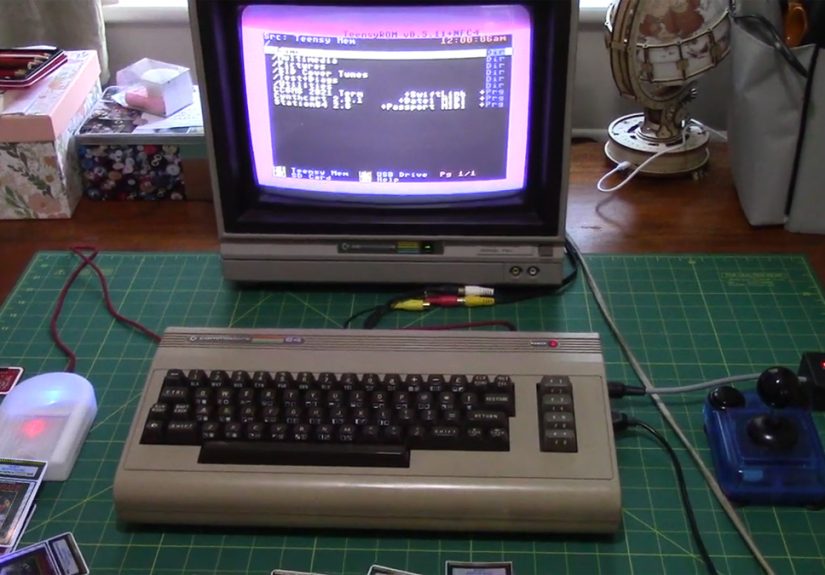
TeensyROM NFC loading gives a real Commodore 64 a console-like feel. You can hold a game card, tap it, and watch the machine launch the selected title with almost theatrical confidence. The effect is bigger than the technical explanation. It changes how the collection feels.
Digital libraries are efficient, but they can be a little sterile. An NFC card system restores a sense of physical ritual. You can label cards, arrange them in small cases, make themed sets, or create a kid-friendly library where tapping “Summer Games” is easier than teaching directory navigation on 40-year-old hardware. It is not just faster. It is more inviting.
Setting Up TeensyROM NFC Loading Without Losing Your Mind
Basic Setup Flow
In general, the process is refreshingly reasonable. You connect the TeensyROM cartridge to the C64 expansion port, connect the NFC reader to the TeensyROM USB host port, power up the machine, and then enable the relevant host serial device setting for NFC in the TeensyROM menu. The documentation also recommends using recent firmware, version 0.7 or later for the latest NFC features, and setting special I/O to none to avoid conflicts. After a reboot, the configuration persists.
There is one practical caveat worth knowing: if the reader is not connected, leaving the NFC setting enabled can slow startup. That is the kind of small real-world detail that tells you the project was built by people who actually use the thing and have been mildly annoyed on purpose so you do not have to be.
Best Practices for a Cleaner Experience
For storage, microSD is generally favored over USB for slightly faster access times. For content, CRT files are especially attractive because TeensyROM was designed to emulate ROM cartridges cleanly, and collections like OneLoad64 pair nicely with that use case. If you want the system to feel like a polished home console rather than a science fair with better fonts, organizing your files matters. Keep folders clear, use readable names, and avoid absurdly huge random-launch directories unless you enjoy suspense with a side of delay.
Practical Use Cases That Make This More Than a Gimmick
The easiest mistake is to look at NFC game loading and think, “Cute demo.” But the deeper you go, the more useful it becomes.
For collectors, it offers a way to build a curated physical library without needing original cartridges for every title. For families, it simplifies access so younger players can launch games by card instead of memorizing menu steps. For demo tables, conventions, classrooms, or retro clubs, it creates an immediate and understandable experience. Someone walks up, taps a card, and the machine responds. That is powerful because it removes friction.
It also works beautifully for themed collections. You can create a set of arcade titles, a stack of platformers, a homebrew showcase, or a “friends who have never touched a C64” starter deck. Suddenly your vintage computer becomes easier to share, and that is a big deal. Retro hardware survives when people actually use it.
Limitations and Things to Keep in Mind
No good retro project is complete without at least one minor detail that sends you back to the menu to mutter under your breath. TeensyROM NFC loading is impressive, but it is still a real hardware setup. You need the correct reader hardware, supported tags, compatible file structure, proper firmware, and a little patience during initial setup.
The tags are storing launch paths, not full game metadata or giant chunks of software. That keeps the system lightweight, but it also means your storage organization matters. Rename or move the file on the SD card, and the tag may no longer point where you intended. Likewise, random-launch tags are fun, but they work best in smaller directories because the system has to process the folder contents before choosing a title.
None of those are deal-breakers. They are just the normal rules of the workshop. And frankly, compared with the traditional ritual of coaxing old drives, tapes, and cracked software into behaving, this system still feels suspiciously civilized.
Why Retro Enthusiasts Love the Idea
The bigger story here is not merely that NFC works on a C64. The bigger story is that TeensyROM respects the machine. It does not erase the identity of the Commodore 64. It enhances it. The cartridge still lives in the expansion port. The games still run on real hardware. The SID still sings through an actual Commodore setup. The only thing that changes is the route you take to get there.
That balance is what makes the project so compelling. It blends modern convenience with old-school physicality. It is the same reason people love mechanical keyboards, vinyl records, and beautifully restored arcade cabinets. Convenience matters, but ritual matters too. TeensyROM NFC loading gives you both.
Examples of How a Smart C64 NFC Collection Could Be Organized
Starter Deck
Create ten cards for crowd-pleasers: a platformer, a shooter, a sports game, a puzzle title, a demo scene classic, and a few educational or family-friendly picks. This is perfect for introducing the C64 to visitors who have never typed a BASIC command in their lives.
Genre Binders
Use labeled cards for arcade, racing, strategy, text adventures, SID music, and demos. Suddenly your C64 shelf feels less like random storage and more like a curated library.
Random Party Cards
Set a card to launch a random file from a specific directory. One tap might pick a different game each time. That is a great way to rediscover titles you forgot you even had.
Experience: What It Actually Feels Like to Use TeensyROM NFC Game Loading on a C64
In day-to-day use, the most striking thing about TeensyROM NFC loading is not the technology. It is the mood shift. A stock Commodore 64 can feel like a machine you operate. A C64 with a well-organized TeensyROM NFC setup starts to feel like a machine you interact with. That sounds like marketing fluff, but it is a real difference. When you reach for a labeled game card, tap it against the reader, and watch the title load on authentic hardware, the experience becomes less like navigating a utility and more like opening a tiny time capsule.
There is also an odd emotional benefit to reducing menus. Modern digital libraries are convenient, but they are often so large that they create decision fatigue. On a C64 with NFC cards, your collection becomes intentionally smaller at the point of use. You are holding one choice in your hand. That makes the machine easier to enjoy. It is a little like the difference between browsing a thousand streaming options and pulling one favorite movie off a shelf.
For people showing off retro hardware to friends, the effect is even better. Most non-retro users do not care that a directory browser is technically impressive. They care that the computer responds in a fun, understandable way. Tap card, game appears. That is instantly legible. It invites curiosity instead of confusion. Kids understand it. Casual visitors understand it. Even the one friend who calls every old computer “basically a typewriter with commitment issues” will usually admit it is cool.
The tactile side matters more than expected too. A stack of custom cards, especially with printed labels or themed artwork, turns software into an object again. That gives the collection personality. You can make a set for party games, one for demos, one for educational titles, or one made entirely of oddball experiments you want guests to try. The C64 stops being a museum piece and becomes a host.
There is still a little setup work, of course. You need to organize files sensibly, write tags properly, and keep your storage paths consistent. But once that is done, the system becomes remarkably smooth. It feels polished in the way the best retro upgrades do: not because it imitates a modern PC, but because it removes just enough friction to let the original machine shine.
That is probably the best way to describe the experience. TeensyROM NFC loading does not make the Commodore 64 less authentic. It makes it more approachable, more social, and honestly a lot more fun. And if a forty-something-year-old computer can still surprise people by acting like a magical game console with physical tap cards, that is not just clever engineering. That is retro joy doing a victory lap.
Conclusion
TeensyROM NFC game loading on the C64 is one of those rare upgrades that feels both playful and practical. It combines the Commodore 64’s cartridge-era spirit with modern tap-to-launch convenience, using NFC tags as physical shortcuts to software stored on SD, USB, or internal media. The result is a cleaner, faster, and more tactile way to enjoy real Commodore hardware.
For collectors, it is a clever way to curate a playable library. For families and demo setups, it makes vintage computing easier to share. For hackers and homebrew fans, it is simply delightful proof that the C64 still has new tricks left in it. And really, that may be the biggest win of all. A machine from 1982 is still inspiring fresh ideas in 2026. Not bad for a beige legend.