Table of Contents >> Show >> Hide
- Why the Right Projector Mount Matters
- Best Projector Mounts: Top Picks by Category
- Best Overall Projector Mount: Peerless-AV PRG or PRGS Universal Mount
- Best Budget Projector Mount: VIVO Universal Adjustable Ceiling Projector Mount
- Best Heavy-Duty Projector Mount: SANUS VMPR1
- Best Low-Profile Mount: Kanto P101 Universal Projector Mount
- Best Adjustable Consumer Mount: QualGear PRB-717
- Best Brand-Specific Option: Epson ELPMBPJG Universal Projector Mount Kit
- Best Professional Mount System: Chief RPAU or RPMAU
- How to Choose the Best Projector Mount
- Projector Mount Types Explained
- Common Mistakes to Avoid
- Best Projector Mount Recommendations by Room
- Installation Tips for Better Results
- My Practical Experience With Projector Mounts
- Conclusion
Buying a projector is exciting. Mounting it, however, is where the popcorn-scented dream can turn into a ceiling-stud treasure hunt. The best projector mounts do more than hold a box above your head; they protect your projector, improve image alignment, reduce clutter, and help your home theater, office, classroom, or gaming room look like it was planned by someone who owns a level and knows where it is.
A good projector mount should be strong, compatible, adjustable, and easy enough to install without requiring a second mortgage or a degree in ceiling archaeology. The wrong one can sag, wobble, block vents, misalign the image, or make your brand-new 4K projector look like it is projecting from a nervous tree branch. This guide breaks down the best projector mounts by use case, explains what specs actually matter, and gives practical buying advice based on real product features from trusted U.S. retailers and manufacturers.
Why the Right Projector Mount Matters
A projector mount is not just an accessory. It is the foundation of your projected image. Even a high-end projector can look disappointing if it is mounted too far from the screen, too close, off-center, tilted incorrectly, or attached to a surface that vibrates every time someone closes a door.
The best projector mounts help solve four common problems: stability, alignment, safety, and room design. Stability keeps the image from shifting. Alignment helps you square the picture without relying too heavily on digital keystone correction. Safety keeps the projector securely attached to a structural surface. Room design matters because a ceiling-mounted projector looks cleaner than a table setup surrounded by cables, remotes, and someone’s half-finished iced coffee.
Best Projector Mounts: Top Picks by Category
There is no single “best” mount for every setup. A lightweight mini projector in a bedroom does not need the same hardware as a heavy long-throw projector in a dedicated theater room. Below are strong choices by category, along with the type of buyer each mount fits best.
Best Overall Projector Mount: Peerless-AV PRG or PRGS Universal Mount
The Peerless-AV PRG and PRGS projector mounts are excellent choices for people who want professional-grade adjustment and long-term reliability. These mounts are commonly used in commercial and home theater installations because they offer fine image alignment, a sturdy universal adapter system, and support for projectors up to about 50 pounds.
The big advantage is precision. If you have ever tried to nudge a projector one millimeter to the left while standing on a ladder and whispering motivational speeches to yourself, you will appreciate a mount designed for controlled roll, pitch, and yaw adjustment. It is especially useful for larger projectors, dedicated media rooms, conference rooms, and installations where the image must be dialed in cleanly.
Best for: serious home theaters, conference rooms, classrooms, and heavier multimedia projectors.
Why it stands out: strong weight capacity, precise adjustment, reliable universal compatibility, and a more professional feel than many budget mounts.
Best Budget Projector Mount: VIVO Universal Adjustable Ceiling Projector Mount
The VIVO Universal Adjustable Ceiling Projector Mount is one of the best values for basic home and office setups. It typically supports projectors up to 30 pounds and uses adjustable arms to fit many projector mounting patterns. Its low-profile design places the projector close to the ceiling, helping small rooms look neat instead of “college dorm media lab.”
VIVO’s mount is popular because it is affordable, widely available, and practical for common projectors. It offers tilt, swivel, and rotation adjustment, making it flexible enough for living rooms, bedrooms, offices, and casual gaming setups. However, buyers should check compatibility carefully. Some larger Epson home theater models and certain oversized projectors may not match the mounting arm pattern.
Best for: budget home theaters, bedrooms, offices, and lighter projectors.
Why it stands out: low cost, solid steel construction, compact profile, and useful adjustment range for everyday installations.
Best Heavy-Duty Projector Mount: SANUS VMPR1
The SANUS VMPR1 is a strong option for users who need a more robust ceiling mount. It supports projectors up to 50 pounds and offers independent roll, yaw, and pitch adjustments. That means you can fine-tune the projected image without turning every alignment tweak into a wrestling match.
Another useful feature is its quick-release design, which can make projector maintenance easier. If your projector uses a replaceable lamp or filter, being able to access it without completely destroying your alignment is a major bonus. The SANUS VMPR1 is also built from heavy-gauge steel, giving it a sturdy feel that inspires more confidence than featherweight brackets.
Best for: heavier home theater projectors, long-term ceiling installations, and users who want easier maintenance access.
Why it stands out: high weight limit, independent image adjustments, sturdy construction, and maintenance-friendly design.
Best Low-Profile Mount: Kanto P101 Universal Projector Mount
The Kanto P101 is a smart pick when you want a clean, compact ceiling installation. It supports projectors up to 22 pounds and can sit close to the ceiling or extend down using included extension tubes. It also includes 360-degree rotation and tilt adjustment, which helps with leveling and sloped ceiling situations.
This mount works well in rooms where aesthetics matter. A low-profile projector ceiling mount can make the installation feel more intentional, especially in living rooms where nobody wants hardware hanging down like a small industrial chandelier. It is not the best choice for very heavy projectors, but for many compact DLP and LCD models, it is a polished option.
Best for: clean home theater setups, living rooms, offices, and medium-weight projectors.
Why it stands out: attractive design, close-to-ceiling option, extension flexibility, and simple universal mounting hardware.
Best Adjustable Consumer Mount: QualGear PRB-717
The QualGear PRB-717 is a versatile consumer projector mount designed for users who want more adjustment than a basic low-cost bracket provides. It supports up to 30 pounds and offers tilt, swivel, roll, pitch, and shift adjustments. That range of movement can be helpful when your ceiling location is not perfect, which is most ceilings because houses were apparently not built around future projector owners.
QualGear’s PRB-717 is especially useful when you need flexibility during installation. It can work well for home theaters, classrooms, and conference rooms where the projector needs to be aligned precisely with a fixed screen. It is also a good option for users who want a mount that feels more advanced without jumping fully into commercial pricing.
Best for: users who need lots of adjustment in a consumer-friendly package.
Why it stands out: strong adjustment range, quick-release style convenience, and good capacity for many common projectors.
Best Brand-Specific Option: Epson ELPMBPJG Universal Projector Mount Kit
The Epson ELPMBPJG is a good choice for Epson projector owners who prefer a mount kit from the projector manufacturer’s ecosystem. It supports up to 25 pounds and includes a universal projector mount, a short extension column, and a ceiling plate. It is designed with independent roll, pitch, and yaw adjustment, which helps with precise projector registration.
While “universal” does not mean “fits every projector ever made by humankind,” Epson’s mount is a dependable option for compatible Epson models and many other projectors within its weight and pattern range. It is usually more expensive than basic third-party mounts, but it can be worth considering if you want a cleaner brand-matched installation path.
Best for: Epson projector owners and users who prefer a manufacturer-backed mount kit.
Why it stands out: complete kit, clean design, reliable adjustment, and compatibility with many standard projector installations.
Best Professional Mount System: Chief RPAU or RPMAU
Chief projector mounts are widely used in professional AV installations, and the RPAU and RPMAU lines are strong choices for high-quality setups. These mounts generally support up to 50 pounds, depending on the configuration, and offer secure locking, quick connection, and fine adjustment options. Chief also offers a broad ecosystem of ceiling plates, columns, suspended ceiling kits, security accessories, and structural adapters.
This matters because not every ceiling is the same. A wood joist ceiling, concrete ceiling, drop ceiling, vaulted ceiling, or truss installation may require different support hardware. Chief’s system approach makes it easier to build a safe, customized installation instead of improvising with mystery bolts from the bottom drawer.
Best for: professional AV installs, commercial rooms, large homes, schools, churches, and offices.
Why it stands out: modular accessories, strong security options, professional-grade build quality, and broad installation support.
How to Choose the Best Projector Mount
Check the Projector’s Weight First
The first rule of projector mounting is simple: the mount must support more than the projector weighs. Never choose a mount right at the edge of its stated limit. A 24-pound projector on a 25-pound mount is technically possible, but it does not leave much comfort margin. For heavier models, look at 50-pound-rated mounts from Peerless-AV, SANUS, or Chief.
Confirm the Mounting Hole Pattern
Most projectors have threaded mounting holes on the bottom. Universal projector mounts use adjustable arms to connect to those holes, but every “universal” design has limits. Before buying, measure the distance between your projector’s mounting holes and compare it with the mount’s supported range.
This step is not glamorous, but it saves you from the classic DIY tragedy: standing on a ladder with a bracket in one hand, a projector in the other, and the sudden realization that the holes do not line up.
Match the Mount to Your Ceiling Type
Flat drywall ceilings with wood joists are common in homes, but not all rooms are that simple. Drop ceilings often require special suspended ceiling kits. Concrete ceilings require masonry anchors. Vaulted ceilings may need an angled ceiling plate or a mount with generous tilt adjustment. A projector ceiling mount is only as safe as the structure it is attached to.
For permanent installations, attaching the mount to a joist, beam, concrete structure, or manufacturer-approved ceiling plate is essential. Drywall alone is not enough. Drywall is wonderful for paint. It is not wonderful for catching a projector.
Consider Throw Distance and Screen Size
Before drilling, calculate projector throw distance. Throw distance is the space required between the projector lens and the screen to create a specific image size. Long-throw, short-throw, and ultra-short-throw projectors all behave differently. Mounting a projector six inches too far forward or back can make the image too large, too small, or difficult to focus.
Use the projector manufacturer’s throw ratio or a projection calculator before finalizing mount placement. Also remember that the lens position matters more than the center of the projector body. Some projectors have offset lenses, and ignoring that detail can make the image land slightly sideways, like it had a dramatic disagreement with the screen.
Look for Fine Adjustment Features
The best projector mounts offer some combination of tilt, roll, pitch, yaw, swivel, and rotation. These adjustments help you square the image on the screen. A basic mount may work fine if the projector is perfectly centered and the ceiling is level. In the real world, fine adjustment is often the difference between a crisp rectangle and a trapezoid with confidence issues.
Optical lens shift on the projector is even better because it moves the image without reducing quality. Digital keystone correction can help, but it may slightly reduce resolution or brightness because it digitally reshapes the picture. A well-positioned mount plus lens shift usually produces the cleanest result.
Plan for Cable Management
A mount can look great until power and HDMI cables start dangling like jungle vines. Many quality projector mounts include cable routing options through an extension column or mounting plate. For a cleaner setup, consider in-ceiling rated cables, a power outlet near the projector, or a wireless HDMI solution if appropriate.
In finished rooms, cable management has a huge impact on appearance. A clean ceiling mount makes the projector feel built-in. A messy cable run makes it feel like the room is still buffering.
Projector Mount Types Explained
Ceiling Projector Mounts
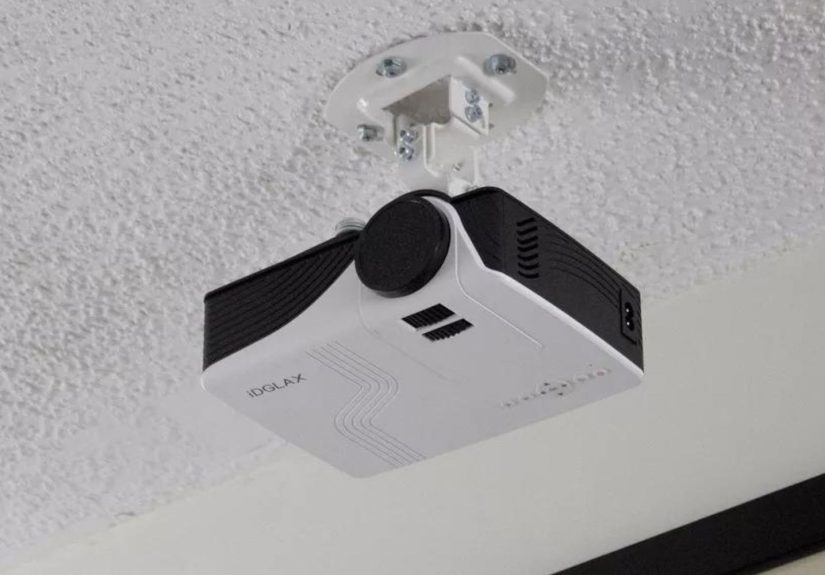
Ceiling projector mounts are the most common choice for home theaters, classrooms, and conference rooms. They keep the projector out of the way, reduce furniture clutter, and usually provide the best fixed alignment. They can be flush, low-profile, or extended with a pole.
Wall Projector Mounts
Wall mounts are useful when ceiling mounting is not possible. They are often used for short-throw projectors or rooms with exposed beams, decorative ceilings, or rental limitations. A wall mount must be anchored into studs or masonry and should offer enough extension to place the projector lens correctly.
Drop Ceiling Projector Mounts
Drop ceiling projector mounts are common in offices, schools, and commercial spaces. They usually use a ceiling tile replacement plate, above-tile support, or suspended hardware system. Because drop ceiling tiles are not structural, the mount must connect to proper support above the tile grid.
Projector Tray Mounts
A projector tray mount is a platform that holds the projector rather than attaching to threaded mounting holes. It can be useful for mini projectors, portable units, or projectors without standard mounting holes. The downside is that tray mounts can look bulkier and may be less secure than a direct-attached bracket.
Common Mistakes to Avoid
Buying by Price Alone
A cheap projector mount can be fine for a small lightweight projector, but price should not be the only factor. Weight capacity, mounting pattern, adjustment range, hardware quality, and ceiling compatibility matter more. Saving twenty dollars is not very satisfying if the image slowly droops every time the air conditioner turns on.
Ignoring Projector Ventilation
Projectors generate heat, and heat needs somewhere to go. Make sure the mount does not block vents or press the projector too close to a surface. Good airflow helps protect lamp life, LED performance, laser components, and internal electronics.
Overusing Keystone Correction
Keystone correction is helpful, but it should not be the main installation strategy. Try to mount the projector as square and centered as possible first. Use lens shift when available, then use minimal keystone correction if needed.
Skipping a Test Fit
Before drilling final holes, test the projector position. Confirm image size, focus range, cable reach, screen alignment, and seating clearance. A few minutes of testing can prevent a ceiling full of “learning holes.”
Best Projector Mount Recommendations by Room
For a Living Room
Choose a low-profile ceiling mount like the Kanto P101 or VIVO Universal Mount if your projector is lightweight. These mounts keep the setup clean and reduce visual clutter. White finishes often blend better with ceilings.
For a Dedicated Home Theater
Choose a stronger, more precise mount like the Peerless-AV PRG, SANUS VMPR1, or Chief RPAU. These mounts are better suited for larger projectors and careful image alignment.
For an Office or Conference Room
Durability and serviceability matter. Peerless-AV, Chief, SANUS, and Epson mount kits are strong options. Look for quick-release features and cable management to simplify maintenance.
For a Classroom
Choose a secure mount with good adjustment and optional theft-deterrent features. Chief systems are especially useful when security accessories, suspended ceiling support, or commercial-grade hardware are needed.
For a Bedroom or Small Apartment
A compact low-profile mount or tray mount may be enough. Make sure it supports your projector’s weight and can be removed cleanly if you rent. For renters, always check lease rules before drilling into the ceiling.
Installation Tips for Better Results
Measure Twice, Drill Once
Measure the screen width, ceiling height, lens offset, and throw distance before drilling. Mark the lens location, not just the projector body. Then double-check everything. The ceiling is not a great place to practice optimism.
Use the Right Hardware
Use lag bolts for wood joists, proper anchors for concrete, and approved support kits for suspended ceilings. Do not rely on drywall anchors for a ceiling projector installation. The mount may hold temporarily, but gravity is extremely patient.
Have a Helper
Projectors are awkward overhead objects. A second person can hold the projector, pass tools, confirm image alignment, and prevent the classic ladder wobble panic dance.
Leave Access for Maintenance
Make sure you can reach filters, ports, lens controls, and power connections after installation. A beautiful mount is less beautiful if you need to uninstall the projector every time you change an HDMI cable.
My Practical Experience With Projector Mounts
After dealing with projector setups in living rooms, offices, classrooms, and casual home theater spaces, one lesson stands out: the mount is never the part people get excited about, but it is often the part that decides whether the whole setup feels premium or painfully improvised. People love comparing brightness, resolution, contrast ratio, HDR support, input lag, and whether the projector can make movie night look like a tiny private cinema. Then the projector arrives, and suddenly everyone remembers ceilings exist.
The best projector mount experience usually starts before the box is opened. The smartest installers check the projector’s weight, measure the mounting hole pattern, calculate throw distance, and decide where the lens needs to sit. That sounds boring, but it is much less boring than discovering the projector needs to be mounted directly where a ceiling fan currently lives. Planning is the quiet hero of projector installation.
In smaller rooms, low-profile mounts are usually the most satisfying. They keep the projector tucked close to the ceiling and reduce the feeling that a gadget is hovering over the sofa. A mount like the VIVO or Kanto style works well when the projector is light enough and the ceiling location is simple. The installation feels cleaner, and the room still looks like a living space rather than a miniature command center.
For heavier home theater projectors, spending more on a stronger mount is usually worth it. Larger projectors can be surprisingly unforgiving. A tiny sag at the mount can create a visibly crooked image on a large screen. This is where Peerless-AV, SANUS, and Chief-style mounts earn their keep. Fine adjustment controls make the alignment process calmer, and a rigid mount helps the image stay put after the ladder is folded away.
Another experience-based tip: cable planning matters more than people expect. A projector mounted perfectly in the center of the room still looks unfinished if a power cable and HDMI cable are dangling down the wall. Clean cable routing can make even a modest projector setup look high-end. For permanent installations, it is worth thinking about an outlet near the projector and safe in-wall or in-ceiling cable routing where local code allows.
The most common frustration is compatibility. Universal projector mounts are useful, but they are not magic. Some projectors have unusual hole spacing, offset mounting points, or bodies that make certain brackets awkward. Before buying, always check the mount’s supported hole range and the projector’s manual. This tiny step can prevent returns, delays, and language that may not be suitable for family movie night.
Finally, the best projector mounts are the ones you stop noticing. When the projector is secure, the image is square, the cables are tidy, and the room feels natural, the mount has done its job. Nobody gathers around to compliment the bracket, and that is exactly the point. A great projector mount quietly supports the show while the projector gets all the applause. Honestly, it is the stage crew of home theater: underappreciated, essential, and absolutely capable of ruining the performance if ignored.
Conclusion
The best projector mounts combine strength, compatibility, adjustability, and clean installation. For most budget home setups, the VIVO Universal Adjustable Ceiling Projector Mount is a practical pick. For polished living rooms, the Kanto P101 offers a clean low-profile design. For heavier projectors, the SANUS VMPR1, Peerless-AV PRG or PRGS, and Chief RPAU or RPMAU systems deliver stronger support and better alignment control. Epson owners may also appreciate the ELPMBPJG kit for a brand-friendly installation path.
Before choosing any projector ceiling mount, confirm your projector’s weight, mounting hole pattern, throw distance, ceiling structure, and adjustment needs. The right mount will not make a bad projector great, but it can help a good projector perform the way it should. And that means sharper movie nights, cleaner conference rooms, smoother gaming sessions, and fewer mysterious holes in the ceiling.
Note: This article was written from synthesized real-world product specifications, manufacturer guidance, retailer information, and practical installation considerations. Always verify the latest compatibility, weight limits, hardware requirements, and local building rules before installing a projector mount.