Table of Contents >> Show >> Hide
- What Is a Tiny UPS Doing Inside a Lightbulb?
- The Teardown: A Lightbulb With Secrets
- Why the Salvaged Board Looks So Useful
- The First Big Caveat: No Isolation
- Load Testing: How Much Power Can It Really Provide?
- The Real Plot Twist: AC Mode
- Can Filtering Fix It?
- Why LEDs Are Easier to Please Than Microcontrollers
- Battery Safety: The Small Cell Is Still Serious
- Practical Ways to Use a Salvaged Lightbulb UPS Board
- A Sensible Testing Checklist
- Is the Tiny Salvaged UPS Worth It?
- Hands-On Experience: What This Investigation Teaches in the Real World
- Conclusion
At first glance, a battery-backup LED bulb looks like a normal lightbulb that went to night school. Screw it into a lamp, let it charge, and when the power fails, it keeps glowing like a tiny household hero. But hidden under the plastic dome and aluminum LED board is something far more interesting than a simple emergency light: a miniature power system that behaves a little like a low-voltage UPS.
That idea is irresistible to anyone who has ever built a microcontroller project, a sensor node, a desk gadget, or a “temporary” electronics experiment that somehow becomes permanent enough to deserve its own zip code. Could a cheap battery-backup lightbulb be cracked open and repurposed as a tiny uninterruptible power supply? Could it keep an ESP8266, Arduino, Raspberry Pi Pico, weather station, or low-power alarm circuit alive during outages? Or is it one of those projects that looks brilliant until the oscilloscope clears its throat?
The answer is wonderfully nerdy: yes, the salvaged board is clever, useful, and educational. No, it is not a ready-made safe UPS module for random projects. Like many great teardown discoveries, it comes with a charming mix of promise, compromise, and “please do not touch that while it is plugged into the wall.”
What Is a Tiny UPS Doing Inside a Lightbulb?
A UPS, or uninterruptible power supply, is designed to keep equipment running when main power disappears. Full-size UPS units protect computers, routers, servers, and medical or industrial devices by switching to battery power during an outage. A battery-backup LED bulb follows the same broad idea, but on a much smaller and stranger scale.
Inside many rechargeable emergency LED bulbs are several familiar parts: an LED array, a lithium-ion or lithium-polymer battery, a charging circuit, a driver circuit for the LEDs, and some form of automatic switching. When AC power is available, the bulb lights normally and charges the internal battery. When power fails, the circuit switches to battery mode and runs a lower-power LED section so the bulb can glow for hours instead of minutes.
That lower-power mode matters. A bulb rated at 8 or 9 watts on normal AC power cannot usually run at full brightness for several hours from a small cell hidden in the base. The trick is not magic; it is budgeting. In backup mode, many bulbs reduce light output dramatically. They may still be bright enough to help you find the hallway, the fuse box, or the snack drawer, but they are not running like a full-power room light.
The Teardown: A Lightbulb With Secrets
Open a battery-backup LED bulb and the first surprise is how much is packed into such a small shell. Under the frosted diffuser, there is usually a metal-core printed circuit board holding the LEDs. That board helps move heat away from the diodes because LEDs may be efficient, but they are not tiny frozen miracles. Heat still has to go somewhere, preferably not into the battery like a bad idea wearing a lab coat.
Some bulbs use separate LED groups for line-power and battery-power operation. In normal mode, a brighter set of LEDs runs from the mains-driven LED driver. In backup mode, a smaller group runs from the battery. This explains why the bulb can claim several hours of emergency runtime even though its normal wattage would drain a small cell quickly.
Behind the LED board sits the part that attracts hackers: the power board. It may include a single-cell lithium battery, a charge controller, protection circuitry, rectification components, current regulation for the LEDs, and switching behavior that decides whether the bulb should run from the wall or the battery. That little board is the “tiny UPS” everyone wants to rescue.
Why the Salvaged Board Looks So Useful
For small electronics projects, power interruption is annoying. A weather sensor resets. A Wi-Fi module loses data. A microcontroller forgets what it was doing and returns to life like it just walked into a room and forgot why. A miniature UPS could solve that problem by keeping the circuit alive during brownouts and brief blackouts.
The salvaged lightbulb board looks appealing because it already has the ingredients: a rechargeable cell, charging circuitry, automatic source switching, and a low-voltage DC output. In battery mode, experiments have shown that these boards can produce a few volts at a few hundred milliamps, which is enough for some low-power electronics. That immediately suggests applications such as small sensors, LED indicators, data loggers, alarm circuits, or remote devices that need a graceful shutdown when the grid takes a coffee break.
But electronics has a rule: the more exciting a salvaged board looks, the more likely it is hiding a caveat the size of a toaster. In this case, there are several.
The First Big Caveat: No Isolation
The most important discovery is not about brightness, runtime, or output current. It is about safety. Many LED bulbs use non-isolated power supplies. That means the low-voltage side of the circuit is not safely separated from mains voltage in the way a proper USB charger or certified external power adapter should be.
In the original bulb, this can be acceptable because the user never touches the internal electronics. Everything dangerous is sealed inside plastic and metal. Once you remove the board and start attaching wires, sensors, programmers, USB cables, metal enclosures, or test equipment, the situation changes completely. A circuit that was safe as a sealed lightbulb can become hazardous as an exposed module on a workbench.
This is the central lesson of the tiny salvaged UPS: it is not automatically safe just because the output measures only a few volts. In a non-isolated circuit, “low voltage” can still be referenced to something dangerous. Any project using such a board must be fully enclosed, untouchable, and carefully designed. For most hobby projects, a certified isolated AC-DC adapter plus a proper battery charger module is the smarter path.
Load Testing: How Much Power Can It Really Provide?
A battery-backup bulb is designed to run LEDs, not your entire robot army. Load testing shows why expectations need to stay realistic. If the bulb contains a roughly 2,000 mAh single-cell lithium battery and claims around 3.5 hours of emergency light, basic math suggests a usable output in the neighborhood of a few hundred milliamps. Real-world testing of a salvaged board found a practical range around 400 mA before voltage began to sag.
That is not bad for a tiny board pulled from a lightbulb. It might power a low-energy microcontroller, a small radio module with careful sleep behavior, or a simple sensor circuit. But it is not generous. A Wi-Fi board that draws bursts of current can be fussy. A Raspberry Pi is almost certainly too hungry. Motors, relays, heaters, bright LED strips, and anything with “turbo” in the product name should look elsewhere.
Voltage regulation is another concern. The board may output around 3.5 to 3.8 volts under certain battery-mode loads. That is close to what many 3.3-volt devices can tolerate, but “close” is not a design strategy. Sensitive electronics should use a proper low-dropout regulator, buck converter, boost converter, or power-management circuit. Otherwise, the device may work perfectly during a quick test and fail later in the most theatrical way possible.
The Real Plot Twist: AC Mode
Battery mode is only half the story. A UPS must keep the load running both when power is available and when power disappears. The tiny lightbulb board becomes more complicated when AC power is connected.
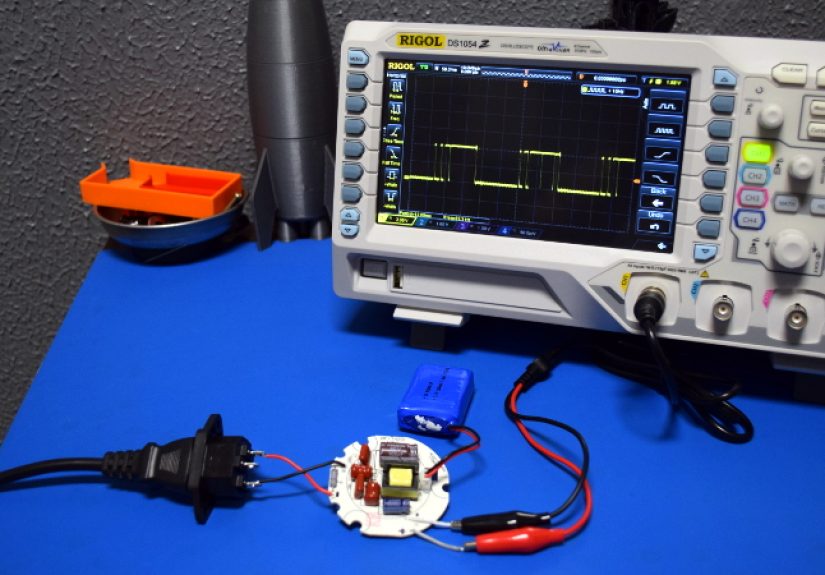
Testing has shown that while running from AC, the low-voltage side may produce a pulsed DC waveform around mains frequency instead of smooth DC. That is fine for LEDs because LEDs are current-driven devices and can tolerate pulsed operation when the driver is designed for it. The human eye may average the light enough that it appears steady. A microcontroller, however, is less forgiving. It does not appreciate being fed a square-wave-ish supply and then being asked to behave like a responsible adult.
This pulsed output can cause resets, brownouts, communication errors, unstable sensors, noisy ADC readings, and general gremlin behavior. You might see the device work on battery, then misbehave the moment line power returns. That is a terrible quality in a UPS, whose entire job description is “please do not make power weird.”
Can Filtering Fix It?
In theory, a large capacitor or supercapacitor could smooth the pulsed DC output. Add enough stored energy and the circuit might ride through the gaps between pulses. In practice, the required capacitance, charging behavior, inrush current, leakage, voltage rating, and safety requirements make the idea less elegant than it first appears.
A small electrolytic capacitor may reduce noise but not solve the real problem. A supercapacitor could help, but then you need balancing, protection, and possibly an isolated DC-DC converter if anything external or touchable connects to the project. By the time you add those parts, the “free UPS from a bulb” starts looking like a custom power supply wearing a fake mustache.
The better solution depends on the project. For a fully enclosed, ultra-low-power device with no external ports, the salvaged board might be usable with careful regulation and filtering. For a device that connects to USB, a computer, sensors outside the enclosure, metal mounting hardware, or human fingers, do not improvise. Use a proper isolated supply and a purpose-built battery backup module.
Why LEDs Are Easier to Please Than Microcontrollers
LEDs and microcontrollers both use electricity, but they complain differently. LEDs mainly care about current. Feed them pulses at the right level and they light up. Their brightness may vary with duty cycle, current, and temperature, but they do not “crash.”
Microcontrollers, on the other hand, need a stable supply voltage. They have brownout thresholds, clock timing requirements, flash memory rules, and radio transmit bursts. A noisy power rail can cause them to reset, lock up, corrupt data, or silently behave like a haunted calculator. That is why a board that works beautifully inside an emergency bulb may be unsuitable as a direct power source for digital electronics.
Good embedded power design usually includes regulation, decoupling capacitors near every IC, bulk capacitance for current spikes, reverse-current protection where needed, and a clear understanding of maximum and minimum operating voltage. The salvaged UPS board gives you a starting point, not a finished design.
Battery Safety: The Small Cell Is Still Serious
The battery inside a backup bulb is usually a rechargeable lithium-based cell. Lithium-ion batteries are common and reliable when used with the right charger, protection, temperature limits, and enclosure. They are also energy-dense enough to deserve respect.
Never use a swollen, punctured, overheated, corroded, or mystery-damaged cell. Never charge a lithium cell with an improvised circuit. Never bypass protection just to squeeze out a little more runtime. That extra ten minutes is not worth turning your workbench into a cautionary slideshow.
Also consider heat. LED bulbs are cramped. Their batteries live near warm components, and heat shortens battery life. If you salvage a board and place it into a smaller or poorly ventilated enclosure, you may make the thermal situation worse. A useful test is not just “does it turn on?” but “does it remain safe after hours of charging, discharging, and sitting in a real environment?”
Practical Ways to Use a Salvaged Lightbulb UPS Board
The safest use is educational. Study the circuit, trace the power paths, identify the battery charger, inspect the LED driver, and learn how compact emergency lighting products are engineered. As a teardown subject, the board is excellent.
For actual projects, be selective. A sealed night-light-style device, a self-contained sensor with wireless communication, or a battery-backed indicator may be plausible if the design has no exposed conductive parts and never connects to external equipment while powered from mains. Even then, the enclosure should be robust, strain-relieved, and clearly labeled.
If your goal is simply to keep a microcontroller alive, there are cleaner options. A USB power adapter with a lithium charge-management board, a power-bank module with low-current support, a LiFePO4 cell with a suitable charger, or an off-the-shelf UPS HAT for a microcontroller board will usually be safer and more predictable.
A Sensible Testing Checklist
1. Identify the Power Architecture
Before attaching anything, determine whether the circuit is isolated. If you cannot prove isolation, assume it is not isolated. That assumption may save your test equipment, your project, and possibly your fingerprints.
2. Measure Battery-Mode Output
Use a controlled load and measure voltage at different current levels. Watch for sudden drop-offs, heating, or protection cutouts. A board that looks stable at 50 mA may not behave at 350 mA.
3. Test AC Mode Carefully
If oscilloscope testing is necessary, use proper isolation methods and safe bench practice. Do not casually clip grounded oscilloscope probes onto unknown mains-referenced circuits. That is how sparks get invited to the party.
4. Add Regulation
For 3.3-volt electronics, use a regulator. For 5-volt devices, use a boost converter only if the current budget supports it. Remember that boosting voltage increases input current demand.
5. Check Runtime and Heat
Run the intended load through full charge and discharge cycles. Monitor enclosure temperature, battery temperature, voltage stability, and recovery after power returns.
Is the Tiny Salvaged UPS Worth It?
As a learning project, absolutely. It teaches LED driver design, rechargeable battery behavior, power switching, load testing, thermal compromise, and the hard truth that consumer products are designed for their original enclosuresnot your weekend invention involving zip ties and optimism.
As a practical UPS module, it depends. If you need a safe, reliable backup supply for a real device, especially anything with external connections, the salvaged bulb board is probably not the best answer. Its non-isolated design and pulsed AC-mode output make it a risky shortcut. But if your goal is to understand how emergency LED bulbs work, the tiny UPS is a fascinating little machine.
The board is not useless. It is simply specialized. It was born to keep LEDs glowing during blackouts, not to babysit a Wi-Fi microcontroller through every electrical mood swing. Treat it as a clever donor organ, not a universal transplant.
Hands-On Experience: What This Investigation Teaches in the Real World
The first experience anyone gets from investigating a tiny salvaged UPS from a lightbulb is humility. The object is small, cheap, and ordinary, so the brain expects a simple circuit. Then the diffuser comes off, the LED board lifts away, and suddenly the bulb looks like a compact engineering argument. There is a battery squeezed into the base, multiple wires doing different jobs, an LED array divided by function, and a power board trying to juggle charging, driving, switching, and survival in a space barely larger than a cookie.
The second experience is the joy of being almost right. On battery power, the salvaged board can look like exactly what you hoped for. A meter shows a few volts. A small load runs. A microcontroller may even boot. That moment is dangerous because it feels like victory. You start imagining a drawer full of discarded emergency bulbs becoming free backup supplies for every project in the house. The garage sensor gets one. The plant monitor gets one. The cat feeder gets one, because apparently the cat has infrastructure needs.
Then comes the third experience: measurement ruins the fantasy, but improves the engineer. Under heavier load, the voltage begins to sag. Under AC power, the output may pulse instead of staying smooth. The board that looked like a neat miniature UPS becomes a specialized LED power system. It is still impressive, but it is no longer simple. That is the point where a hobbyist becomes more careful and starts asking better questions. What is the load current? What is the ripple? Is the output isolated? What happens when the battery is nearly empty? What happens when mains returns?
The fourth experience is respect for enclosure design. When the board is inside the bulb, the dangerous parts are hidden. When it is sitting on a bench, every exposed trace becomes a possible hazard. This is where practical electronics stops being only about schematics and becomes about physical safety. Plastic barriers, strain relief, fuses, insulation distance, battery placement, ventilation, and labeling are not boring extras. They are the reason consumer products can live in kitchens, bedrooms, and garages without turning into tiny villains.
The final experience is creative restraint. Salvaging parts is fun, and it should stay fun. But not every salvaged part needs to be reused in the most ambitious way possible. Sometimes the best outcome is knowledge. You learn that emergency bulbs reduce output in battery mode to extend runtime. You learn that LED circuits can tolerate power waveforms that digital electronics cannot. You learn that lithium cells need proper charging and protection. You learn that non-isolated mains circuits are not friendly playgrounds.
In other words, investigating the tiny salvaged UPS from a lightbulb is worth doing because it changes how you look at ordinary devices. A lightbulb is no longer just a lightbulb. It is a thermal design problem, a power-management puzzle, a battery-safety lesson, and a reminder that clever engineering often hides in the cheapest aisle of the hardware store. Just do the investigation carefully, keep one hand in your pocket when appropriate, use the right tools, and never trust a circuit simply because it fits in your palm.
Conclusion
The tiny salvaged UPS from a lightbulb is a brilliant little lesson in modern compact electronics. It shows how rechargeable LED bulbs combine batteries, LED drivers, charging circuits, and automatic backup behavior in a surprisingly small package. It also shows why teardown enthusiasm must be balanced with electrical safety and realistic testing.
For makers, the biggest takeaway is simple: the board is interesting, but not plug-and-play. Its limited current capacity, imperfect voltage regulation, pulsed behavior in AC mode, and likely non-isolated design make it unsuitable for many exposed or connected projects. Still, as a learning platform, it is gold. It reveals how emergency lighting products stretch a small battery into useful runtime and why power quality matters when moving from LEDs to microcontrollers.
So yes, investigate it. Learn from it. Salvage it if you know what you are doing. But do not let a tiny board from a lightbulb convince you to ignore the big rules of power electronics. The best hacks are not just clever; they are safe enough to still be clever tomorrow.