Table of Contents >> Show >> Hide
- Why the New Philips Hue App Feels Like a Real Upgrade
- Cleaner Navigation, Less Tapping, Fewer Tiny Annoyances
- Automations Finally Feel Like They Belong to Daily Life
- It Plays Better With the Rest of the Smart Home
- Beyond Lights: Security, Sensors, and a Bigger Job Description
- What the “Seamless Experience” Really Means for Users
- Real-World Experiences Related to the New Philips Hue App
- Conclusion
Smart lighting used to sound like a luxury for people who say things like “set the mood” without giggling. Then Philips Hue came along and made connected lights feel practical, flexible, and, yes, just a little bit cool. But hardware is only half the story. In any smart home, the app is the real front door. If the software is clunky, even the prettiest bulb starts to feel like an expensive night-light.
That is why the new Philips Hue app matters. It was pitched as a sleeker, future-ready control center for your lights, routines, scenes, and accessories. More importantly, it promised something smart-home users crave but rarely get in one neat package: a seamless experience. Not “mostly fine if you tap three menus and whisper a prayer.” Seamless. Smooth. Fast. Easy enough that you stop thinking about the app and start enjoying what the lights can actually do.
That promise is a big one. The smart-home world is crowded with products that brag about convenience while hiding their settings behind confusing icons and oddly dramatic menus. Philips Hue has tried to move in the opposite direction by making the app more intuitive, more organized, and more useful whether you are controlling a single Bluetooth bulb or a whole-home system with a Hue Bridge.
Why the New Philips Hue App Feels Like a Real Upgrade
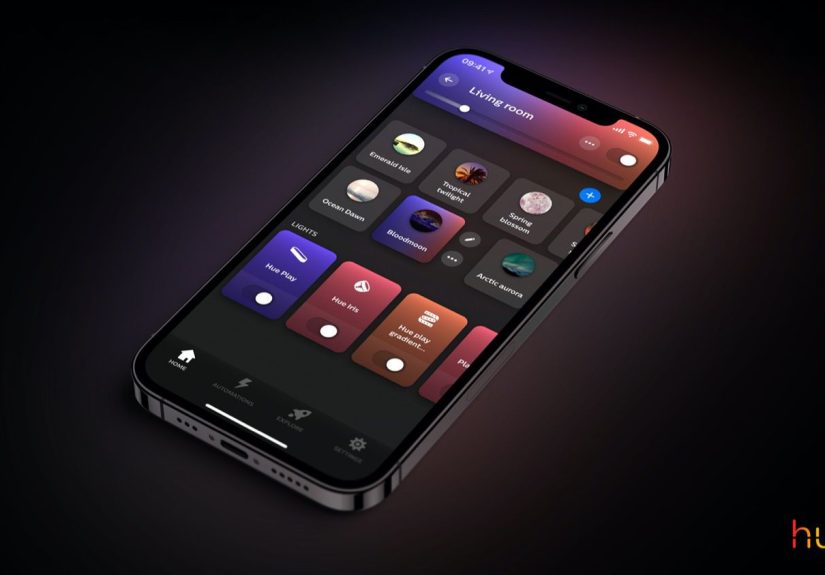
The biggest shift in the new Philips Hue app is not just how it looks. It is how it thinks. Earlier smart-lighting apps often treated bulbs like a pile of gadgets that happened to glow. The newer Hue experience treats lighting like part of your home. Rooms, Zones, scenes, automations, accessories, and entertainment features now feel more connected instead of scattered across a maze of tabs.
That sounds like a small design choice, but it changes everything. If your kitchen, hallway, and living room each have several lights, you do not want to manage them one bulb at a time like a stressed-out theater technician. You want to open the app, see your spaces clearly, and control them quickly. Hue leans into that with cleaner room organization, easier scene access, and more direct control from the same screen.
Another major win is flexibility. The app supports both Bluetooth-only setups and systems built around the Hue Bridge. That means a new user can start simple and still grow into a more advanced setup later without feeling like they need to throw the software away and begin from scratch. In smart-home terms, that is the difference between “starter-friendly” and “great, now I need a second app and a headache.”
Cleaner Navigation, Less Tapping, Fewer Tiny Annoyances
One reason people stick with Philips Hue is that the company keeps sanding down the little frustrations. Over time, the app has added better scene discovery, easier scene creation, improved search, stronger room and zone management, and more customization for what appears on the home screen. That matters because seamless experiences are rarely built on one flashy feature. They are built on dozens of small moments where the app simply gets out of your way.
The Hue app now makes it easier to search for Rooms, Zones, lights, and scenes from the Home tab. That may not sound thrilling, but it is the kind of improvement that saves real time when your setup gets bigger. If you have ever stood in a dark room wondering why your “Movie Night” scene somehow migrated to the office, search suddenly becomes very exciting.
Philips Hue has also refined how scenes are handled. Users can browse the Scene Gallery more easily, create scenes from within a Room or Zone, copy scenes to other spaces, and search through scene names and categories. That turns scenes from a novelty into a practical daily tool. Instead of setting brightness and color manually every evening, you can tap once and let the room do its thing.
Scenes Are More Than Pretty Colors
A lot of people hear “scene gallery” and imagine a rainbow explosion with names like Tropical Disco Thunderstorm. Hue can absolutely do fun lighting, but its real strength is range. Scenes can support work, sleep, reading, entertaining, relaxing, and seasonal moods without making your house look like a music festival. The app’s growing library of categories, plus search and copy tools, makes those scenes easier to use in real life.
That is where the new Philips Hue app earns its “seamless” label. It does not just give you more buttons. It makes those buttons easier to understand and easier to repeat as habits. Smart lighting becomes more useful when it turns into muscle memory.
Automations Finally Feel Like They Belong to Daily Life
One of the best things Philips Hue has done is push automations closer to normal human behavior. Good automation should feel invisible. You should not need a flowchart to make your bedroom glow softly in the morning or your hallway light up when you come home.
The app has steadily improved in this area. Users can build wake-up routines, sleep-focused automations, location-based actions like Coming Home and Leaving Home, and accessory-triggered controls tied to switches and sensors. More recent updates have also made automations easier to access inside Rooms and Zones, so users no longer have to bounce between separate sections of the app to adjust something simple.
That change matters more than it sounds. When automations are buried, people stop using them. When automations are visible where the lights actually live, they become part of everyday control. A bedside routine, a porch-light schedule, a movie sync setup, or a security arming schedule all feel more natural when the app presents them in context.
From Wake-Up Light to “I Forgot the Porch Again”
Hue’s automation story works because it covers both dreamy lifestyle moments and practical household problems. Yes, you can create a gentle sunrise effect that helps ease you into the day. You can also stop forgetting the porch light, set lights to respond when you arrive home, or use accessories to trigger preset behaviors with one press.
That balance is what keeps the app from becoming a toy. Philips Hue is not just selling color. It is selling convenience with personality.
It Plays Better With the Rest of the Smart Home
No smart-home app can call itself seamless if it behaves like it has never met the neighbors. Philips Hue has clearly focused on making the app work more smoothly with larger ecosystems. The app supports integrations with Apple Home, popular voice platforms, widgets, shortcuts, and Matter-based linking through Smart Home settings. That gives users more freedom to control lights in the way that feels most natural to them.
For Apple users, that means easier syncing with HomeKit and handy shortcuts on the iPhone home screen. For Android users, widgets offer fast access to favorite scenes without opening the app every single time. For broader smart-home households, Matter support helps Hue fit more neatly into mixed-brand environments. Translation: your lights are less likely to act like divas just because your thermostat and speaker have different last names.
Entertainment is another area where Hue keeps stretching beyond ordinary bulbs. The Hue ecosystem includes sync experiences for TV and gaming, and the app helps tie those setups together. Whether you want subtle ambient lighting behind a screen or a full color-chasing movie-night spectacle, the software is designed to keep the experience approachable rather than overly technical.
Beyond Lights: Security, Sensors, and a Bigger Job Description
The modern Hue app is not only about bulbs anymore. It increasingly acts as a hub for sensors, switches, cameras, and security features. Users can set up and program switches and sensors directly in the app, view Secure camera live feeds, manage alerts, and even handle arming modes from the Security Center.
This broader role is important because it shows where Philips Hue is heading. The company is not just building a lighting brand. It is building a home-control experience where lighting, accessories, and security features work together under one roof. If done well, that makes the app feel more valuable over time instead of more cluttered.
And yes, there is always risk when an app tries to do more. Add too much and it becomes messy. But Philips Hue seems aware of that danger, which is why so many of its updates focus on organization, search, view customization, and simplifying frequent actions. It is trying to expand without becoming bloated. That is a tricky act, but a necessary one.
What the “Seamless Experience” Really Means for Users
Marketing language loves the word “seamless,” mostly because it sounds expensive and soothing. In the case of Philips Hue, the phrase has some substance behind it. A seamless smart-lighting experience means you can move from setup to daily use without fighting the interface. It means scenes are easy to find, automations make sense, rooms feel organized, accessories behave predictably, and integrations do not require a minor degree in app archaeology.
It also means the app grows with you. A first-time user might start by dimming a living-room lamp. A more advanced user might later build wake-up routines, security schedules, TV syncing, widget shortcuts, and voice integrations. The best smart-home apps make that progression feel natural. Hue has spent years moving in that direction, and the newer app experience shows it.
That does not mean the app is perfect. No smart-home platform is. Larger ecosystems always create complexity, and power users will always want more control, more transparency, and fewer odd bugs. But the direction is promising. Philips Hue is clearly treating software as a product, not just a companion download for the hardware box.
Real-World Experiences Related to the New Philips Hue App
In real homes, the value of the new Philips Hue app shows up in small wins. A parent can set a softer bedtime scene in the kids’ room and trigger it with one tap instead of adjusting multiple bulbs every night. A remote worker can switch the home office from a bright focus scene in the morning to a warmer late-afternoon setup without manually tuning each light. A couple can create a dinner scene once, save it, and stop arguing over whether “cozy” means candlelight or “why is the kitchen orange?”
There is also a quiet joy in how the app reduces friction. You open it, see your rooms, and the structure makes sense. That sounds basic, but smart-home veterans know this is not guaranteed. Plenty of apps still feel like they were designed by someone who has never actually stood barefoot in a hallway at 11:30 p.m. trying to turn off one lamp without waking the whole house.
For users with a growing setup, the better Room and Zone layout feels especially practical. Maybe the downstairs lights need one scene for weekday mornings and another for weekends. Maybe the backyard needs a summer entertaining look, while the bedroom needs something calmer and warmer. The app now supports those lifestyle differences more naturally, which is exactly what smart lighting should do: adapt to your life instead of asking your life to adapt to it.
The experience gets even better when accessories enter the picture. A Tap dial switch in the kitchen, a motion sensor in the hallway, a dimmer switch near the bed, and suddenly the app is not just software. It becomes the control brain behind habits. Press once for a cooking scene, rotate to dim during dinner, trigger a low-light path to the bathroom at night, and automate a gentle morning wake-up. That is the kind of layered convenience that turns a smart-home purchase from “nice gadget” into “I do not want to go back.”
Another relatable experience is the jump from beginner to enthusiast. A lot of people start Hue with one bulb because they are curious. Then they add a lamp. Then a strip light. Then a Bridge. Then they are naming scenes like a tiny interior designer with a caffeine habit. The app helps that transition because it does not force users to relearn everything at each stage. You can start simple and grow into more advanced control.
Even entertainment setups benefit from the smoother app experience. Gamers and movie fans want immersive lighting, but they do not want setup to feel like assembling a spaceship. The Hue ecosystem has gotten better at making those experiences feel approachable. When the software keeps scenes, rooms, and entertainment areas organized, users are more likely to actually use the features they paid for instead of forgetting they exist two weeks after installation.
Then there is the emotional side of smart lighting, which sounds dramatic until you live with it. Lighting changes how a home feels. The right scene can make a rushed morning calmer, a rainy afternoon more cozy, and a late-night reading session easier on the eyes. The new Philips Hue app supports that emotional layer by making lighting choices quicker and more repeatable. It helps turn ambience into routine rather than special occasion only.
So when Philips Hue says the app delivers a new and seamless experience, the most convincing proof is not the tagline. It is the everyday feeling that your lights respond the way you expect, your spaces are easier to manage, and the app stops feeling like a chore. In the smart-home world, that is not a small achievement. That is the whole game.
Conclusion
The new Philips Hue app succeeds because it understands a simple truth: people do not buy smart lighting just to stare at settings menus. They buy it to make daily life smoother, more comfortable, more expressive, and occasionally a little dramatic in the best possible way. By improving navigation, scenes, automations, integrations, and whole-home organization, Philips Hue has made its app feel less like a utility and more like a natural extension of the home itself.
That is why the promise of a new and seamless experience rings true. The app is not merely prettier. It is smarter about how people live, how rooms function, and how habits form. And in a category where software can make or break the value of the hardware, that is exactly the kind of upgrade that matters.