Table of Contents >> Show >> Hide
- Why Your Thermostat Choice Matters
- Step 1: Know Your HVAC System and Voltage
- Step 2: Choose the Right Thermostat Type
- Step 3: Key Features That Actually Matter
- Step 4: Energy-Saving Setpoints and Best Practices
- Step 5: DIY vs. Professional Installation
- Budgeting for Your New Thermostat
- Real-World Example: Who Should Buy What?
- Extended Homeowner Experiences: Living With a New Thermostat
- Conclusion: Picking the Thermostat That Fits Your Life
If your energy bill keeps creeping up or your home can’t decide if it’s a sauna or a walk-in freezer, your thermostat might be the quiet troublemaker in the hallway. The right thermostat can save you money, keep you comfortable, and even play nicely with your smart home. The wrong one… just blinks at you and ignores your feelings.
This ultimate thermostat buying guide breaks down the different types of thermostats, how to match them with your HVAC system, which features actually matter, and what to expect from today’s smart models. We’ll keep things practical, homeowner-friendly, and just technical enough that your HVAC contractor will be impressed you did your homework.
Why Your Thermostat Choice Matters
Your thermostat is the “brain” of your heating and cooling system. It doesn’t actually heat or cool the air, but it tells your furnace, boiler, heat pump, or AC when to wake up and when to take a nap. That simple job has a huge impact:
- Comfort: A good thermostat keeps temperatures consistent instead of creating hot and cold zones across the house.
- Energy savings: The U.S. Department of Energy estimates that you can save around 10% a year on heating and cooling by turning your thermostat back 7–10°F for 8 hours a day with proper scheduling.
- System health: Smarter control can reduce short-cycling and unnecessary run time, helping your HVAC equipment last longer.
- Convenience: Modern smart thermostats automate a lot of the fiddling you used to do by hand.
In other words, this isn’t just another plastic box on the wall. It’s worth taking the time to get the right one.
Step 1: Know Your HVAC System and Voltage
Low-Voltage vs. Line-Voltage Thermostats
Before you fall in love with a shiny smart thermostat, you need to make sure it can actually talk to your HVAC system. Thermostats generally fall into two wiring/voltage camps:
- Low-voltage (24V) thermostats: The most common type in U.S. homes with central furnaces, boilers, heat pumps, or central air. These use thinner, multi-strand thermostat wire connected to screw terminals on the back of the thermostat. Most programmable and smart thermostats are low-voltage.
- Line-voltage (120V or 240V) thermostats: Typically used with electric baseboard heaters, wall heaters, and some in-floor electric systems. These use thicker wires (often wire-nutted) carrying household voltage. Many popular smart thermostats will not work with these.
If you’re unsure which you have, pop off the existing thermostat cover (with the power off at the breaker) and check the wiring type and labelsor snap a photo and show it to an HVAC pro.
System Type and Stages
Compatibility isn’t just about voltage; it’s also about the kind of system you’re running:
- Single-stage vs. multi-stage: Some high-efficiency furnaces and heat pumps have multiple heating and cooling stages. Your new thermostat must support the same number of stages for proper control.
- Heat pump systems: Heat pumps may need thermostats that understand auxiliary/emergency heat and reversing valves.
- Boiler or radiant systems: Some advanced thermostats include features specifically for hydronic systems, like optimized setback strategies.
Most major thermostat makers offer online compatibility checkersusually you just select your system type, input model numbers, or upload a picture of your wiring.
The Famous C-Wire Question
Many modern smart thermostats want a C-wire, short for “common wire,” which provides continuous power for Wi-Fi radios, bright screens, and smart features.
If your current thermostat only has a few wires (often R, W, Y, G) and no C, you may have options:
- Choose a smart thermostat that can run on batteries or steal power from existing wires.
- Have an HVAC pro run a new C-wire from the furnace control board.
- Use a manufacturer-provided adapter kit that simulates a C-wire.
Don’t guess hereif in doubt, consult a pro. Crossed wires don’t end well.
Step 2: Choose the Right Thermostat Type
1. Non-Programmable (Manual) Thermostats
These are the old-school units: you set a temperature, and that’s it. No schedules. No apps. No learning. They still have their place:
- Pros: Very inexpensive, simple, almost no learning curve.
- Cons: No automatic setbacks, so you miss out on easy energy savings.
- Best for: Spare rooms, workshops, or homeowners who truly want “set it and forget it” at a single temperature.
2. Programmable Thermostats
Programmable thermostats let you set scheduleslike cooler when you’re at work, warmer when you’re home. According to the Department of Energy, properly using a programmable thermostat can trim up to 10% from your annual heating and cooling costs by adjusting the temperature 7–10°F for 8 hours a day.
- Pros: Affordable, reliable, no Wi-Fi required, proven energy savings.
- Cons: You must actually program it. Many people never change the default schedule and lose the benefits.
- Best for: Households with predictable routines who don’t need app control or voice assistants.
3. Wi-Fi and Smart Thermostats
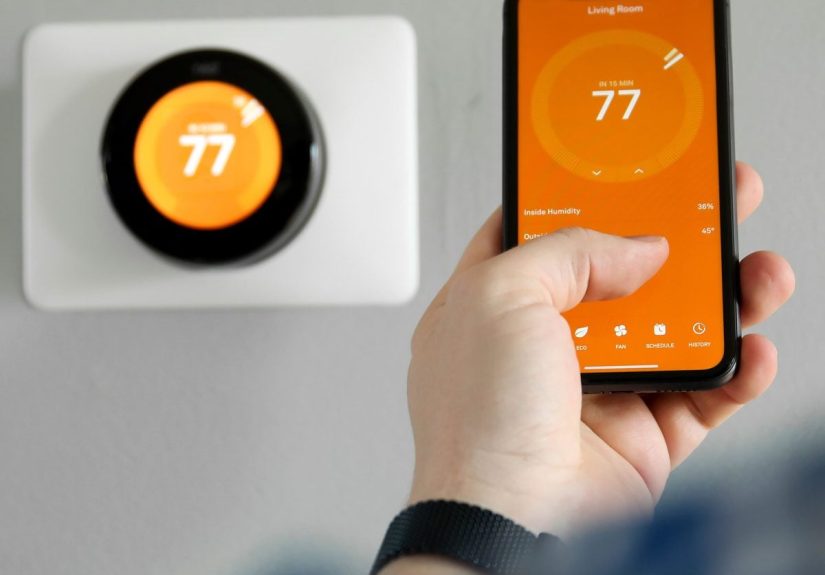
Smart thermostats are Wi-Fi enabled and often ENERGY STAR certified. They can learn your schedule, track occupancy, adjust based on weather, and be controlled from your phone or voice assistant.
- Pros:
- Remote control via appchange settings from the couch, office, or airport.
- Learning and automation features that optimize comfort and savings.
- Energy reports showing how your settings affect usage.
- Integration with smart home systems (Alexa, Google Home, Apple Home, Matter, etc.).
- Cons:
- Higher upfront cost.
- May require a C-wire or professional installation.
- Extra features you might never use if you’re a “set it once” type.
- Best for: Homeowners who want maximum control, data, and long-term energy savings.
ENERGY STAR notes that qualified smart thermostats deliver real-world, field-tested energy savings, often in the 8–15% range for heating and cooling when used with recommended settings.
Step 3: Key Features That Actually Matter
Programming and Scheduling
Even a basic thermostat should let you schedule different temperatures for different times of day. Look for:
- Weekday/weekend or 7-day scheduling: More flexibility if your schedule is irregular.
- Vacation or hold mode: Easy way to keep things efficient while you’re away.
- Adaptive recovery: Some smart models learn how long your home takes to heat or cool so it reaches your setpoint exactly when you want it.
Ease of Use
If a thermostat is too confusing, no one will use its best features. Prioritize:
- Clear, backlit display you can read across the room.
- Simple navigationphysical buttons or an intuitive touchscreen.
- Plain-language menus instead of mysterious codes.
Some newer models even prioritize large numbers and high-contrast screens, which are great if you’re installing it in a home where accessibility is important.
Smart Home Integration
If you’re building a smart home, check whether the thermostat supports:
- Voice assistants (Alexa, Google Assistant, Siri).
- Platforms like Apple Home, SmartThings, or Matter for broad device interoperability.
- Geofencing, so your home can automatically switch to away mode when your phone leaves the area.
Energy Monitoring and Reports
Many smart thermostats show you how long your system ran, which days use the most energy, and how your settings compare to recommended ones. That feedback can help you tweak schedules and setpoints for extra savings over time.
Room Sensors and Zoning
If your thermostat is in a hallway that never matches the actual spaces you live in (looking at you, icy bedrooms and stuffy family rooms), consider:
- Smart thermostats that support remote room sensors to prioritize the rooms you care about.
- Compatibility with multi-zone systems, if your home is already zoned or you’re planning an upgrade.
Step 4: Energy-Saving Setpoints and Best Practices
Recommended Temperatures
There’s no single magic number that works for everyone, but energy agencies provide some useful starting points:
- Winter: Around 68°F while you’re awake and at home, and lower (by 7–10°F) while you’re sleeping or away.
- Summer: Around 78°F while you’re home, and higher when you’re away or asleep, especially if you use ceiling fans to feel cooler.
Think of these as starting points, not laws. Your comfort, insulation levels, and climate all matter. But setting up a smart or programmable thermostat around these ranges can noticeably soften your utility bills.
Placement Matters
Even the smartest thermostat will act goofy if it’s in the wrong spot. Aim for:
- An interior wall, in a frequently used room.
- Away from direct sun, drafts, windows, or heat sources.
- Roughly 52–60 inches from the floor for accurate readings.
If the thermostat is right above a supply vent or next to a sunny window, it might think the whole house is warmer or cooler than it really is.
Step 5: DIY vs. Professional Installation
Many low-voltage thermostats are DIY-friendly if you’re comfortable turning off breakers, labeling wires, and following directions. Basic steps include:
- Turn off power to the furnace/air handler at the breaker.
- Remove the old thermostat cover and label each wire according to its terminal (R, W, Y, G, C, etc.).
- Attach the new mounting plate, reconnect wires to the matching terminals, and attach the new thermostat.
- Restore power and follow on-screen setup prompts.
Call in a pro if you have:
- Line-voltage thermostats for baseboard heaters.
- Complicated systems (multi-stage, heat pump with backup heat, boiler plus AC, zoning, etc.).
- No C-wire and no desire to crawl through your basement or attic.
Professional installation adds cost but can prevent expensive wiring mistakes and ensure all those advanced features actually work.
Budgeting for Your New Thermostat
Here’s a rough breakdown of what to expect:
- Basic non-programmable: Very low cost, usually the cheapest option.
- Programmable (no Wi-Fi): Still budget-friendly but with useful scheduling.
- Smart thermostats: Higher upfront cost, but ENERGY STAR models typically pay for themselves via energy savings over timeespecially in climates with long heating or cooling seasons.
Don’t forget to check for utility rebates in your area; many power companies offer incentives for installing qualified smart thermostats.
Real-World Example: Who Should Buy What?
- The work-from-home professional: A smart thermostat with room sensors and fine-grained scheduling makes sense. You can keep your office perfectly comfortable while allowing less-used rooms to drift a bit.
- The frequent traveler: Smart thermostat with app control and geofencing. You’ll never again realize your AC has been blasting away while you were at the beach for a week.
- The “don’t give me more tech” homeowner: A simple programmable thermostat, set up once with a weekday/weekend schedule, can quietly save you money without requiring apps or accounts.
- The landlord: A basic, lockable programmable or smart thermostat with limited user adjustments can balance tenant comfort and predictable energy use.
Extended Homeowner Experiences: Living With a New Thermostat
So what does all this look like in real life once the shiny new thermostat is on the wall and the box is in the recycling bin? Here are some common experiences homeowners report after upgradingand a few lessons learned along the way.
1. The “Wow, My System Runs Less Than I Thought” Moment
Many smart thermostats include run-time reports that show how long your heating or cooling system operates each day. For a lot of people, the first month’s report is eye-opening. You might notice your furnace runs heavily just before dawn, or your AC kicks on every time afternoon sun hits the living room.
Armed with that information, you can tweak schedules and setpoints: maybe pre-cool the house earlier in the morning, or use window shades more strategically. Over several months, those small adjustments often show up as lower bills and fewer comfort complaints from family members.
2. Learning Curve vs. Long-Term Convenience
Most people experience a short “getting to know you” phase with a new thermostat. The app may feel crowded with options at firstfan modes, schedules, home/away modes, eco presets, and temperature ranges. The trick is to spend an evening going through the setup screens calmly instead of randomly hitting buttons when you’re already too warm or too cold.
After that initial learning curve, things usually get easier. Many homeowners find they adjust the thermostat far less often than before because the scheduling and smart features do the heavy lifting. You may only open the app when seasons change or when you’re heading out of town.
3. The Family Negotiation: Comfort vs. Savings
Thermostats live at the intersection of physics and feelings. One person’s “perfectly comfortable” 68°F can be another person’s “I’m wearing three sweaters.” Smart thermostats don’t solve that debate, but they do provide tools to compromise.
For example, you might agree on a slightly cooler winter setpoint if everyone uses throws and slippers, while a room sensor makes sure the family roomnot the hallwaydrives the temperature. Or you can set a “comfort mode” scene for evenings and a more efficient mode for daytime when the house empties out.
4. Hidden Issues a Thermostat Can Reveal
Sometimes installing a new thermostat uncovers problems that were always there, just hidden. Maybe you notice the system runs nonstop during very cold or very hot days, which could point to undersized equipment, poor insulation, or leaky ductwork. Or certain rooms remain stubbornly cold, suggesting airflow or balancing issues.
Your thermostat won’t fix those problems by itself, but the data it provideslong run times, frequent cycling, big temperature swingscan help you decide whether it’s time to call in a contractor for duct sealing, insulation upgrades, or a system checkup.
5. Using Smart Features Without Getting Overwhelmed
Modern thermostats come with a buffet of features: learning algorithms, occupancy sensing, geofencing, weather-aware preheating, and more. The good news is you don’t need to use everything to get value from the device.
A simple approach many homeowners like is this:
- Turn on basic scheduling for wake, work, evening, and sleep.
- Enable away detection or geofencing so the system can ease off when nobody’s home.
- Check energy reports once a month to see whether you’re trending in the right direction.
If you want to dig deeper later and fine-tune things, you canbut you don’t have to become a full-time thermostat programmer to benefit.
6. The Long Game: Payback and Peace of Mind
From a cost perspective, many homeowners find that the savings from better scheduling and setpoints begin to offset the purchase price within a couple of heating or cooling seasons, especially in regions with extreme temperatures. When paired with basic home improvementslike sealing drafts, insulating attics, and maintaining HVAC equipmentthe thermostat becomes part of a bigger energy-efficiency strategy.
From a lifestyle perspective, you may discover that what you appreciate most isn’t just the lower bill, but the sense of control: being able to adjust the temperature before you arrive home, keeping tabs on a vacation property, or making sure elderly relatives stay comfortable in their homes without constantly fiddling with the dial.
At the end of the day, a thermostat is a small device with a big job. Choosing the right oneand taking advantage of its featuresmeans your home’s comfort system works smarter, not harder. And that’s something every handy homeowner can get behind.
Conclusion: Picking the Thermostat That Fits Your Life
Choosing a thermostat isn’t about chasing every fancy featureit’s about matching your home, your HVAC system, and your daily routine. Start by confirming your voltage and system type, then decide whether a manual, programmable, or smart thermostat makes the most sense for the way you actually live. Prioritize ease of use, solid scheduling, and energy-saving tools over gimmicks.
Whether you’re a gadget lover building a smart home or a practical homeowner who just wants consistent comfort and lower bills, the right thermostat can deliver both. Install it correctly, set realistic schedules, and use those energy insights, and you’ll turn that little box on the wall into one of the hardest-working tools in your house.